Real Dirt Color for Farming Simulator 25
Script that colors dirt on tractors and implements by terrain: brown or red mud, grass, slurry, lime, snow... A top-rated mod, updated October 20, 2026. PC/Mac only.
Download Real Dirt Color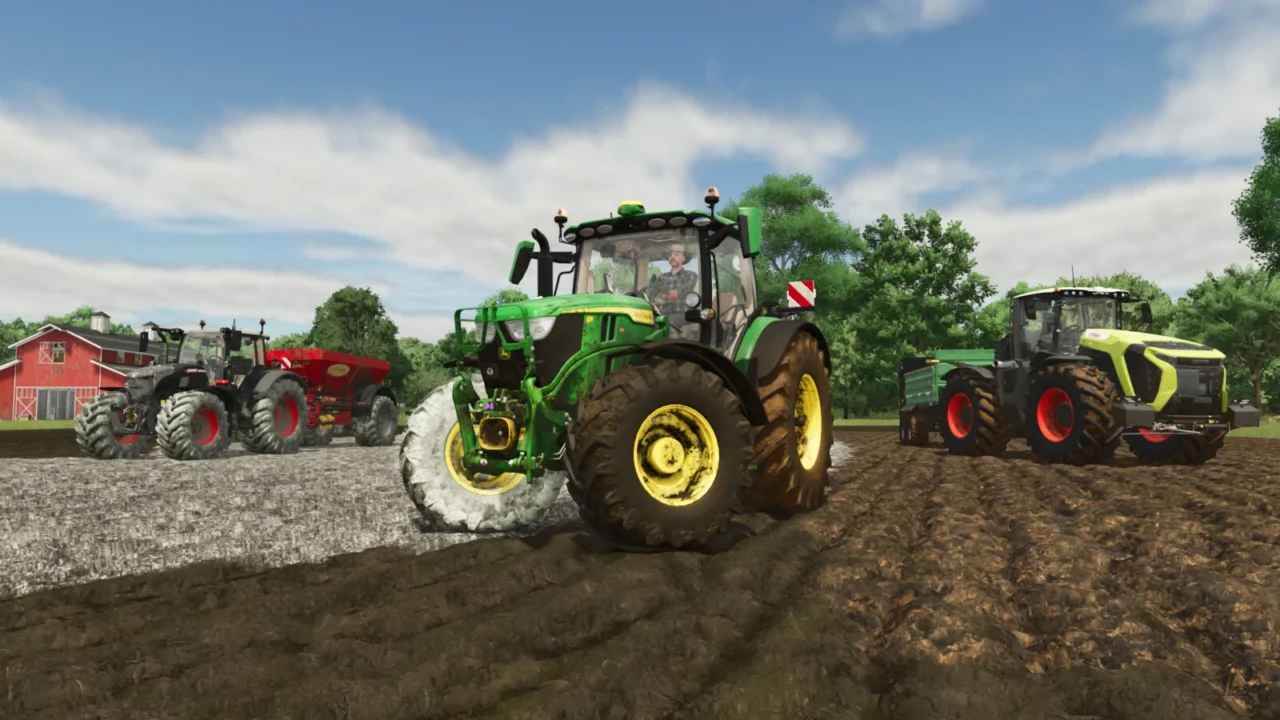
More screenshots on GIANTS ModHub ↗
What this mod does
Real Dirt Color by ViperGTS96 fixes one of the game’s most noticeable visual details: machine dirt that’s always the same color. With this script, tractors and implements get stained the color of the ground or the product they’re working with. It has more than 1,200 votes and a 4.8 rating.
What it changes
- Ten colors: brown soil and mud, red soil and mud, grass, chopped straw, manure, slurry or digestate, lime and snow.
- Tires get a wet look when driving through fields with slurry (this can be limited or turned off).
- It starts from each map’s own dirt color, ideal for southern maps with red soil.
- Gradual transition between colors, with adjustable speed.
- Snow detector: when it melts, the machine goes back to its normal color.
Settings
It has a simple mode and a per-wheel mode. The options are in an XML file inside the game’s modSettings folder, with its documentation, and that’s where you can add a map to the list of red-soil maps.
What’s new
Version 1.2 added the wet wheel effect and improved detection on dual wheels; 1.2.0.1 fixes a bug in the snow-melt script.
Holyfix Check
Will it work with your mods?
Load your log.txt and check whether this mod is for your FS25 version, whether you're missing a mod or DLC it needs and where to place it.
It's in Documents › My Games › FarmingSimulator2025 › log.txt. It's read in your browser: the file is never uploaded.
Something else failing? Holyfix for FS25 checks all your mods at once.
User rating
Highlights and things to keep in mind
- 4.8 out of 5 from more than 1,200 votes
- Greatly improves visual realism
- Only 0.11 MB
- PC/Mac only
- Settings are changed by editing an XML file
Requirements
- Farming Simulator 25 on PC/Mac
- About 0.2 MB of free space
How to install it
- Download it from the official ModHub (link on this page) or search for "Real Dirt Color" in the in-game Mods menu on PC/Mac.
- If you download it manually, copy FS25_realDirtColor.zip (don't unzip it) into the mods folder: Documents > My Games > FarmingSimulator2025 > mods.
- Enable the mod when you create or load your savegame.
- Adjust the options in the XML it creates in the modSettings folder if you want to change the mode or the transition speed.
Version history
-
1.2.0.120 Oct 2026Current
Fixes a bug in the snow-melt script
Common problems
Does it work on console?
No. The ModHub only offers it for PC/Mac.
Does it work on maps with red soil?
Yes. It uses each map's default color and has a list of red-soil maps you can extend.
More mods for FS25
 PC and consoles
  PC and consoles