Another Trash Can for Hytale
Three decorative trash cans that delete whatever you put inside instead of dropping it on the floor. Version 1.2.1 for Hytale 0.7, with no dependencies.
Download Another Trash Can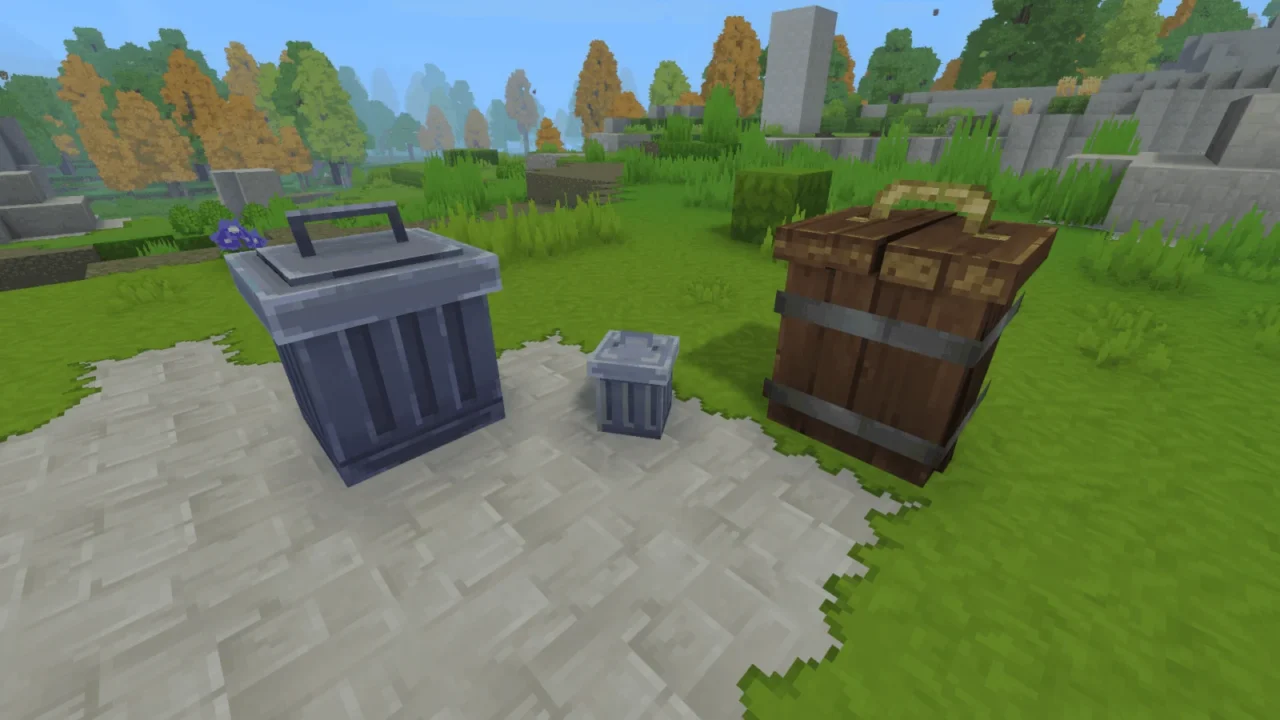
More screenshots on CurseForge ↗
What this mod does
Another Trash Can adds three trash cans that work as furniture and, at the same time, as item destroyers: whatever you put inside disappears instead of lying around on the floor of your base.
What’s included
- Trash Can, Wooden Trash Can and Small Trash Can, each with its own design.
- They work like a custom chest, so the author expects them to be compatible with mods that interact with chests, such as item transport pipes.
- Text in English and Brazilian Portuguese.
Important details
Whatever you throw away is deleted and there’s no way to get it back, so double-check before closing the trash can. The page doesn’t give the recipe or the crafting bench, so you’ll have to look them up in-game. Trash cans placed before Update 4 had to be replaced after updating; if you’re coming from a very old save, place them again.
With Update 7
Version 1.2.1, from October 12, 2026, simply updates the mod to 0.7.0 and has no dependencies. It’s lightweight and handy when expeditions in the new Update 7 fill your inventory with junk. If you’d rather get rid of items another way, compare it with Simply Trash, another option we already list on Holymod.
User rating
Highlights and things to keep in mind
- Simple and handy for keeping your base tidy
- Three different designs
- Lightweight with no dependencies
- Permanent deletion: be careful what you put in
- The page doesn't give the recipe
- All Rights Reserved license
Requirements
- Hytale (Early Access) on PC or server, version 0.7 (file AnotherTrashCan-1.2.1.jar)
- No dependencies: the Relations tab is empty
How to install it
- Open the Another Trash Can page on CurseForge and click Install to set it up with the CurseForge app, or download AnotherTrashCan-1.2.1.jar from the Files tab (the file marked 0.7).
- If you download it manually, copy the file as is, without unzipping it, into the mods folder: on Windows, %APPDATA%\Hytale\UserData\Mods.
- Open Hytale, right-click the world, check Another Trash Can in the mod list and save the world settings.
- On a dedicated server, put the file in the server's mods folder and restart it.
- Place a trash can, open it like a chest and put in whatever you want to delete.
Version history
-
1.2.112 Oct 2026Current
Updated to Hytale v0.7.0
-
1.2.027 Mar 2026
Previous version, tagged only as Early Access
Common problems
Can I recover what I throw away?
No. Items are deleted instead of dropping on the floor.
Does it work with pipes or hoppers from other mods?
The author expects so, because the trash can is a custom chest, but he doesn't give a list of tested mods.
Do my old trash cans still work?
Ones placed before Update 4 had to be replaced; there are no warnings for later versions.
More mods for Hytale
 Multiplayer
 Multiplayer
  Multiplayer