Armor Stand for Hytale
Adds two armor stands to display armor and tools at home: a wooden one (3 logs) and a lighter straw one (3 hay bales). Version 1.3.0 for Hytale 0.7.
Download Armor Stand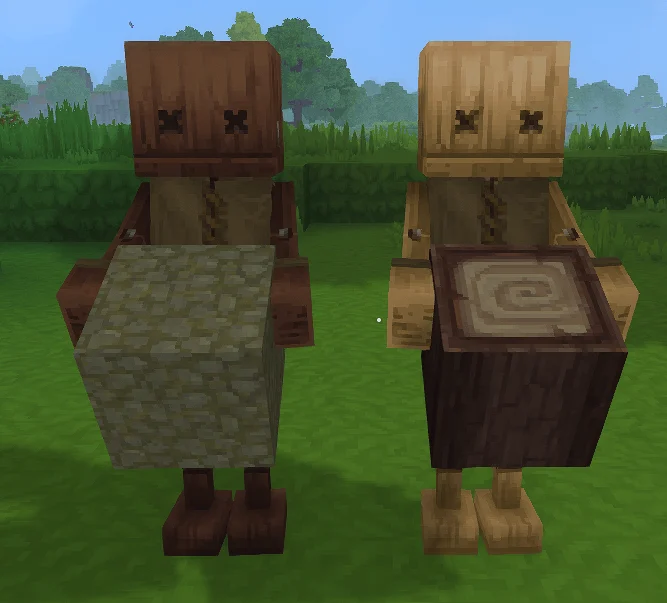
More screenshots on CurseForge ↗
What this mod does
Armor Stand adds something many players miss when decorating in Hytale: stands to display armor and tools. It’s made by Mrbysco with ShyNieke, the same authors behind Gone Fishing.
What it adds
- Two armor stands that you place in the world like any other object.
- Regular stand: 3 logs of any wood type at the Furniture Bench.
- Light variant: 3 hay bales at the same bench.
- To equip it, interact with the stand while holding a piece of armor or a tool. To take it back, interact with an empty hand.
Version for Update 7
Version 1.3.0, released October 14, 2026, is tagged for Hytale 0.7, and its changelog says it was compiled against 0.7.1. No other changes are listed.
Who it’s for
For anyone who wants an armory or dressing room that shows off their gear instead of stashing it in chests. It pairs well with furniture mods like The Fantasy Furniture. The page doesn’t detail poses or config options.
User rating
Highlights and things to keep in mind
- Cheap recipes available from the start
- Very lightweight: 38 KB
- Open source under the MIT license
- No poses or config options described
- The gallery only has one screenshot
Requirements
- Hytale (Early Access) on PC, version 0.7 (file ArmorStand-1.3.0.jar)
- No dependencies: no other mods needed
- Furniture Bench to craft the stands
How to install it
- Open the Armor Stand page on CurseForge and click Install to install it with the CurseForge app, or download ArmorStand-1.3.0.jar from the Files tab (the file tagged 0.7).
- If you download it manually, copy the file as is, without unzipping it, into your mods folder: on Windows %APPDATA%\Hytale\UserData\Mods.
- Open Hytale, right-click the world, check Armor Stand in the mod list and save the world settings.
- Craft the stand at the Furniture Bench: 3 logs of any wood or, for the light variant, 3 hay bales.
- Place it and interact with it while holding armor or a tool; with an empty hand you take it back.
Version history
-
1.3.014 Oct 2026Current
Compiled against Hytale 0.7.1
-
1.2.01 Sep 2026
Version for Hytale 0.6
Common problems
What can I put on the stand?
Armor pieces and tools, according to the author's description.
How do I get back what I put on it?
Interact with the stand with an empty hand.
Are there differences between the two stands?
The page only says that one is made from logs and the other, lighter one from hay bales.
More mods for Hytale

 Multiplayer
  Multiplayer
  Multiplayer
  Multiplayer