The Fantasy Furniture for Hytale
Fantasy furniture and storage: animated wardrobes, banners, paintings, large crates, colored roofs and, in 1.6.0, mantlets and stone windows. Version 1.6.0 for Hytale 0.7.
Download The Fantasy Furniture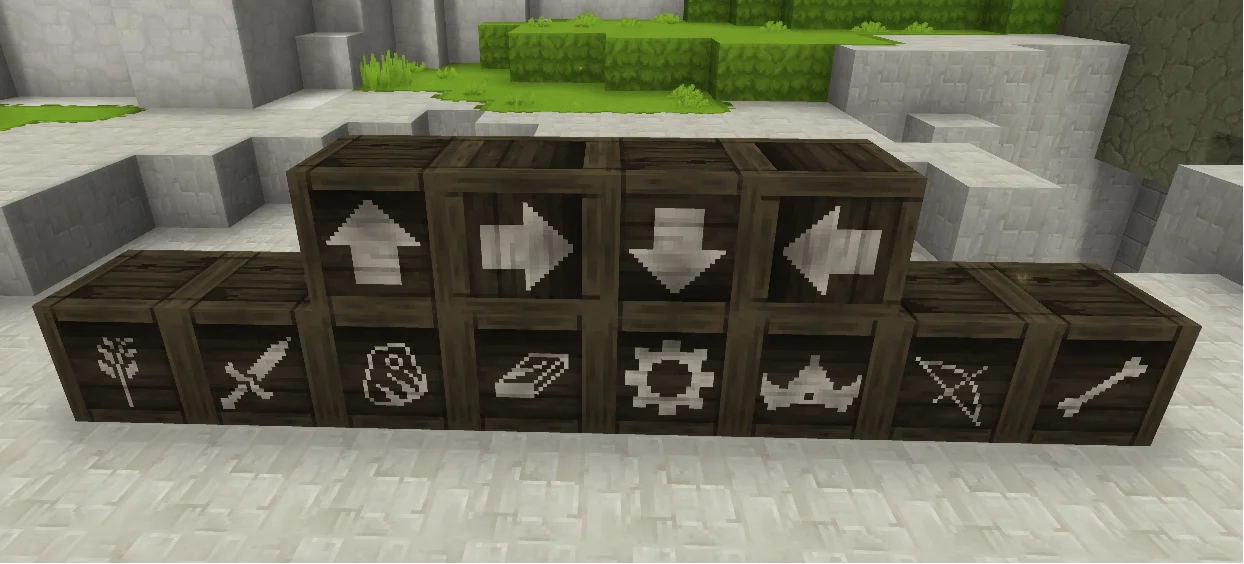
More screenshots on CurseForge ↗
What this mod does
The Fantasy Furniture, by LadyPaladra, is a decor and storage pack with a fantasy look. It doesn’t add complex mechanics: it expands what you can put in your home and storage room.
What’s included
- Functional wardrobes with full animations.
- Banners in 6 sizes and 8 colors, and 18 paintings in 2 sizes.
- 5 glass wall sconces.
- Storage crates: 3 large industrial ones with lots of space, 3 low industrial ones, 3 reinforced ones with extra capacity and 10 with icons to organize your storage.
- Log piles in several woods and 7 new roof colors (for now only for red wood roofs).
What’s new with Update 7
Version 1.6.0 (October 12, 2026), tagged for 0.7, adds a siege mantlet with three variants (Heavy, Arrow and Burnt) and stone stained-glass windows with partial transparency, in line with the transparent glass introduced in Update 7 (more in how to make glass). It’s a 4.2 MB pack with no dependencies. The page doesn’t say which bench each piece is crafted at.
The author is working on 2×1 and 1×2 paintings, more roof colors, decorative skeletons and more beds. If you need more furniture, pair it with Gui’s Furniture and Stuff; avoid using it alongside another mod that also changes wardrobes without testing them first.
If you just want the base game’s wardrobes to store items, there’s Hyper Wardrobes.
User rating
Highlights and things to keep in mind
- Lots of variety: banners, paintings, crates and roofs
- Large storage crates for your storage room
- New content of its own in the 0.7 version
- No documented recipes or benches
- Colored roofs only for red wood
- Possible conflict with other mods that change wardrobes
- All Rights Reserved license
Requirements
- Hytale (Early Access) on PC or server, version 0.7 (file The Fantasy Furniture 1.6.0.zip)
- No dependencies
How to install it
- Open The Fantasy Furniture page on CurseForge and click Install to install it with the CurseForge app, or download The Fantasy Furniture 1.6.0.zip from the Files tab (the file tagged 0.7).
- If you download it manually, copy the file as is, without unzipping it, into your mods folder: on Windows %APPDATA%\Hytale\UserData\Mods.
- Open Hytale, right-click the world, check The Fantasy Furniture in the mod list and save the world settings.
- On a dedicated server, place the file in the server's mods folder and restart it.
- Look for the new pieces at the furniture and construction benches; the page doesn't say which one each is at.
Version history
-
1.6.012 Oct 2026Current
Updated for Chapter 1; mantlet with 3 variants (Heavy, Arrow, Burnt); stone stained-glass windows with partial transparency
-
1.5.128 Aug 2026
Version for Hytale 0.6
Common problems
Do the wardrobes store items?
The author says it adds functionality and full animations to wardrobes, but doesn't detail their capacity.
Do the roof colors work for every wood?
For now only for red wood roofs; the author plans more types.
What does 1.6.0 bring?
A mantlet with three variants (Heavy, Arrow and Burnt) and stone stained-glass windows with partial transparency.
More mods for Hytale
 Multiplayer
  Multiplayer
  Multiplayer
  Multiplayer
  Multiplayer
  Multiplayer