Better Crates/LootBox for Hytale
Loot crates for servers with keys, rarities, eleven opening animations and an in-game editor; they link to chests in the world. Version 6.5.1 for Hytale 0.6.
Download Better Crates/LootBox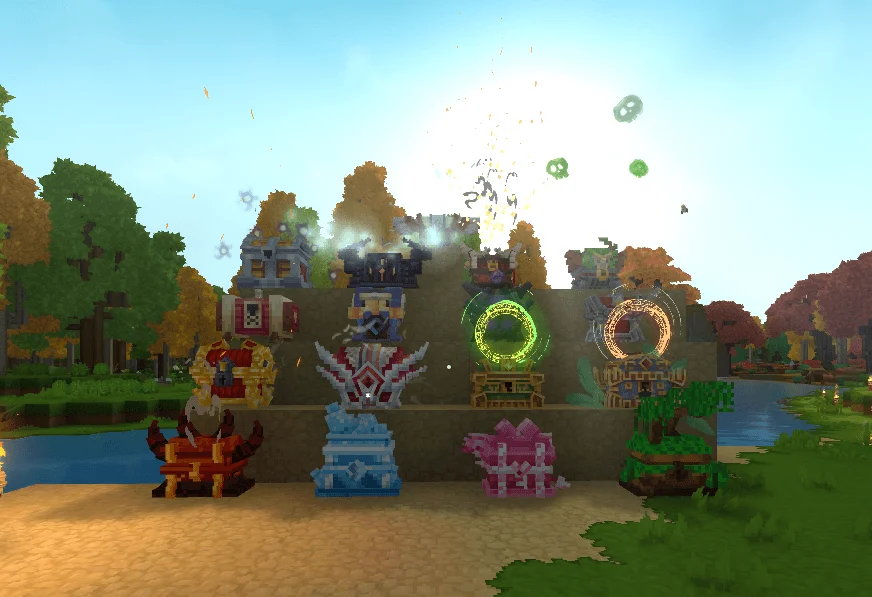
More screenshots on CurseForge ↗
What this mod does
Better Crates/LootBox adds configurable loot crates to Hytale servers. Each crate has its own rewards with rarity tiers and is opened with a key; when you open it, an animation picks the prize, which is always a real in-game item.
What’s included
- Eleven opening styles: roll, grid, wheel, slot machine, guess the number, tower, ritual and more.
- 11 chest models and 7 key models, with animations that can be turned off.
- In-game editor and admin panel (
/lootbox editor,/lootbox admin). - Prize preview without using a key (
/lootbox preview) and a per-player key inventory. - Every key is logged with a unique ID to prevent duplicates.
How to use it
The admin creates the crate, links it to a chest in the world with /lootbox bind and hands out keys with /lootbox givekey. There’s also a key shop using in-game currency if the server has an economy system. There’s no real money involved. It’s translated into Spanish, and version 6.5.1 (October 1, 2026) introduces a new key design.
This mod page was checked with Hytale 0.6 (Update 6). With Update 7 (0.7), released on October 12, 2026, the author has already released version 7.0.0 (October 11, 2026), which is ready for Update 7 according to its changelog.
User rating
Highlights and things to keep in mind
- Very configurable, with an in-game editor
- Flashy opening animations
- Translated into Spanish
- It's a server tool: it makes little sense in solo play
- Some chests won't link on the first try (known bug)
- Update 7 (0.7) already has a compatible file from the author (October 11, 2026)
Requirements
- Hytale server (Early Access), version 0.7 (file BetterLootBox-7.0.0.jar)
- No required dependencies
- For the key shop: an economy system on the server
How to install it
- Open the Better Crates/LootBox page on CurseForge and click Install to install it with the CurseForge app, or download BetterLootBox-7.0.0.jar from the Files tab (the file tagged 0.7).
- If you download it manually, copy the file as is, without unzipping it, into the mods folder: on Windows, %APPDATA%\Hytale\UserData\Mods.
- Open Hytale, right-click the world, check Better Crates/LootBox in the mod list and save the world settings.
- On a dedicated server, place the file in the server's mods folder and restart it.
- As an admin, create a crate with /lootbox create, link it to a chest with /lootbox bind and hand out keys with /lootbox givekey.
Version history
-
7.0.011 Oct 2026Current
File for Hytale 0.7 (Update 7)
-
6.5.11 Oct 2026
New key design
-
6.0.027 Aug 2026
First version for Hytale 0.6
Common problems
Do you pay with real money?
No. Keys are handed out by the admin or bought in a shop with the server's in-game currency.
A chest won't link, what do I do?
It's a known bug: the author recommends breaking that chest, placing it again and repeating /lootbox bind.
Is it useful for solo play?
It's designed for servers: managing crates, keys and permissions is an admin task.
More mods for Hytale
 Multiplayer
  Multiplayer
 Multiplayer