Bigger Backpack for Stardew Valley
Adds a 48-slot backpack you can buy at Pierre's General Store for 50,000g. Version 7.3 for 1.6; requires StardewHack and has a Spanish translation.
Download Bigger Backpack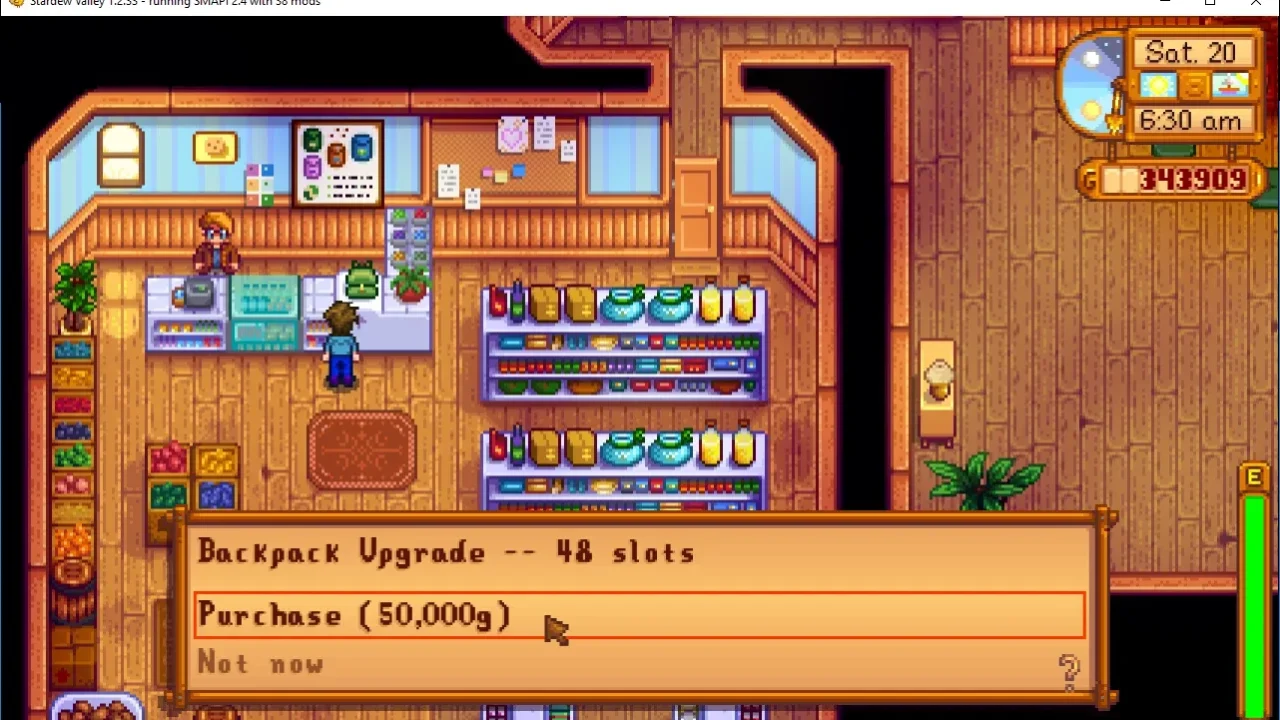
More screenshots on Nexus Mods ↗
What this mod does
Bigger Backpack adds a fourth row to your inventory. The base game tops out at the 36-slot Deluxe Backpack; with this mod you can buy a bigger 48-slot backpack at Pierre’s shop for 50,000g. It isn’t free, so it fits nicely into normal progression.
Options
BackpackCostinconfig.jsonchanges the price (50000 by default). The file is created the first time you launch the game.- The console command
player_setbackpacksizechanges the inventory size (12, 24, 36 or 48). Items in removed slots drop to the ground.
Requirements and compatibility
Version 7.3 (June 1, 2024) was built with SMAPI 4.0.8 and Stardew Valley 1.6.8, and it needs StardewHack. It doesn’t work on Android or mobile. Inventory mods such as Chests Anywhere or Convenient Inventory support it.
Known issues and uninstalling
The fourth row doesn’t show up in the museum, and there’s only one upgrade; for more sizes, the author suggests The Return Of Custom Backpack Framework. Before removing the mod, type player_setbackpacksize 36 in the SMAPI console and save. There’s a Spanish translation by Gonzy42 on Nexus, updated for 7.3.
User rating
Highlights and things to keep in mind
- 48 slots at a reasonable in-game cost
- Configurable price
- Lightweight (42 KB)
- Spanish translation on Nexus
- Requires StardewHack
- Doesn't work on Android
- The fourth row doesn't show in the museum
- You need to shrink the backpack before uninstalling
Requirements
- Stardew Valley 1.6.x on PC
- SMAPI 4.x
- StardewHack
- Doesn't work on Android or mobile
How to install it
- Install SMAPI first (see its mod page) and launch the game once with it to make sure it works.
- Download and install StardewHack from its Nexus page (mod 3213) the same way, into the Mods folder.
- Open the Bigger Backpack page on Nexus Mods, go to the Files tab and click Manual download on the main file (Bigger Backpack 7.3). You need a free Nexus account to download.
- Extract the .zip outside the game folder and move the resulting folder into the Mods folder, inside the game folder.
- Launch the game with SMAPI and, once you have the Deluxe Backpack, look for the 48-slot backpack at Pierre's shop (50,000g by default).
Version history
-
7.31 Jun 2024Current
Polish translation
-
7.121 Mar 2024
Updated for 1.6, translation support and a fix for the Community Center UI
Common problems
Where do I buy it?
At Pierre's shop, for 50,000g by default. You can change the price with BackpackCost.
How do I uninstall it without losing items?
Empty the fourth row, type player_setbackpacksize 36 in the SMAPI console and save before removing the mod.
Is there a Spanish version?
Yes, Gonzy42's translation on Nexus, updated for 7.3.
More mods for Stardew Valley
 ✓ Stardew Valley 1.6Multiplayer
  ✓ Stardew Valley 1.6Multiplayer
  ✓ Stardew Valley 1.6
  ✓ Stardew Valley 1.6
  ✓ Stardew Valley 1.6
  ✓ Stardew Valley 1.6Multiplayer