Chests Anywhere for Stardew Valley
Open your chests, fridge and shipping bin from anywhere with the B key, with categories and names. Version 1.30.1 for Stardew Valley 1.6.15 and later.
Download Chests Anywhere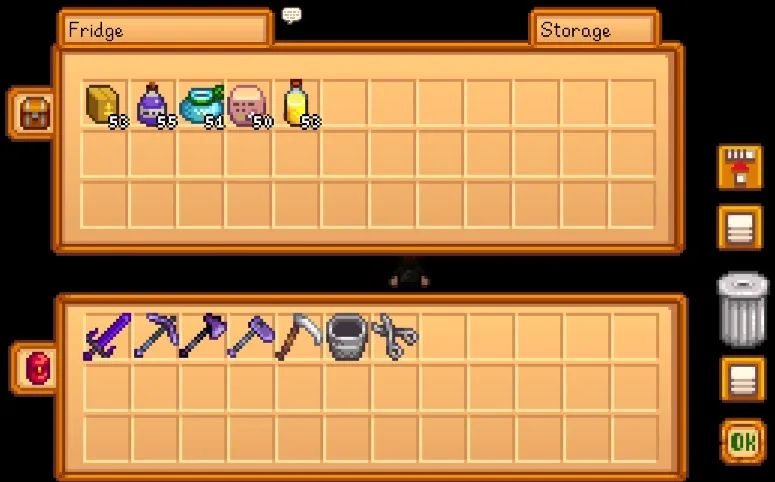
More screenshots on Nexus Mods ↗
What this mod does
Chests Anywhere lets you open your chests from anywhere by pressing B: not just chests, but also dressers, the fridge, the shipping bin and Junimo Huts. No more trips home for one material.
Features
- Groups chests into categories, and you browse them with dropdowns or the arrow keys.
- You can give each chest a name, category and sort order, or hide it from the list.
- Hover over a chest on the map to see its name.
- Optional balanced mode: limits access to the area you’re in and disables it in the mines (there’s a ready-made
config.jsonin the optional files).
Compatibility
Version 1.30.1 (March 15, 2026) requires SMAPI 4.1.10 or later and Stardew Valley 1.6.15 or later, on Windows, macOS and Linux, in single-player and multiplayer. In multiplayer, farmhands only see chests in synced areas: basically the farm, its buildings and wherever they are. With Joys of Efficiency it can throw errors when opening the shipping bin. You configure it with Generic Mod Config Menu or by editing its config file. It started as a continuation of AccessChestAnywhere, with permission from its original author. Nexus links a Spanish (Spain) translation by Gonzy42.
User rating
Highlights and things to keep in mind
- Saves you a ton of trips
- Organization by categories and names
- Optional balanced mode
- Spanish translation on Nexus
- Limited for farmhands in multiplayer
- Possible errors with Joys of Efficiency on the shipping bin
- Makes the game much easier; if you want a challenge, use balanced mode
Requirements
- Stardew Valley 1.6.15 or later (PC)
- SMAPI 4.1.10 or later
- Optional: Generic Mod Config Menu
How to install it
- Install SMAPI first (see its mod page) and launch the game with it once to make sure it works.
- Open the Chests Anywhere page on Nexus Mods, go to the Files tab and click Manual download on the main file (Chests Anywhere 1.30.1). You need a free Nexus account to download.
- Extract the .zip outside the game folder and move the resulting folder into Mods, inside the game folder (on Steam for Windows: C:\Program Files (x86)\Steam\steamapps\common\Stardew Valley\Mods).
- Optional: if you want balanced mode, download the 'balanced mode' config.json and put it inside the mod folder.
- Launch the game with SMAPI and press B to open the chest list.
Version history
-
1.30.115 Mar 2026Current
Current version; requires SMAPI 4.1.10 or later
-
config.json 'balanced mode'8 Dec 2018
Optional file to limit access to the current area
Common problems
Which key opens the chests?
B, and you can change it.
Can I limit it so it's not so convenient?
Yes, with balanced mode: you can only access chests in the area you're in, and it doesn't work in the mines.
Does it work in multiplayer?
Yes, but farmhands only see chests in synced areas, mainly the farm, its buildings and their current location.
More mods for Stardew Valley
 ✓ Stardew Valley 1.6Multiplayer
  ✓ Stardew Valley 1.6Multiplayer
  ✓ Stardew Valley 1.6Multiplayer
  ✓ Stardew Valley 1.6
  ✓ Stardew Valley 1.6
  ✓ Stardew Valley 1.6