Better Game Menu for Stardew Valley
Replaces the game's pause menu with a faster, easier-to-extend one: each tab loads only when you use it, and you can choose between pages from different mods.
Download Better Game Menu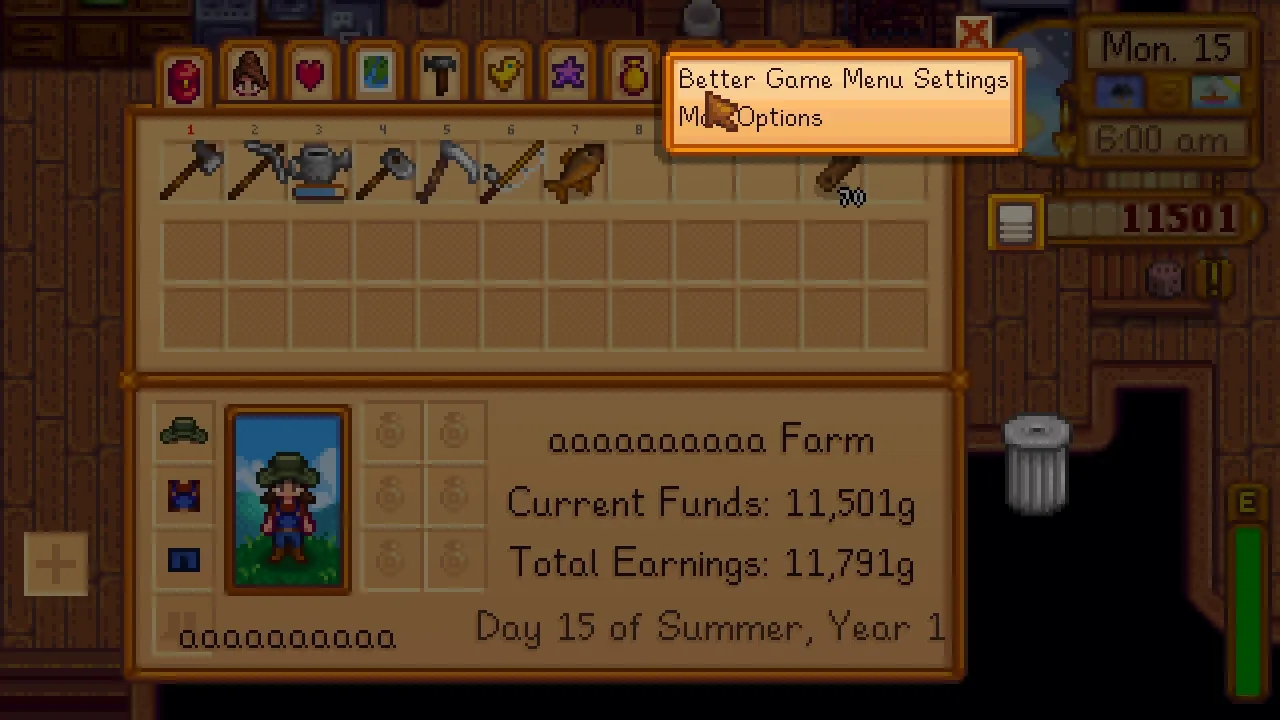
More screenshots on Nexus Mods ↗
What this mod does
Better Game Menu, by Khloe Leclair (author of Better Crafting), replaces the game’s pause menu, the one that holds your inventory, skills, Social tab, map and options. It looks the same on the outside, but under the hood it’s rebuilt to run faster and play nicer with other mods.
What it improves
- Performance: each tab loads only when you open it, not all at once. People who tested it with lots of mods noticed the menu opens faster.
- Context menus on the tabs: if several mods replace the same page, you can choose which one to use. With Generic Mod Config Menu, the author suggests right-clicking the options tab.
- A crash in one tab no longer breaks the whole menu.
- A C# API so other mods can add or replace pages.
Requirements and compatibility
It only needs SMAPI. Version 1.0.1 (April 9, 2025, 221 KB) is for 1.6.15 or later on PC and doesn’t work on Android. It fixes a bug that could stop you from closing the map with M or opening the local co-op menu.
Since it’s a new menu, C# mods that touch the pause menu need to be updated. The author keeps a compatibility list on GitHub; Social Page Order Redux already supports it.
User rating
Highlights and things to keep in mind
- A faster menu with lots of mods installed
- A bug in one tab doesn't break the whole menu
- Lets you choose between pages from different mods
- Only needs SMAPI
- Some C# mods may not be compatible yet
- Doesn't work on Android
- No Spanish translation (it has hardly any text)
Requirements
- Stardew Valley 1.6.15 or later (PC only; doesn't work on Android)
- SMAPI 4.x
How to install it
- First install SMAPI (see its mod page) and launch the game once with it to check that it works.
- Open the Better Game Menu page on Nexus Mods, go to the Files tab and click Manual download on the main file (Better Game Menu 1.0.1). You need a free Nexus account to download.
- Unzip the .zip outside the game folder and move the resulting folder into the Mods folder inside the game folder.
- Launch the game with SMAPI, open the pause menu and check that your other mods' tabs show up correctly. If any of them break, check the compatibility list linked from the mod's page.
Version history
-
1.0.19 Apr 2025Current
Fixes a bug that could stop you from closing the map with M or opening the local co-op menu
-
1.0.031 Mar 2025
First release
Common problems
Does it change how the menu looks?
Not visibly: it's an under-the-hood replacement for the pause menu focused on performance and compatibility.
Does it work on Android?
No. The mod's page says it's PC only.
Is it compatible with every mod?
C# mods that touch the pause menu need to be adapted; the author keeps a compatibility list on GitHub.
More mods for Stardew Valley
 ✓ Stardew Valley 1.6Multiplayer
  ✓ Stardew Valley 1.6
  ✓ Stardew Valley 1.6
  ✓ Stardew Valley 1.6
  ✓ Stardew Valley 1.6Multiplayer
  ✓ Stardew Valley 1.6Multiplayer