Social Page Order Redux for Stardew Valley
Sorts the Social tab by hearts or by name and adds a search bar plus filters to hide villagers you've already talked to or given gifts to.
Download Social Page Order Redux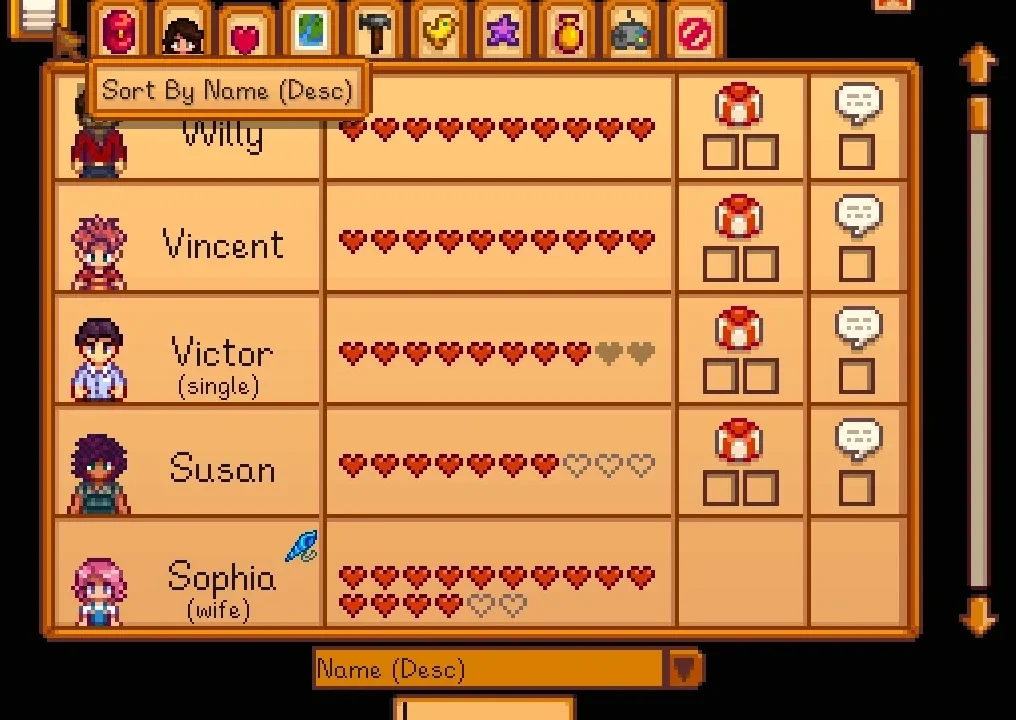
More screenshots on Nexus Mods ↗
What this mod does
Social Page Order Redux, by FlyingTNT building on aedenthorn’s work, merges two classics into a single mod: Social Page Order Menu and Social Page Order Button. It’s really handy when you have lots of characters, for example with Stardew Valley Expanded or Ridgeside Village.
What it adds to the Social tab
- A button and a dropdown to sort by hearts (most to fewest or the other way around) or by name.
- A search bar to find a specific character.
- Buttons to hide villagers you’ve already talked to today or already given all their gifts, and since 1.3.0, filters for max friendship and characters you haven’t met yet.
Requirements and compatibility
It only needs SMAPI. Version 1.3.1 (May 30, 2025, 46 KB) is for 1.6. It works in split-screen and with a controller: the D-pad changes the sort order. Since 1.3.0 it’s compatible with Better Game Menu and offers an API so other mods can add filters.
You can change the keys, move each element and turn the button, dropdown, search bar and filters on or off with Generic Mod Config Menu or in config.json. The options are translated into Spanish within the mod itself.
User rating
Highlights and things to keep in mind
- A must if you play with lots of NPCs
- Very practical search bar and filters
- Works with split-screen and controllers
- Options translated into Spanish
- The mod's page says nothing about online multiplayer
- No Android compatibility listed
Requirements
- Stardew Valley 1.6.x (PC)
- SMAPI 4.x
- Optional: Generic Mod Config Menu
How to install it
- First install SMAPI (see its mod page) and launch the game once with it to check that it works.
- Open the Social Page Order Redux page on Nexus Mods, go to the Files tab and click Manual download on the main file (Social Page Order Redux 1.3.1). You need a free Nexus account to download.
- Unzip the .zip outside the game folder and move the resulting folder into the Mods folder inside the game folder.
- If you had Social Page Order Menu or Social Page Order Button installed, remove them: this mod combines both.
- Launch the game with SMAPI and check that there are no red errors in the console.
Version history
-
1.3.130 May 2025Current
Adds a Japanese translation
-
1.3.028 May 2025
Max friendship and unmet character filters, API for other mods, Better Game Menu compatibility and Spanish fixes
Common problems
Do I need aedenthorn's original mods?
No. Social Page Order Redux combines Social Page Order Menu and Social Page Order Button into a single mod.
Does it work with a controller?
Yes. You can press the buttons with the controller and change the sort order with the D-pad.
Is it available in Spanish?
The config options include a Spanish translation within the mod itself.
More mods for Stardew Valley
 ✓ Stardew Valley 1.6
  ✓ Stardew Valley 1.6
  ✓ Stardew Valley 1.6Multiplayer
  ✓ Stardew Valley 1.6Multiplayer
  ✓ Stardew Valley 1.6Multiplayer
  ✓ Stardew Valley 1.6Multiplayer