Custom Menu Background for Stardew Valley
A configurable main menu background: skies, clouds, mountains and trees with mist and sparkles, random or to your taste. Version 1.2.0, tagged 1.6-compatible.
Download Custom Menu Background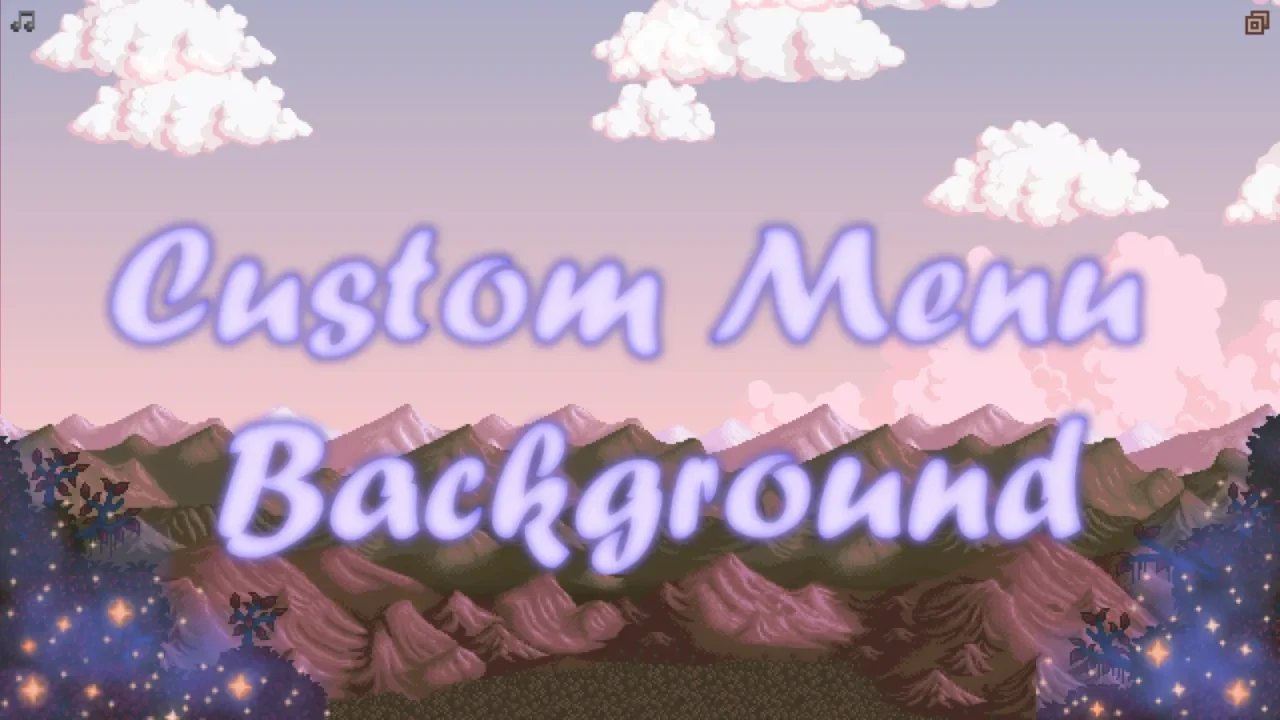
More screenshots on Nexus Mods ↗
What this mod does
Custom Menu Background, by herbivoor and seitanicbean, changes the background of the title screen and other menus. It recolors the landscape and adds its own elements to it: the sky, clouds, mountains and trees, with optional layers of mist and sparkles over the trees.
How it works
- By default, the background changes randomly every time you open the game, with more than 20 million possible combinations according to the page.
- There’s a filtered random mode that rules out odd options, like black and white, and a fully random one.
- You can also set each part by hand in
config.json, with presets such as «realism» or «spooky» and «pastel» trees. - Version 1.2.0 added new skies: stormy, icy, rainy and autumnal.
Requirements and compatibility
It needs SMAPI and Content Patcher. The page tags it as compatible with 1.6 and with Android; the mobile version, by TmTFruitz, was released in December 2024. It isn’t compatible with other menu background mods, but it is with mods that only recolor the interface, like DaisyNiko’s Earthy Interface.
There’s an optional visual guide (27 MB) that explains each option with images. It has no text to translate.
User rating
Highlights and things to keep in mind
- Huge variety of combinations
- A different background every launch
- Mobile version available
- Pairs with interface recolors
- The PC file is from April 2023; 1.6 compatibility is based on the page's tag
- Configured by editing config.json
- Conflicts with other menu background mods
Requirements
- Stardew Valley 1.6.x (PC; separate mobile version)
- SMAPI 4.x
- Content Patcher
How to install it
- Install SMAPI and Content Patcher first (see their mod pages) and launch the game once with SMAPI to make sure everything loads.
- Open the Custom Menu Background page on Nexus Mods, go to the Files tab and click Manual download on the main file (CP Custom Menu Background 1.2.0). You need a free Nexus account to download.
- Extract the .zip outside the game folder and move the resulting folder into the Mods folder, inside the game folder.
- If you had an earlier version, delete its folder first (you can keep your config.json).
- Optional: also download the Customization Guide if you want to see each option with examples; it isn't a mod and doesn't go in the Mods folder.
- Launch the game with SMAPI: you'll see a different background on the title screen. To lock it in, edit the config.json created in the mod folder.
Version history
-
1.2.06 Dec 2024Current
Mobile version (TmTFruitz) in Optional files
-
1.2.022 Apr 2023
Realism, spooky and pastel presets, plus new skies
-
1.1.317 Apr 2023
Compatibility with DaisyNiko's Earthy Interface
Common problems
Can I always keep the same background?
Yes: in config.json you choose the sky, clouds, mountains and trees instead of random mode.
Does it work with other interface mods?
With mods that only recolor the interface, yes; with other menu background mods, no.
Is there a mobile version?
Yes, in Optional files, prepared by TmTFruitz.
More mods for Stardew Valley
 ✓ Stardew Valley 1.6
  ✓ Stardew Valley 1.6Multiplayer
  ✓ Stardew Valley 1.6
  ✓ Stardew Valley 1.6
  ✓ Stardew Valley 1.6
  ✓ Stardew Valley 1.6