Community Center Helper for Stardew Valley
Shows hints on where to get each Community Center bundle item when you hover over it. Version 1.6.10 (January 2026), with Spanish included.
Download Community Center Helper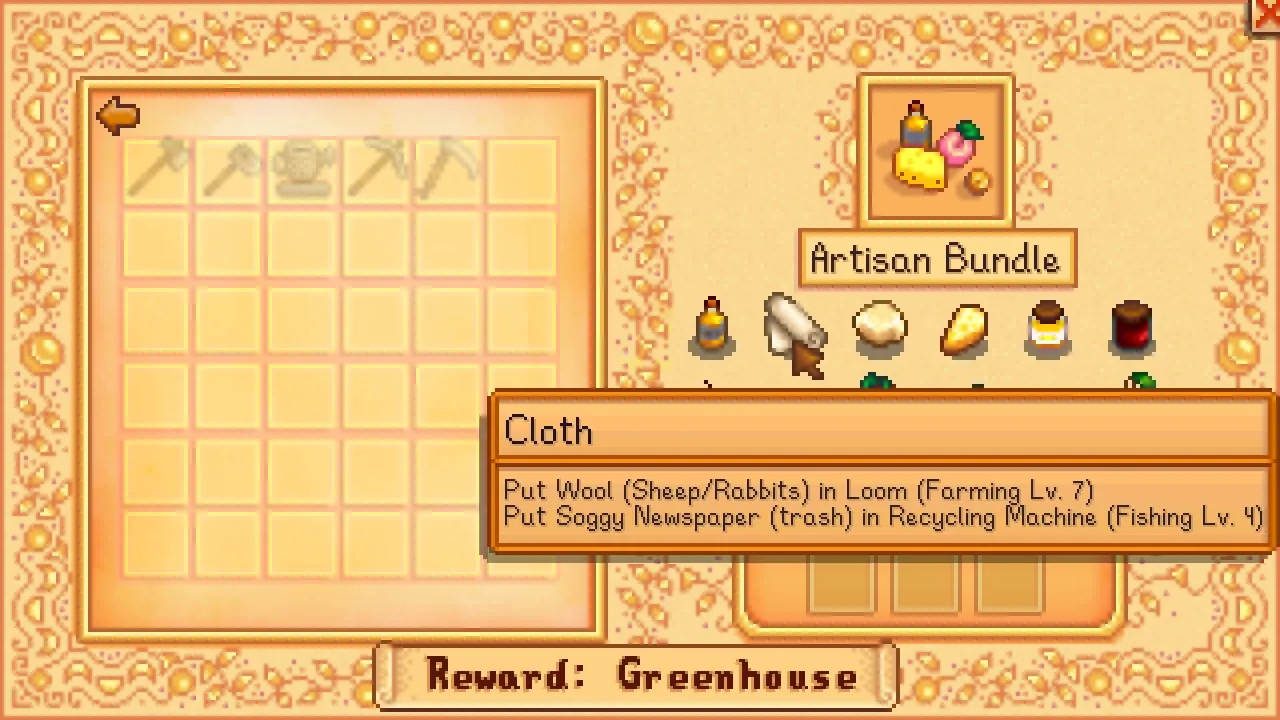
More screenshots on Nexus Mods ↗
What this mod does
Community Center Helper, by vgperson, answers the big question of every first playthrough: where do I get this item for the bundle? When you hover over an item in the Community Center bundle menu, a hint appears with the ways to obtain it.
How it helps
- Hints adapt to your progress: if an item is cooked, it tells you whether you’re missing the recipe or the ingredients, and it flags the skill levels you need.
- Optionally, it also shows hints in the Collections tab (only items you don’t have, or all of them).
- With
ShowSpoilersturned off (the default) it doesn’t reveal areas or characters you haven’t met yet. - It works with normal and remixed bundles and with a dozen bundle mods, including those by Alja, Minerva and Alchemistry.
Compatibility
It needs SMAPI and is configured with Generic Mod Config Menu. It was adapted to 1.6 in version 1.4.0, and 1.6.10 (January 23, 2026) fixes the info for the Stardew Valley Expanded starfish. It doesn’t include the Traveling Cart, since it’s unreliable, and with mods that change the game a lot some hints may be off.
Spanish is included, along with about ten other languages. For 1.4 (mobile too) there’s a separate file, version 1.1.1.
User rating
Highlights and things to keep in mind
- Great for completing the Community Center without checking the wiki
- Hints adapted to your progress and spoiler-free by default
- Spanish included
- Updated in 2026
- Doesn't cover every source (for example, the Traveling Cart)
- Hints are based on the base game: with big mods they may be inaccurate
- Hints in Collections are off by default
Requirements
- Stardew Valley 1.6.x (PC)
- SMAPI 4.x
- Optional: Generic Mod Config Menu
How to install it
- Install SMAPI first (see its mod page) and launch the game once with it to make sure it works.
- Open the Community Center Helper page on Nexus Mods, go to the Files tab and click Manual download on the main file (CommunityCenterHelper 1.6.10). You need a free Nexus account to download.
- Extract the .zip outside the game folder and move the resulting folder into the Mods folder, inside the game folder.
- Launch the game with SMAPI, go into the Community Center, open a bundle and hover over an item to see the hint.
Version history
-
1.6.1023 Jan 2026Current
Fixes the SVE starfish info
-
1.1.117 Aug 2022
Separate file for Stardew Valley 1.4 (mobile too) with the current translations
Common problems
Will it spoil the game?
Not by default: ShowSpoilers is off and it doesn't reveal areas or characters you haven't discovered yet.
Does it work with mods that change bundles?
Yes, with a dozen of them; with others it may give partial hints.
Is it available in Spanish?
Yes, Spanish is included.
More mods for Stardew Valley
 ✓ Stardew Valley 1.6
  ✓ Stardew Valley 1.6Multiplayer
  ✓ Stardew Valley 1.6Multiplayer
  ✓ Stardew Valley 1.6Multiplayer
  ✓ Stardew Valley 1.6
  ✓ Stardew Valley 1.6Multiplayer