Range Highlight for Stardew Valley
Highlights the range of sprinklers, scarecrows, bee houses, bombs, mushroom logs and Junimo Huts. Version 4.2.1 for 1.6, with a Spanish translation.
Download Range Highlight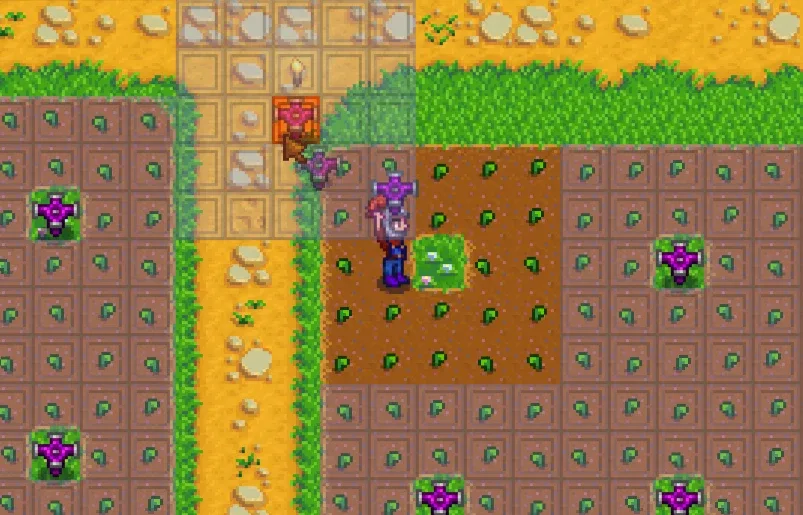
More screenshots on Nexus Mods ↗
What this mod does
Range Highlight marks on the ground the range of sprinklers, scarecrows, bombs, bee houses, mushroom logs and Junimo Huts. The highlight appears when you hold the item or keep a key pressed, and it’s perfect for planning your farm without leaving gaps unwatered or crops unprotected.
Default keys
Left Shift: all ranges.R: sprinklers;O: scarecrows;H: bee houses;J: Junimo Huts.- With
hotkeysToggle, the keys toggle the highlight on and off instead of showing it only while held. - Bombs show three radii: one for rocks and objects, one for crops and damage, and an optional inner one.
Compatibility
Version 4.2.1 (June 8, 2024) works with Stardew Valley 1.6 on Windows, macOS and Linux, in single-player and multiplayer; split-screen isn’t tested regularly. It integrates with Better Junimos, Better Beehouses, Line Sprinklers and other sprinkler mods. You configure it with Generic Mod Config Menu.
UI Info Suite 2 and Better Sprinklers draw their own ranges, so you’ll see duplicate highlights unless you turn theirs off; Data Layers offers something similar as layers. There’s a Spanish translation by Gonzy42 on Nexus.
User rating
Highlights and things to keep in mind
- Makes farm planning much easier
- Covers lots of items, including bombs
- Integrates with sprinkler, bee house and Junimo mods
- Spanish translation on Nexus
- Duplicate highlights with UI Info Suite 2 or Better Sprinklers
- With Simple Sprinklers the range may not be exact
- Split-screen isn't tested regularly
Requirements
- Stardew Valley 1.6 (PC)
- SMAPI 4.x
- Optional: Generic Mod Config Menu and GMCM Options
How to install it
- Install SMAPI first (see its mod page) and launch the game once with it to make sure it works.
- Open the Range Highlight page on Nexus Mods, go to the Files tab and click Manual download on the main file (RangeHighlight 4.2.1). You need a free Nexus account to download.
- Extract the .zip outside the game folder and move the resulting folder into the Mods folder, inside the game folder.
- Optional: for Spanish, download 'Range Highlight - Spanish' by Gonzy42 on Nexus and follow its instructions.
- Launch the game with SMAPI, hold a sprinkler (or hold Left Shift) and you'll see its range highlighted on the ground.
Version history
-
4.2.18 Jun 2024Current
Mega Bomb text and range updated for 1.6; Chinese translation
-
4.2.019 May 2024
Option for compatibility with sprinkler mods and for showing overlaps
Common problems
Which keys does it use?
Left Shift for everything, R for sprinklers, O for scarecrows, H for bee houses and J for Junimo Huts.
Does it work with sprinklers from other mods?
Yes, with Better Sprinklers, Simple Sprinklers, Line Sprinklers and Prismatic Tools, among others.
Can I use it alongside UI Info Suite 2?
You can, but both show ranges. Turn that feature off in one of them.
More mods for Stardew Valley
 ✓ Stardew Valley 1.6Multiplayer
  ✓ Stardew Valley 1.6Multiplayer
  ✓ Stardew Valley 1.6Multiplayer
  ✓ Stardew Valley 1.6Multiplayer
  ✓ Stardew Valley 1.6Multiplayer
  ✓ Stardew Valley 1.6Multiplayer