Data Layers for Stardew Valley
Map overlays showing sprinkler and scarecrow range, unwatered crops, buildable tiles and more; open them with F2. Version 1.23.0 for Stardew Valley 1.6.15.
Download Data Layers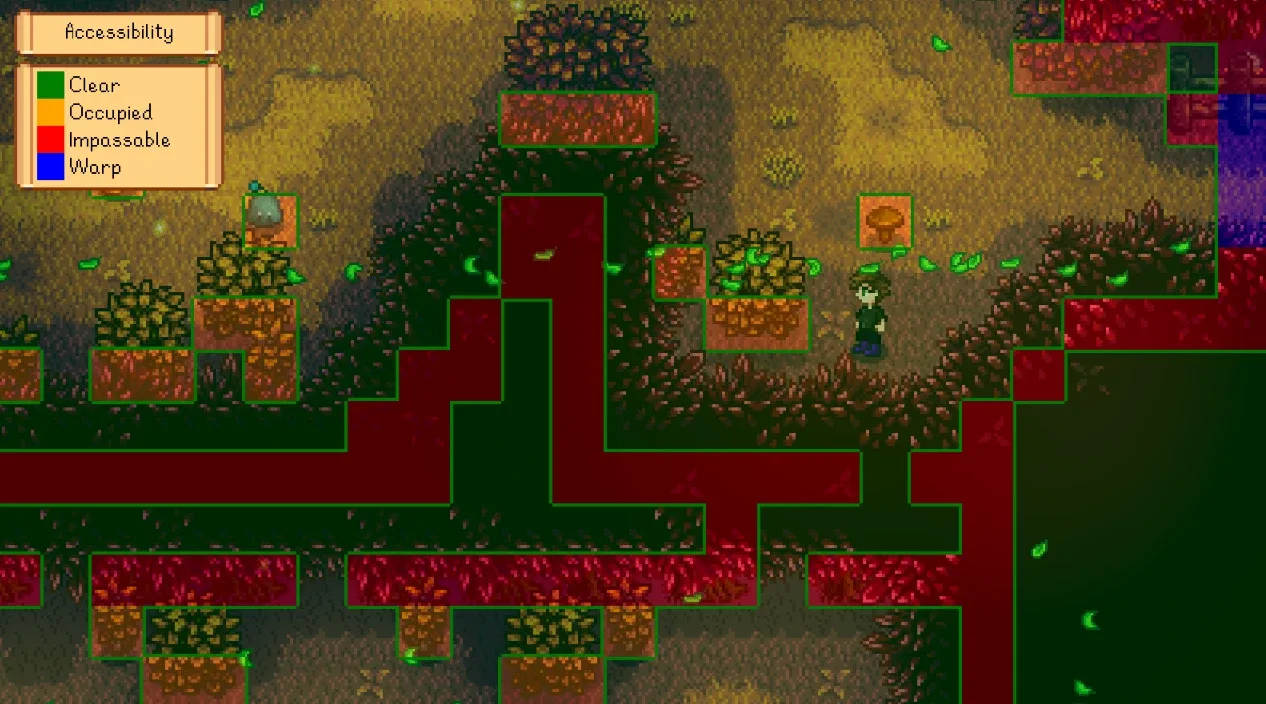
More screenshots on Nexus Mods ↗
What this mod does
Data Layers, by Pathoschild, overlays layers of information on the map so you can plan your farm without eyeballing it. Press F2 to show them and switch layers with left and right Ctrl; both keys can be changed.
Layers
- Coverage: range of sprinklers, scarecrows, bee houses, Junimo huts and bombs.
- Crops: which ones are fertilized, watered or ready to harvest, and water in paddy fields.
- Fishing depth and machine status.
- Accessible, buildable and tillable tiles, hidden paths and map exits.
- A grid and an auto mode.
What it’s for
It’s perfect for placing sprinklers without leaving gaps, checking before bed that you haven’t forgotten to water anything, or seeing where a new building fits. Together with Automate it helps you see which machines are working.
Compatibility
Version 1.23.0 (March 15, 2026, 193 KB) requires SMAPI 4.1.10 or later and Stardew Valley 1.6.15 or later, on Windows, macOS and Linux, in single-player and multiplayer. The author doesn’t list conflicts with other mods. For Android there’s only an old 1.4 tag. The page says translations are included in the mod, but it doesn’t list the languages and Nexus doesn’t link any Spanish translation.
User rating
Highlights and things to keep in mind
- Makes farm planning much easier
- Lots of useful layers (coverage, crops, buildable)
- No known conflicts
- Maintained by Pathoschild
- Unclear whether it includes Spanish
- No documented Android support for 1.6
Requirements
- Stardew Valley 1.6.15 or later (PC)
- SMAPI 4.1.10 or later
How to install it
- Install SMAPI first (see its mod page) and launch the game once with it to make sure it works.
- Open the Data Layers page on Nexus Mods, go to the Files tab and click Manual download on the main file (Data Layers 1.23.0). You need a free Nexus account to download.
- Unzip the .zip outside the game folder and move the resulting folder into Mods, inside the game folder (on Steam for Windows: C:\Program Files (x86)\Steam\steamapps\common\Stardew Valley\Mods).
- Launch the game with SMAPI, load your save and press F2; switch layers with left and right Ctrl.
Version history
-
1.23.015 Mar 2026Current
Current version; requires SMAPI 4.1.10 or later
Common problems
Which key opens the layers?
F2. Left and right Ctrl switch layers; both keys can be rebound.
Does it work in multiplayer?
Yes, in single-player and multiplayer according to the page.
Is it available in Spanish?
The page says it comes with translations inside the mod, without listing languages; Nexus doesn't link any Spanish translation.
More mods for Stardew Valley
 ✓ Stardew Valley 1.6Multiplayer
  ✓ Stardew Valley 1.6Multiplayer
  ✓ Stardew Valley 1.6Multiplayer
  ✓ Stardew Valley 1.6Multiplayer
  ✓ Stardew Valley 1.6Multiplayer
  ✓ Stardew Valley 1.6Multiplayer