Automate for Stardew Valley
Place a chest next to your machines and they'll load and empty themselves; link areas with Junimo Chests. Version 2.6.1 for 1.6.15, with a Spanish translation.
Download Automate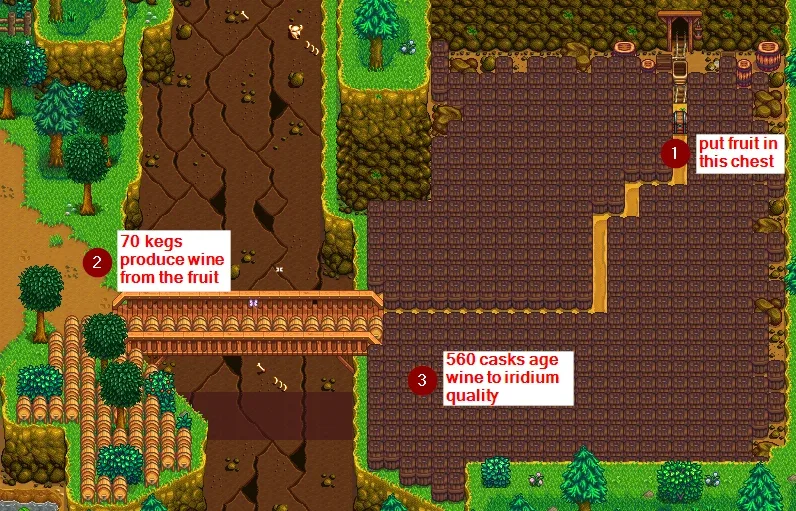
More screenshots on Nexus Mods ↗
What this mod does
Automate connects your machines to chests: place a chest next to a keg, a preserves jar or a furnace and the machine will pull ingredients from the chest and drop whatever it produces back into it. Perfect for cellars and sheds full of machines.
How it works
- Chests and machines that touch each other form a group; paths can act as connectors (an optional file enables wood and crystal paths).
- Junimo Chests link machines in different areas.
- It supports most of the game’s machines and buildings, plus custom machines that use the 1.6 format.
- You configure it with Generic Mod Config Menu.
Watch out for
The shipping bin sells by default: a chest connected to it can end up selling its contents unless you turn that option off. All Qi chests are treated as a single Junimo Chest network. With Expanded Storage, auto-grabbers also store what the machines produce.
Compatibility
Version 2.6.1 (March 15, 2026) requires SMAPI 4.1.10 or later and Stardew Valley 1.6.15 or later, on Windows, macOS and Linux. It works in single-player, split-screen and multiplayer: only the host needs to install it. It pairs well with Data Layers. Nexus links a Spanish (Spain) translation by Gonzy42.
User rating
Highlights and things to keep in mind
- Removes the chore of loading and emptying machines
- Networks across areas with Junimo Chests
- Only the host needs it
- Spanish translation on Nexus
- The shipping bin sells whatever is connected to it by default
- It changes the pace and economy of your save a lot
- With Expanded Storage, auto-grabbers also store machine output
Requirements
- Stardew Valley 1.6.15 or later (PC)
- SMAPI 4.1.10 or later
- Optional: Generic Mod Config Menu
How to install it
- Install SMAPI first (see its mod page) and launch the game with it once to make sure it works.
- Open the Automate page on Nexus Mods, go to the Files tab and click Manual download on the main file (Automate 2.6.1). You need a free Nexus account to download.
- Extract the .zip outside the game folder and move the resulting folder into Mods, inside the game folder (on Steam for Windows: C:\Program Files (x86)\Steam\steamapps\common\Stardew Valley\Mods).
- Optional: to let wood and crystal paths connect machines, download 'Enable path connectors' and put its config.json in the mod folder.
- Launch the game with SMAPI, place a chest right next to a machine, put ingredients in the chest and check the next day that the output shows up in it.
Version history
-
2.6.115 Mar 2026Current
Current version; requires SMAPI 4.1.10 or later
-
Enable path connectors27 May 2021
Optional file to use wood and crystal paths as connectors
Common problems
Does everyone need it in multiplayer?
No. The host installs it, and it's optional for farmhands.
Why did the stuff in one of my chests disappear?
If the chest is connected to the shipping bin, Automate sells its contents by default. Turn that option off in the config.
Does it work with machines from other mods?
Yes, with those that use the 1.6 custom machine format.
More mods for Stardew Valley
 ✓ Stardew Valley 1.6Multiplayer
  ✓ Stardew Valley 1.6Multiplayer
 ✓ Stardew Valley 1.6Multiplayer
  ✓ Stardew Valley 1.6Multiplayer