Ladder Locator for Stardew Valley
Highlights mine rocks that hide ladders or shafts and lists the ores on the current floor. Version 1.5.2 for 1.6, with a Spanish translation on Nexus.
Download Ladder Locator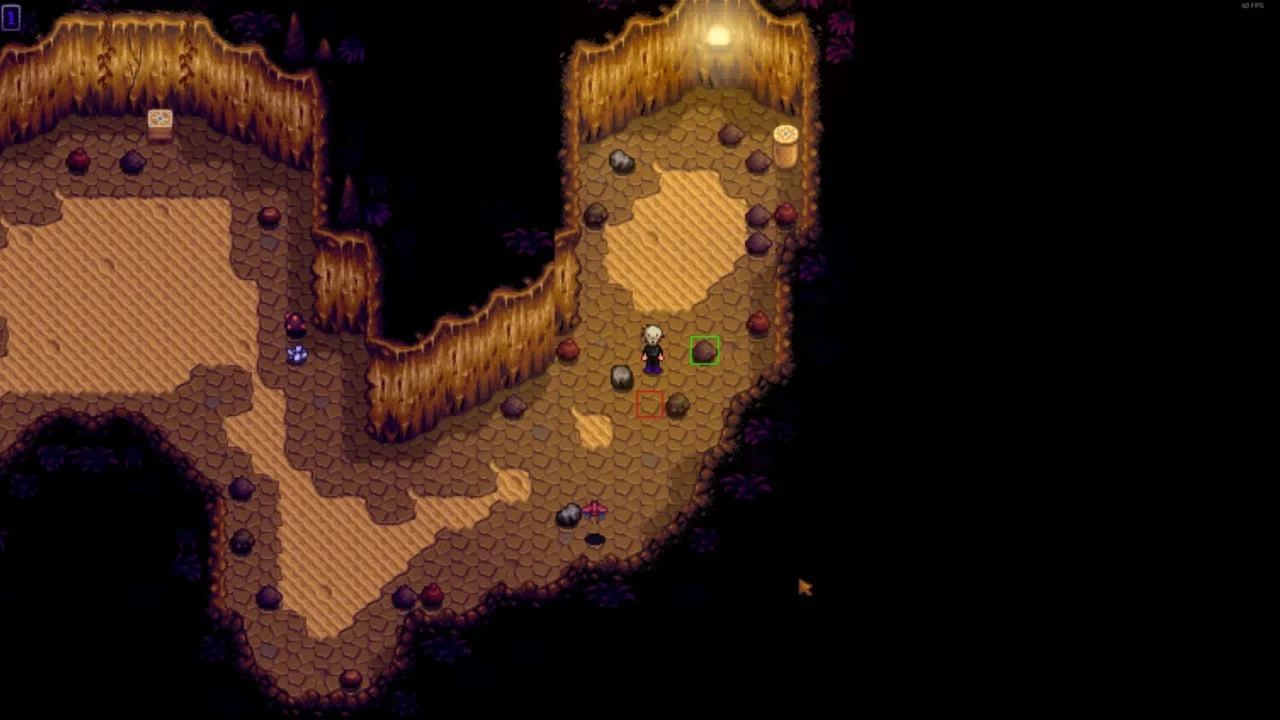
More screenshots on Nexus Mods ↗
What this mod does
Ladder Locator highlights the rocks in the mines that hide a ladder or a shaft down to lower floors. It saves you a ton of time in the mines and in Skull Cavern, the desert cave, where going down fast is everything.
Features
- Several highlight styles (rectangle, image or sprite), configurable.
- In Skull Cavern it can force shafts instead of ladders; toggle it with ~.
- Ctrl + Shift + ~ shows the list of ores on the current floor.
- Configurable with Generic Mod Config Menu.
If no highlights appear, it means no nearby rock is going to drop a ladder yet: break more rocks and look again.
Compatibility
Version 1.5.2 (June 25, 2024, 29 KB) works with Stardew Valley 1.6 on Windows, macOS and Linux, in single-player and multiplayer; on CurseForge the file is listed for 1.6.8, and on Nexus it carries the Android-compatible tag. It only requires SMAPI. It’s by ChaosEnergy, MIT-licensed with code on GitHub. Nexus links a Spain Spanish translation by Gonzy42.
Keep in mind that forcing shafts in Skull Cavern changes the cavern’s challenge: if you’d rather play closer to the original, leave that option off and just use the highlights.
User rating
Highlights and things to keep in mind
- Saves a lot of time in the mines
- List of ores on the current floor
- MIT license and open source
- Spanish translation on Nexus
- Forcing shafts in Skull Cavern reduces the challenge
- Latest version from June 2024 (file for 1.6.8)
- The ~ key combos may vary depending on your keyboard
Requirements
- Stardew Valley 1.6.x (PC; tagged as Android-compatible)
- SMAPI 4.x
- Optional: Generic Mod Config Menu
How to install it
- Install SMAPI first (see its mod page) and launch the game once with it to make sure it works.
- Open the Ladder Locator page on Nexus Mods, go to the Files tab and click Manual download on the main file (Ladder Locator 1.5.2). You need a free Nexus account to download.
- Unzip the .zip outside the game folder and move the resulting folder into Mods, inside the game folder (on Steam for Windows: C:\Program Files (x86)\Steam\steamapps\common\Stardew Valley\Mods).
- Launch the game with SMAPI and go into the mines: rocks with a ladder or shaft will be highlighted.
Version history
-
1.5.225 Jun 2024Current
Current version, for 1.6 (1.6.8 according to CurseForge)
Common problems
Why don't I see any highlights?
Because no nearby rock is going to drop a ladder or shaft yet. Break more rocks and look again.
How do I see the ores on the floor?
With Ctrl + Shift + ~.
Does it work in multiplayer?
Yes, the page says it works in single-player and multiplayer.
More mods for Stardew Valley
 ✓ Stardew Valley 1.6Multiplayer
  ✓ Stardew Valley 1.6Multiplayer
  ✓ Stardew Valley 1.6Multiplayer
  ✓ Stardew Valley 1.6Multiplayer
  ✓ Stardew Valley 1.6Multiplayer
  ✓ Stardew Valley 1.6Multiplayer