NPC Map Locations for Stardew Valley
Shows villagers and players on the map in real time, with an optional minimap and birthday and quest markers. Version 3.5.2, with Spanish included.
Download NPC Map Locations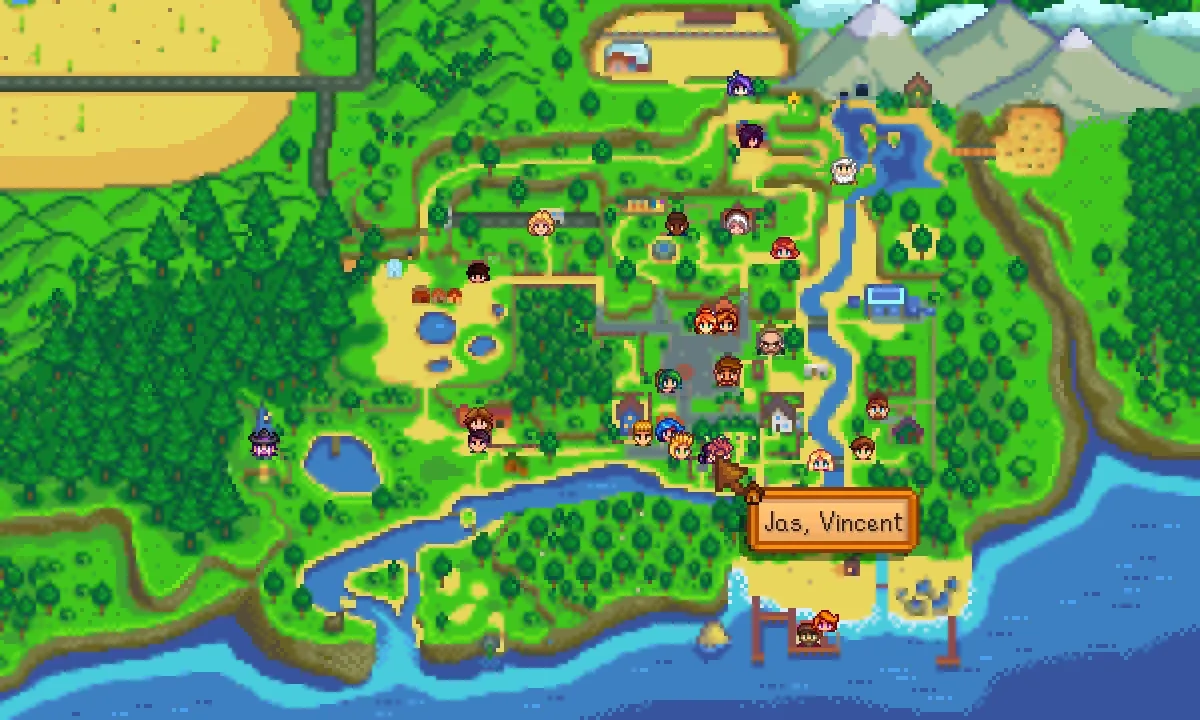
More screenshots on Nexus Mods ↗
What this mod does
NPC Map Locations shows on the game map where every villager and every player is in real time, and adds an optional minimap. Really handy for finding someone on their birthday or delivering a gift without walking across half the town.
Features
- Marks NPCs who have a daily quest or whose birthday is that day.
- Lets you include or exclude specific villagers.
- Immersion options, like only showing villagers who are in the same area as you.
- Optional on-screen minimap.
- Configurable with Generic Mod Config Menu.
Compatibility
Version 3.5.2 (April 25, 2026), published by Bouhm and updated by Pathoschild, requires SMAPI 4.1.10 or later and Stardew Valley 1.6.9 or later, on Windows, macOS and Linux. In multiplayer, the host must install it, plus each farmhand who wants to see NPCs on their map. It has no known conflicts and carries the Android-compatible tag. It’s the solution UI Info Suite 2 recommends for seeing NPCs in multiplayer.
It includes a Spanish translation inside the mod itself (the page credits it to Edith), and Nexus also links another Spain Spanish one by Gonzy42. It’s open source; the author asks that it not be uploaded to other sites without permission.
User rating
Highlights and things to keep in mind
- Find any villager instantly
- Optional minimap
- Spanish included
- No known conflicts
- In multiplayer each farmhand who wants to use it must install it
- Removes some of the challenge of finding villagers (you can soften it with the immersion options)
Requirements
- Stardew Valley 1.6.9 or later (PC)
- SMAPI 4.1.10 or later
- In multiplayer: the host and each farmhand who wants to use it
- Optional: Generic Mod Config Menu
How to install it
- Install SMAPI first (see its mod page) and launch the game once with it to make sure it works.
- Open the NPC Map Locations page on Nexus Mods, go to the Files tab and click Manual download on the main file (NPC Map Locations 3.5.2). You need a free Nexus account to download.
- Unzip the .zip outside the game folder and move the resulting folder into Mods, inside the game folder (on Steam for Windows: C:\Program Files (x86)\Steam\steamapps\common\Stardew Valley\Mods).
- Launch the game with SMAPI and open the map (M key by default in the game): you'll see the villagers' faces at their positions.
Version history
-
3.5.225 Apr 2026Current
Current version (updated by Pathoschild); requires SMAPI 4.1.10 or later
Common problems
Does everyone need it in multiplayer?
The host does; each farmhand who wants to see NPCs on their map must install it too.
Does it come in Spanish?
Yes, the Spanish translation is included in the mod. Nexus also links a Spain Spanish translation by Gonzy42.
Can I hide some villagers?
Yes, you can include or exclude specific NPCs in the config.
More mods for Stardew Valley
 ✓ Stardew Valley 1.6Multiplayer
  ✓ Stardew Valley 1.6Multiplayer
  ✓ Stardew Valley 1.6
  ✓ Stardew Valley 1.6
  ✓ Stardew Valley 1.6
  ✓ Stardew Valley 1.6