Lookup Anything for Stardew Valley
Press F1 on anything to see data the game doesn't show: favorite gifts, days until harvest, animal mood and more. Version 1.55.0 for Stardew Valley 1.6.15.
Download Lookup Anything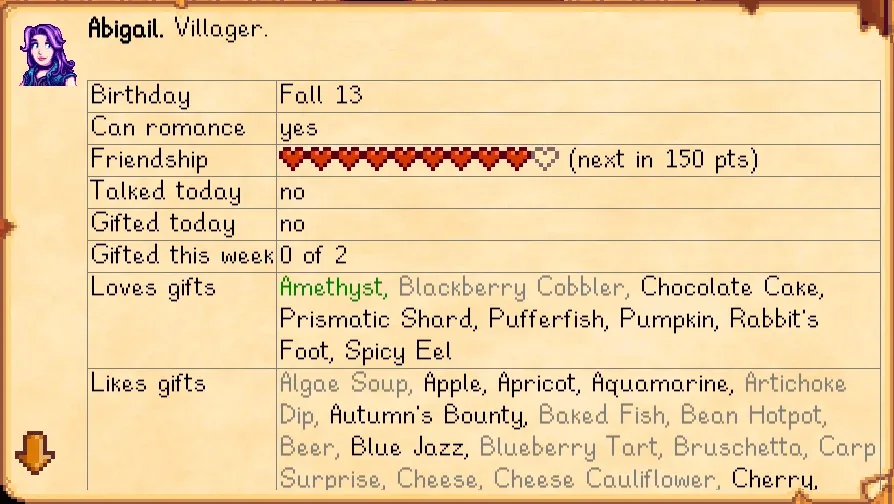
More screenshots on Nexus Mods ↗
What this mod does
Lookup Anything is probably the most useful info mod for Stardew Valley: press F1 on anything and it shows you data the game doesn’t. It works on the world, your inventory, the calendar, menus and shops.
What you can look up
- Villagers: which gifts they like and which they don’t.
- Crops: when they’ll be ready to harvest.
- Fences: how long they’ll last before breaking.
- Farm animals: why they’re not happy.
Press Shift + F1 to open a search. If you play with a controller or on a device without a cursor, it shows the most relevant thing in front of you. Keys and data fields can be changed in the config.
Compatibility
Version 1.55.0 (March 15, 2026) requires SMAPI 4.3.1 or later and Stardew Valley 1.6.15 or later, on Windows, macOS and Linux. In multiplayer it works even if the other players don’t have it, but farmhands can’t see NPC schedules. It works with Custom Ore Nodes, although those custom ores can’t be looked up yet. The page carries the Android-compatible tag, with no further details. Nexus links a Spanish (Spain) translation by Gonzy42.
User rating
Highlights and things to keep in mind
- Very complete info without leaving the game
- Works on the world, inventory, menus, calendar and shops
- Others don't need it in multiplayer
- Spanish translation on Nexus
- Farmhands in multiplayer can't see NPC schedules
- Ores from Custom Ore Nodes can't be looked up yet
- Can take away some of the game's discovery if you look everything up
Requirements
- Stardew Valley 1.6.15 or later (PC)
- SMAPI 4.3.1 or later
How to install it
- Install SMAPI first (see its mod page) and launch the game with it once to make sure it works.
- Open the Lookup Anything page on Nexus Mods, go to the Files tab and click Manual download on the main file (Lookup Anything 1.55.0). You need a free Nexus account to download.
- Extract the .zip outside the game folder and move the resulting folder into Mods, inside the game folder (on Steam for Windows: C:\Program Files (x86)\Steam\steamapps\common\Stardew Valley\Mods).
- Launch the game with SMAPI, hover over an item, crop or villager and press F1 (Shift + F1 to search).
Version history
-
1.55.015 Mar 2026Current
Current version; requires SMAPI 4.3.1 or later
Common problems
Which key do I use?
F1 on whatever is under your cursor, and Shift + F1 to open the search. You can change both in the config.
Does everyone need it in multiplayer?
No. It works even if the others don't have it, but farmhands can't see NPC schedules.
Does it work with a controller?
Yes. Without a cursor, it shows info on the most relevant thing in front of you.
More mods for Stardew Valley
 ✓ Stardew Valley 1.6Multiplayer
  ✓ Stardew Valley 1.6Multiplayer
  ✓ Stardew Valley 1.6
  ✓ Stardew Valley 1.6
  ✓ Stardew Valley 1.6
  ✓ Stardew Valley 1.6