Fishing Info Overlays for Stardew Valley
Holding a rod shows which fish, bait and trash are in nearby water and their odds. Version 1.3.2 for 1.6.15, with multiplayer and split-screen support.
Download Fishing Info Overlays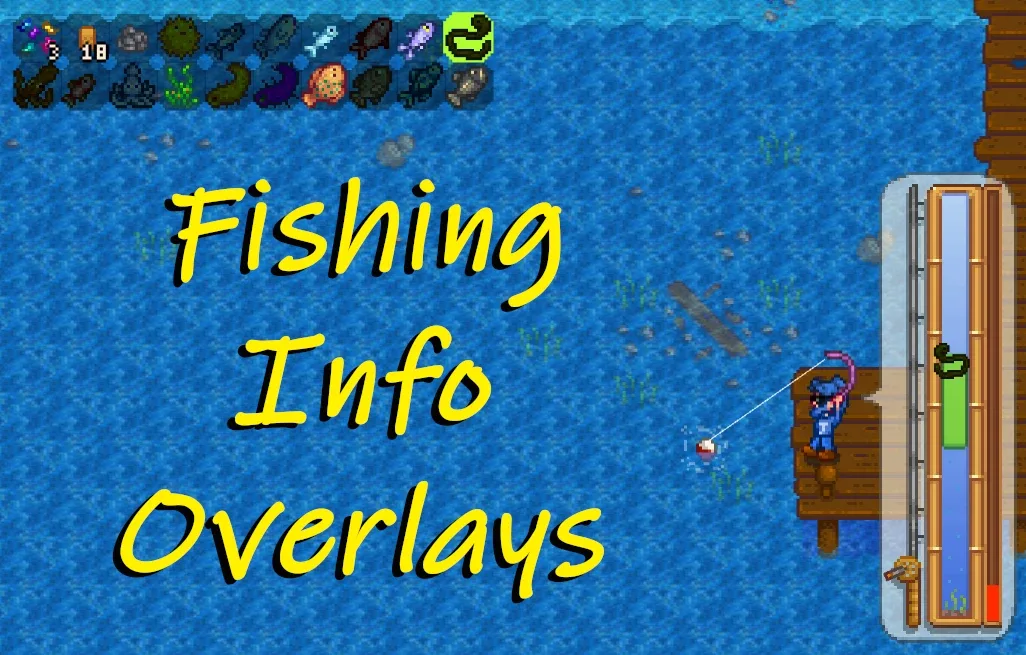
More screenshots on Nexus Mods ↗
What this mod does
Fishing Info Overlays tells you what you can catch before you cast. When you hold a fishing rod or a crab pot, a bar appears with the fish, bait, tackle and trash in the nearest water and, if you want, each one’s catch percentage. That way you know whether a spot is worth sticking around or you should look for another.
What it shows
- An area bar with configurable icons: size, position, colors, sorting by name or by chance, and markers for max size, bundles and aquarium.
- In the minigame, the fish you’re reeling in, its position in the water and an optional sonar-style view.
- Two calculation modes: the normal one reads the game data, and an optional one simulates catches to give more accurate percentages.
- You can require the Sonar Bobber for some features if you want to keep the challenge.
Compatibility
Version 1.3.2 (November 14, 2025) is for 1.6.15 or later and only needs SMAPI. It works in single-player, multiplayer and split-screen, and the author has tested it with Stardew Valley Expanded, Ridgeside Village and Stardew Aquarium. You configure it with Generic Mod Config Menu or in config.json (F5 reloads changes). The changelog credits a Spanish translation by Zer0-sama.
User rating
Highlights and things to keep in mind
- Very complete fishing info
- Highly configurable
- Works in multiplayer and split-screen
- Tested with the big expansions
- Normal-mode percentages are approximate
- Some special items (Golden Walnuts, paintings) are hard-coded
- There may be slight flickering with Magic Bait
Requirements
- Stardew Valley 1.6.15 or later (PC)
- SMAPI 4.x
- Optional: Generic Mod Config Menu and GMCM Options
How to install it
- Install SMAPI first (see its mod page) and launch the game once with it to make sure it works.
- Open the Fishing Info Overlays page on Nexus Mods, go to the Files tab and click Manual download on the main file (Fishing Info Overlays 1.3.2). You need a free Nexus account to download.
- Extract the .zip outside the game folder and move the resulting folder into the Mods folder, inside the game folder.
- Launch the game with SMAPI, equip a fishing rod and walk up to the water: the bar will appear showing what you can catch in that area.
Version history
-
1.3.214 Nov 2025Current
Caroline's Necklace hard-coded in dynamic mode due to a game change in 1.6
-
1.3.114 Nov 2025
Fixes the tackle count and improves performance
-
1.2.94 Oct 2025
Fixes items with a random seed (such as jellyfish)
Common problems
Are the percentages exact?
In normal mode they're approximate. The optional simulated mode gives more accurate figures at the cost of more processing.
Does it work with fish from other mods?
Yes, the author has tested it with Stardew Valley Expanded, Ridgeside Village and Stardew Aquarium.
Does it work in multiplayer?
Yes, in online multiplayer and in split-screen.
More mods for Stardew Valley
 ✓ Stardew Valley 1.6Multiplayer
  ✓ Stardew Valley 1.6Multiplayer
  ✓ Stardew Valley 1.6Multiplayer
  ✓ Stardew Valley 1.6Multiplayer
  ✓ Stardew Valley 1.6Multiplayer
  ✓ Stardew Valley 1.6Multiplayer