Crop Watering Bubbles Continued for Stardew Valley
Shows a water drop over unwatered crops so you never miss one. Version 0.2.10-fix (March 2026) for 1.6, with a Spanish translation included.
Download Crop Watering Bubbles Continued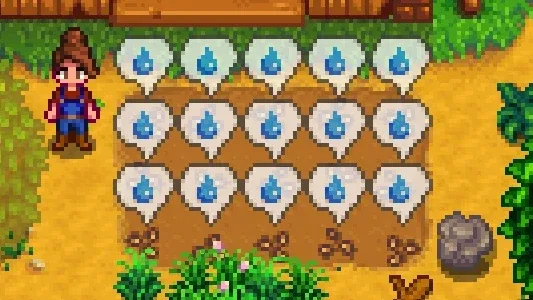
More screenshots on Nexus Mods ↗
What this mod does
Crop Watering Bubbles Continued solves a very common slip-up: leaving a plant unwatered in the middle of your field. Crops that need water show a speech bubble with a water drop (every 3 seconds by default), so you can tell at a glance what still needs watering.
Options
- Change the bubble’s interval, opacity and size, or show it all the time.
- Show it only while holding a key, or only when you have the watering can in hand.
- A no-animation option to reduce visual clutter.
- Works with garden pots and ignores fiber seeds.
Compatibility
The stable version, 0.2.10-fix (March 21, 2026), is for 1.6, only needs SMAPI and includes a Spanish translation (es.json). There’s also a 0.2.12 beta that stops marking fully grown crops and does mark ones that regrow. The changes are client-side only: in multiplayer, only the player who installs it sees it. You configure it with Generic Mod Config Menu.
It’s a continuation of the original mod by aedenthorn, who is credited, and the original is still available separately. The new author has rewritten much of the code.
User rating
Highlights and things to keep in mind
- Never miss watering a plant again
- Highly configurable and unobtrusive
- Spanish translation included
- Updated in March 2026
- The stable version also marks fully grown crops (the beta fixes this)
- Only 1,300 endorsements: less tested than other UI mods
Requirements
- Stardew Valley 1.6 (PC)
- SMAPI 4.x
- Optional: Generic Mod Config Menu
How to install it
- Install SMAPI first (see its mod page) and launch the game once with it to make sure it works.
- Open the Crop Watering Bubbles Continued page on Nexus Mods, go to the Files tab and click Manual download on the main file (Crop Watering Bubbles 0.2.10-fix). You need a free Nexus account to download.
- Extract the .zip outside the game folder and move the resulting folder into the Mods folder, inside the game folder.
- Launch the game with SMAPI and go to your farm: unwatered crops will show a bubble with a water drop.
Version history
-
0.2.12 (beta)22 Mar 2026Current
Explicitly checks whether the crop needs water: skips fully grown ones and includes regrowing ones
-
0.2.10-fix21 Mar 2026
More options, no-animation mode, Spanish translation and a drawing fix
Common problems
Does everyone need it in multiplayer?
No. It only makes client-side changes, so only the player who has it installed sees it.
Is it available in Spanish?
Yes, 0.2.10-fix includes the Spanish translation (es.json).
Which version should I download, stable or beta?
The stable one (0.2.10-fix). The 0.2.12 beta refines which crops get marked, but it's still being tested.
More mods for Stardew Valley
 ✓ Stardew Valley 1.6
  ✓ Stardew Valley 1.6Multiplayer
  ✓ Stardew Valley 1.6Multiplayer
  ✓ Stardew Valley 1.6Multiplayer
  ✓ Stardew Valley 1.6Multiplayer
  ✓ Stardew Valley 1.6Multiplayer