To-Dew for Stardew Valley
An in-game to-do list with repeating tasks, filters by season or weather and an optional on-screen overlay. Version 2.6.3 (August 2026).
Download To-Dew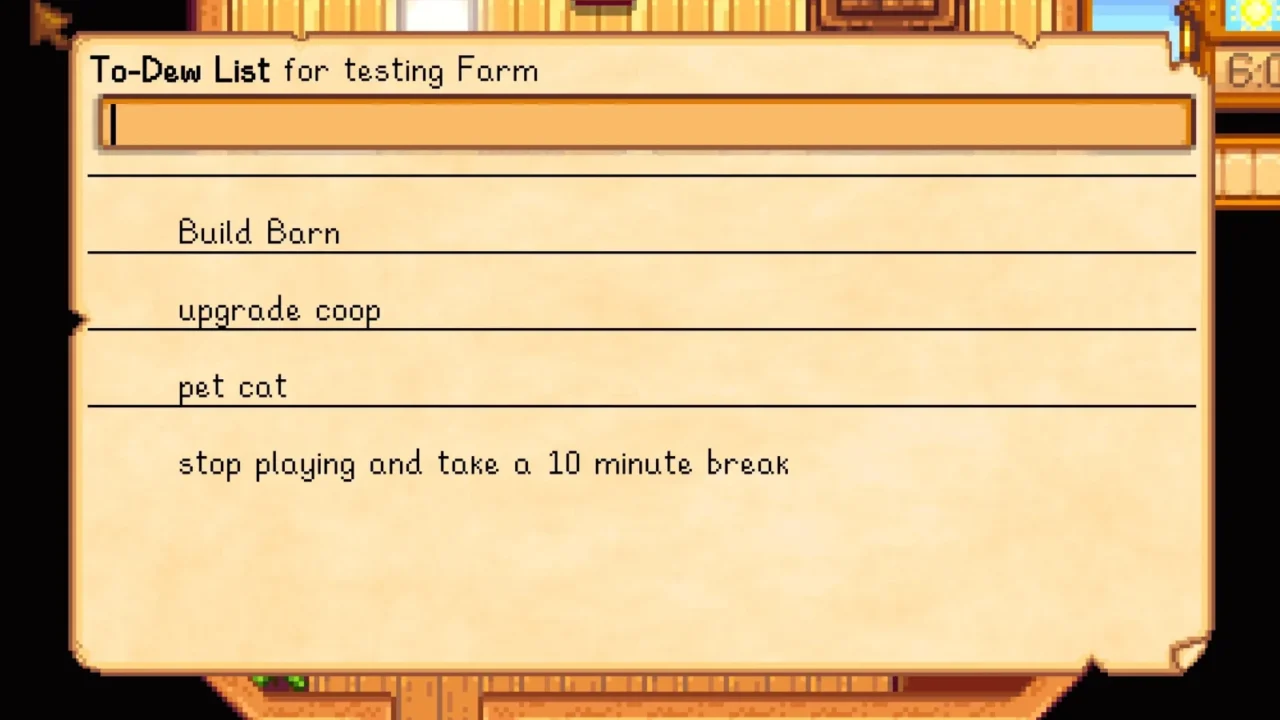
More screenshots on Nexus Mods ↗
What this mod does
To-Dew adds a to-do list inside Stardew Valley. You open it with the L key: type a task, press Enter and it’s on the list. Click a task to mark it as done; finished tasks disappear at the end of the day, or reset if they’re repeating.
Features
- Headers, tasks that repeat every set number of days, and tasks that only show up depending on the weather, day of the week, season or game state queries.
- Optional overlay in the top-left corner, which can be hidden during events and festivals or with a key; since 2.6.0 it supports a larger font.
- Export and import lists with the
todo-exportandtodo-importcommands in the SMAPI console. - With Mobile Phone you get an app that opens the same list.
Requirements and multiplayer
It needs SMAPI; Generic Mod Config Menu is optional for configuring it. Version 2.0.0 was rebuilt for 1.6, and older versions don’t work on it. In co-op there’s a single list per farm that’s stored in the save, so the host must have the mod; other players can use it if they install it too. Gonzy42 publishes the Spanish translation on Nexus.
User rating
Highlights and things to keep in mind
- Built-in to-do list, without leaving the game
- Repeating tasks and tasks based on season or weather
- Updated in August 2026
- Spanish translation available
- In co-op, the host has to have it installed
- The author admits split-screen hasn't been tested
- Some options (like multi-key shortcuts) are only in config.json
Requirements
- Stardew Valley 1.6.x (PC)
- SMAPI 4.x
- Optional: Generic Mod Config Menu and GMCM Options
How to install it
- Install SMAPI first (see its mod page) and launch the game with it once to make sure it works.
- Open the To-Dew page on Nexus Mods, go to the Files tab and click Manual download on the main file (ToDew 2.6.3). You need a free Nexus account to download.
- Unzip the .zip outside the game folder and move the resulting folder into the Mods folder, inside the game folder.
- Optional: to play it in Spanish, download 'To Dew - Spanish' by Gonzy42 on Nexus and follow its instructions.
- Launch the game with SMAPI, load your save and press L to open the list; type a task and press Enter to add it.
Version history
-
2.6.323 Aug 2026Current
Current file
-
1.14.213 Jan 2024
Last version for Stardew Valley 1.5.6 (under Optional files)
Common problems
Which key opens it?
L by default. You can change it in config.json or in Generic Mod Config Menu.
Does it work in co-op?
Yes, with one shared list per farm. The host must have the mod, because the list is stored in their save.
Is there still a version for 1.5?
Yes, 1.14.2 is under Optional files as the last version for 1.5.6.
More mods for Stardew Valley
 ✓ Stardew Valley 1.6Multiplayer
  ✓ Stardew Valley 1.6Multiplayer
  ✓ Stardew Valley 1.6
  ✓ Stardew Valley 1.6Multiplayer
  ✓ Stardew Valley 1.6Multiplayer
  ✓ Stardew Valley 1.6Multiplayer