Running Late for Stardew Valley
Customize the in-game clock: make it tick every minute instead of every ten, use 24-hour format and more. Version 2.0.2 for Stardew Valley 1.6.
Download Running Late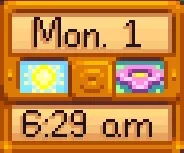
More screenshots on Nexus Mods ↗
What this mod does
Running Late lets you customize the digital clock on Stardew Valley’s HUD. Its headline feature is making the clock advance every in-game minute instead of jumping in tens, so you know more precisely how much time you have left before a shop closes or you need to go to bed.
Options
- Clock update interval: every minute or the original ten-minute jump.
- 24-hour format, also with two digits (added in 2.0.2), handy if you’re not used to AM/PM.
- Everything is adjusted in-game with Generic Mod Config Menu.
Compatibility
It only needs SMAPI. Version 1.3.0 (March 2024) was the first for 1.6 and no longer works on earlier versions of the game; the current file is 2.0.2 (April 13, 2024, 19 KB). It doesn’t change the actual speed of time: it only changes how it’s displayed. To speed up or slow down time there’s TimeSpeed.
In multiplayer it works for farmhands even if the host doesn’t have the mod, and it’s more accurate in locations with a different game speed. There’s no Spanish translation on Nexus, although the mod has hardly any text.
User rating
Highlights and things to keep in mind
- Clock accurate to the minute
- 24-hour format
- Configurable in-game
- Works in co-op even if the host doesn't have it
- Latest file from April 2024
- No Spanish translation (very little text)
- The changelog on the page is incomplete
Requirements
- Stardew Valley 1.6.x (PC)
- SMAPI 4.x
- Optional: Generic Mod Config Menu
How to install it
- Install SMAPI first (see its mod page) and launch the game once with it to make sure it works.
- Open the Running Late page on Nexus Mods, go to the Files tab and click Manual download on the main file (Running Late 2.0.2). You need a free Nexus account to download.
- Extract the .zip outside the game folder and move the resulting folder into the Mods folder, inside the game folder.
- Launch the game with SMAPI, load your save and adjust the clock in the mod menu (Generic Mod Config Menu) or in config.json.
Version history
-
2.0.213 Apr 2024Current
Option for 24-hour format with two digits
-
1.3.022 Mar 2024
First version for 1.6 (doesn't work on earlier versions of the game)
Common problems
Does it make time pass more slowly?
No. It only changes how the clock is displayed; to change the speed of time, use TimeSpeed.
Can I set it to 24-hour format?
Yes, with or without two digits.
Does it work in multiplayer?
Yes, even if the host doesn't have it installed.
More mods for Stardew Valley
 ✓ Stardew Valley 1.6Multiplayer
  ✓ Stardew Valley 1.6
  ✓ Stardew Valley 1.6Multiplayer
  ✓ Stardew Valley 1.6
  ✓ Stardew Valley 1.6
  ✓ Stardew Valley 1.6