TimeSpeed for Stardew Valley
Speed up, slow down or freeze in-game time, with different speeds per location and keys to change it on the fly. Version 2.8.1 (March 2026).
Download TimeSpeed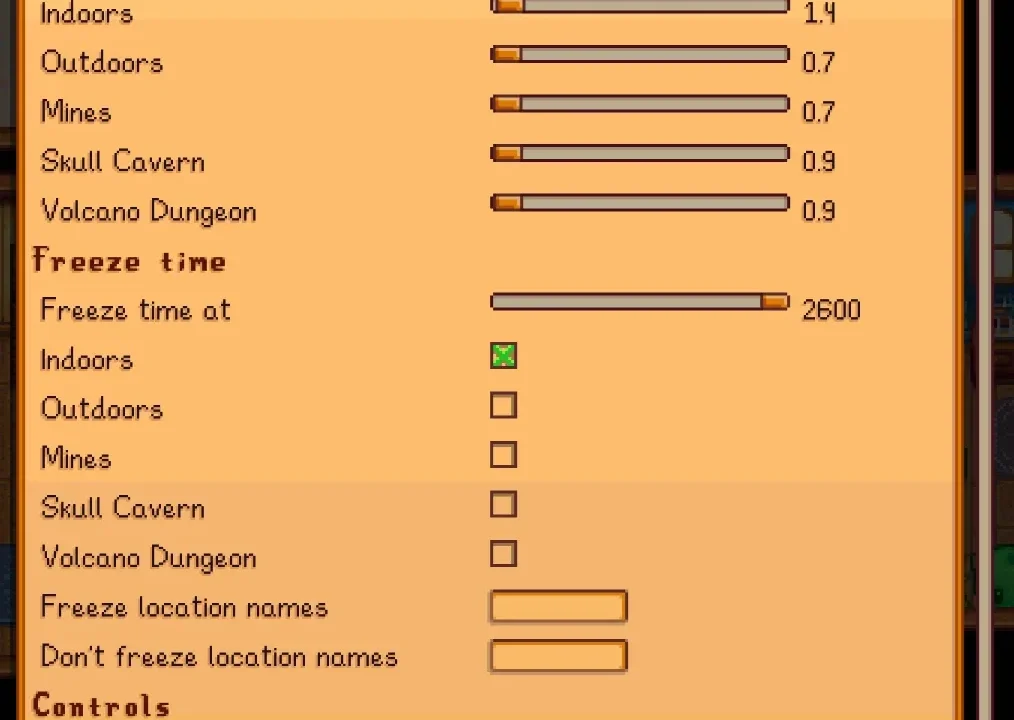
More screenshots on Nexus Mods ↗
What this mod does
TimeSpeed, by cantorsdust and Pathoschild, controls the speed of Stardew Valley’s clock. You can make days last longer so you can play at a relaxed pace, make them go by faster or freeze time completely, automatically or with a key.
How to use it
- Default and per-location speed: in the base game every ten minutes lasts 0.7 seconds (0.9 in the Skull Cavern); the mod lets you change that and, by default, time runs slower indoors.
- Keys:
Nfreezes or unfreezes time, comma and period speed it up or slow it down, andBreloads the config. - Manual speeds reset when you change location or day, on purpose.
- It works with a controller and on Android, and is configured with Generic Mod Config Menu.
Compatibility
Version 2.8.1 (March 15, 2026) requires Stardew Valley 1.6.15 or later and SMAPI 4.1.10. It works in single-player, multiplayer and split-screen: the host must have it, and farmhands with the mod can control time unless the host prevents it. It conflicts with other time mods, such as Pause Time in Multiplayer or Time Master.
Freezing time also stops machines, lightning, the train and pigs’ truffles. Translations are included in the mod.
User rating
Highlights and things to keep in mind
- Play at whatever pace you like
- Different speed per location
- Updated in 2026 and Android-compatible
- Works in multiplayer and split-screen
- Freezing time stops machines, the train and truffles
- Not compatible with other time mods
- Changes the game's balance a lot if you make days longer
Requirements
- Stardew Valley 1.6.15 or later (PC; tagged as Android-compatible)
- SMAPI 4.1.10 or later
- Optional: Generic Mod Config Menu
How to install it
- Install SMAPI first (see its mod page) and launch the game once with it to make sure it works.
- Open the TimeSpeed page on Nexus Mods, go to the Files tab and click Manual download on the main file (TimeSpeed 2.8.1). You need a free Nexus account to download.
- Extract the .zip outside the game folder and move the resulting folder into the Mods folder, inside the game folder.
- If you have another mod that changes time speed, remove it: there should only be one.
- Launch the game with SMAPI, load your save and press N to freeze time; press it again to resume.
Version history
-
2.8.115 Mar 2026Current
Current file (requires SMAPI 4.1.10)
-
2.8.012 Sep 2025
Previous version (requires SMAPI 4.1.10)
-
2.7.1012 Jan 2025
Previous version (requires SMAPI 4.1.10)
Common problems
How long does a day last with the mod by default?
It uses the speeds you configure; by default it slows time indoors. In the base game, every ten minutes is 0.7 seconds.
Can I freeze time?
Yes, with the N key. Keep in mind that machines and other clock-based events also stop.
Does it work in co-op?
Yes. The host must have it; farmhands who install it can control time if the host allows it.
More mods for Stardew Valley
 ✓ Stardew Valley 1.6Multiplayer
  ✓ Stardew Valley 1.6Multiplayer
  ✓ Stardew Valley 1.6
  ✓ Stardew Valley 1.6
  ✓ Stardew Valley 1.6
  ✓ Stardew Valley 1.6Multiplayer