RenoDX HDR for Assetto Corsa EVO for Assetto Corsa EVO
RenoDX-based add-on that rewrites Assetto Corsa EVO's output shaders for true HDR, bloom control and color grading with sliders. Free.
Download RenoDX HDR for Assetto Corsa EVO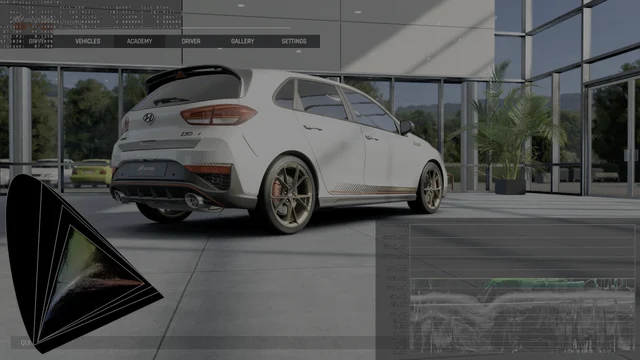
More screenshots on OverTake.gg ↗
What this mod does
This mod by Bit Viper brings the RenoDX project to Assetto Corsa EVO, known for adding real HDR to games that don’t handle it well. Instead of putting filters on top of the image, it rewrites the game’s output shaders: it removes the standard dynamic range (SDR) limit and lets you adjust bloom and color grading in real time.
What you can adjust
- Peak brightness in nits, game brightness and UI brightness separately.
- Exposure, highlights, shadows, contrast and saturation.
- Bloom intensity, the halo of light around bright areas.
- A «Vanilla+» tone mapper that tries to keep the game’s original look.
- Three customizable presets and an «Off» one to compare with the original image.
Color grading is applied to the final image without affecting the UI, so menus and the HUD don’t change color.
How it works
It doesn’t use ReShade effects, but rather its add-on system for DirectX 12. That’s why you need to install ReShade with add-on support and place the mod file next to the game executable. In-game, the Home key opens the ReShade panel, where a RenoDX tab appears with all the sliders.
Who it’s for
Mainly for anyone playing on an HDR monitor or TV who notices EVO looks flat or washed out. It also works in SDR to tweak color and bloom to your liking.
User rating
Highlights and things to keep in mind
- Real HDR instead of a filter
- Real-time adjustments with sliders
- Doesn't change the UI's color
- Known crashes when adding cars to the garage or saving customization
- Requires installing ReShade with add-ons
- No ratings yet and it may break with an EVO patch
Requirements
- Assetto Corsa EVO on PC (Steam)
- ReShade with add-on support (DirectX 12 API)
- HDR display to take advantage of HDR (optional for the other settings)
How to install it
- Download ReShade with add-on support from reshade.me.
- In the installer, choose AssettoCorsaEVO.exe and the DirectX 12 API (no need to install effects).
- Download the mod from OverTake.gg.
- Copy renodx-assettocorsaevo.addon64 next to dxgi.dll and the game executable.
- Open the game and press Home to open ReShade.
- Go to the RenoDX tab and choose or adjust a preset.
Version history
-
1.028 Sep 2026Current
First release
Common problems
Do I need ReShade effects?
No. Just ReShade with add-on support; the mod doesn't use effects.
Does it work without an HDR display?
The color and bloom settings work the same; HDR only pays off with a compatible display.
Are there known bugs?
Yes: the author reports crashes when adding a car to the garage, saving customization or enabling perspective correction.
More mods for AC EVO

 Multiplayer