Generic Police Removal (GPR) for American Truck Simulator
Removes generic patrol cars from ATS traffic and keeps only each city's and state's local police. Brings back the Crown Victoria. Free, with 26,000+ subscribers.
Download Generic Police Removal (GPR)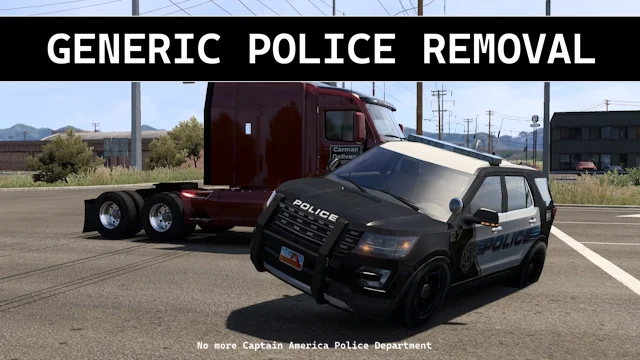
More screenshots on Steam Workshop ↗
What this mod does
Generic Police Removal (GPR), by Hoang Sean and Carman670, removes the generic patrol cars from American Truck Simulator traffic, the ones with the star livery that show up in every city, and keeps the city and state police cars SCS has been adding.
What’s included
- Generic police out; local patrol cars stay.
- The Ford Crown Victoria returns to traffic.
- Fixes the New Mexico State Police lights, which are red again with SCS’s flash pattern.
- It needs updating every time SCS adds a state or city with its own police; the author keeps it maintained.
Load order
Place it above your other traffic mods. The order the author recommends is: GPR, Extra Police Vehicles, Local Police Traffic, the rest of your mods and, at the bottom, Sound Fixes Pack. He suggests pairing it with Extra City Police Vehicles, Local Police Traffic and several company traffic packs.
Known issues
Some users still see generic patrol cars in Illinois, Missouri or Fort Worth, usually because of the load order. It doesn’t work well with Real Emergency AI Pack, and the author doesn’t plan to make it compatible. On special transport jobs you’ll see fewer patrol cars blocking streets.
Holyfix Check
Will it work with your mods?
Load your game.log.txt and check whether this mod is for your ATS version, whether you're missing a mod or DLC it needs and where to place it.
It's in Documents › American Truck Simulator › game.log.txt. It's read in your browser: the file is never uploaded.
Something else failing? Holyfix for ATS checks all your mods at once.
User rating
Highlights and things to keep in mind
- Police with a local identity in every city
- Brings back the Crown Victoria
- Authors who reply and explain the load order
- Needs an update with every new state
- Incompatible with Real Emergency AI Pack
- No update since July 2026
Requirements
- American Truck Simulator 1.60 or later (the author doesn't list a version; updated in July 2026)
- Steam account
- Recommended: state DLCs to see their local police
How to install it
- Open the Generic Police Removal page on Steam Workshop and click Subscribe.
- Launch ATS and enable the mod in the Mod Manager.
- Place it above your other traffic mods, police mods included.
- If you still see generic patrol cars, check the order: GPR, Extra Police Vehicles, Local Police Traffic and then the rest.
Version history
-
—15 Jul 2026Current
Latest update on Steam (10 change notes in total)
-
—20 Jun 2026
Released on Steam Workshop
Common problems
Does it remove all patrol cars?
No. Only the generic ones; local and state police keep showing up.
Where does it go in the load order?
Above your other traffic mods.
Is it compatible with Real Emergency AI Pack?
Not fully: with that mod generic patrol cars keep appearing.
Does it work on ATS 1.61?
The author doesn't say; the latest update is from July 2026.
More mods for ATS
 ATS 1.59
  ✓ ATS 1.61
  ✓ ATS 1.61
  ✓ ATS 1.61
  ✓ ATS 1.61
  ✓ ATS 1.61