Google Maps Navigation Dark Mode (predator) for ATS for American Truck Simulator
ATS GPS with the look of Google Maps at night: new colors, arrow and icons, plus the speed limit top right. Made for 1.53 to 1.57; players report bugs on 1.61.
Download Google Maps Navigation Dark Mode (predator) for ATS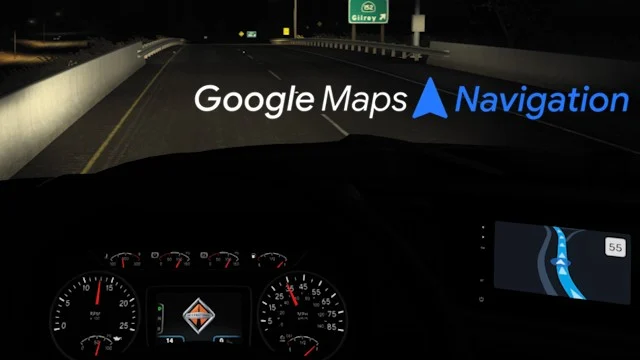
More screenshots on Steam Workshop ↗
What this mod does
Google Maps Navigation Dark Mode is a mod by predator that gives the navigation screen in American Truck Simulator the look of Google Maps’ dark mode. It’s an update of Sinagrit Baba’s Google Maps Navigation Night, who, according to the author, gave him permission to update and share it. It has almost 25,000 subscribers.
What it changes
- Map colors, player arrow and icons.
- The speed limit moves to the top right corner.
- It deliberately doesn’t add ETA or similar data.
Usage and load order
You adjust the brightness with the dashboard backlight option (F4). Day mode and night mode don’t work together: whichever is higher wins. Place it below mods that change the dashboard or interior. If it clashes with another UI mod, move it to the very top. It can be used with voice mods. There’s a light version, a version compatible with background maps and a version for ETS2.
Version and issues
The author lists compatibility from 1.53 to 1.57 and hasn’t touched it since December 2025. In September 2026 several players said almost every map feature breaks on 1.61 and that Illinois barely shows when zoomed. It doesn’t work on TruckersMP.
Holyfix Check
Will it work with your mods?
Load your game.log.txt and check whether this mod is for your ATS version, whether you're missing a mod or DLC it needs and where to place it.
It's in Documents › American Truck Simulator › game.log.txt. It's read in your browser: the file is never uploaded.
Something else failing? Holyfix for ATS checks all your mods at once.
User rating
Our rating
0.0 / 5- Google Maps dark mode look
- Clearly visible speed limit
- Permission from the original mod's author
- Latest game version confirmed by the author: 1.57. It may cause errors in 1.61; Holyfix will warn you if so.
- Several players say map features break on 1.61 and Illinois looks bad when zoomed
- Doesn't work on TruckersMP
- Unofficial mod: trademarks belong to their owners; neither Holymod nor the author is affiliated with them
Requirements
- American Truck Simulator 1.53 to 1.57 (according to the author)
- Steam account to subscribe on the Workshop
How to install it
- Open the "Google Maps Navigation Dark Mode" page on Steam Workshop and click "Subscribe".
- Launch American Truck Simulator and wait for Steam to finish the download.
- Open your profile's Mod Manager and enable the mod.
- Place it below dashboard or interior mods; if it clashes with another UI mod, move it to the very top.
- Adjust the brightness with the dashboard backlight (F4).
Common problems
Can I use day and night mode together?
No: whichever is higher in the Mod Manager wins.
Does it work on TruckersMP?
No, according to the author.
Does it work on 1.61?
The author only lists 1.53 to 1.57, and some players say it breaks on 1.61.
More mods for ATS
 ATS 1.59
  ✓ ATS 1.61
  ATS 1.59
  ✓ ATS 1.61
  ATS 1.60