Finding undiscovered Roads (NightEagle): undiscovered roads in pink for American Truck Simulator
ATS map with discovered roads in gray and the rest in pink, so you can find that last percent. NightEagle updated it in October 2026 with Illinois and Indiana.
Download Finding undiscovered Roads (NightEagle): undiscovered roads in pink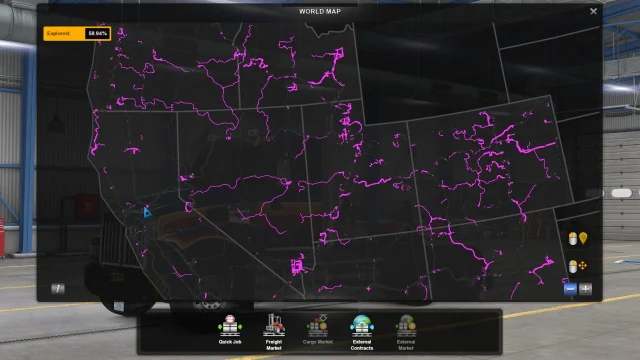
More screenshots on Steam Workshop ↗
What this mod does
Finding undiscovered Roads is a mod by NightEagle for the world map in American Truck Simulator. It paints the roads you’ve already discovered gray and the ones you’re missing pink, and it hides city names and icons. That makes it easy to find the last percent of the map. It has almost 17,000 subscribers.
How to use it
The author recommends enabling it only to hunt for roads and disabling it afterward, because the map is awkward for normal play. Routes and waypoints stay visible.
Map DLCs covered
The author expands the map borders with each new state: Washington, Colorado, Texas, Arkansas, Missouri and, on October 18, 2026, Illinois and Indiana. He says it already covers every current and announced map DLC except British Columbia, which he’ll add when it comes out.
Version
The author doesn’t list a game version number, but he keeps it up to date with the DLCs: the latest update is from October 18, 2026.
Known issue
Some points, especially gas stations, rest areas and some companies, can become invisible, although they still get discovered. The temporary fix is to turn on gas station visibility on the map, zoom in or out, and turn it off again. There’s a version for ETS2.
Holyfix Check
Will it work with your mods?
Load your game.log.txt and check whether this mod is for your ATS version, whether you're missing a mod or DLC it needs and where to place it.
It's in Documents › American Truck Simulator › game.log.txt. It's read in your browser: the file is never uploaded.
Something else failing? Holyfix for ATS checks all your mods at once.
User rating
Our rating
0.0 / 5- Find the last percent of the map
- Up to date with Illinois and Indiana
- Very lightweight
- The author doesn't specify a game version. It may cause errors in 1.61; Holyfix will warn you if so.
- Use it only to hunt for roads and disable it afterward
- Some gas stations and rest areas may become invisible
Requirements
- Up-to-date American Truck Simulator (the author doesn't specify a version)
- Steam account to subscribe on the Workshop
How to install it
- Open the "Finding undiscovered Roads" page on Steam Workshop and click "Subscribe".
- Launch American Truck Simulator and wait for Steam to finish the download.
- Open your profile's Mod Manager and enable the mod.
- Open the world map and look for the pink stretches: those are the ones you're missing.
- When you're done, disable the mod to get the normal map back.
Version history
-
18 Oct 2026Current
Support for Illinois and Indiana
-
17 Jul 2025
Support for Missouri and Arkansas
-
23 Sep 2024
Arkansas borders, icons and discovered areas in dark gray
Common problems
What do the colors mean?
Gray: discovered roads. Pink: the ones you're missing.
I can't see some gas stations
Turn on their visibility on the map, change the zoom and turn it off again.
Does it include British Columbia?
Not yet; the author will add it when the DLC comes out.
More mods for ATS
 ATS 1.59
  ✓ ATS 1.61
  ATS 1.59
  ✓ ATS 1.61
  ATS 1.60
  ✓ ATS 1.61