Reforma ProMods Background Fix (Eblem) for American Truck Simulator
Fixes the UI map so Mexico (Reforma) and Canada (ProMods) show together, on a North America background marking built areas. By Eblem, v30.161 for ATS 1.61.
Download Reforma ProMods Background Fix (Eblem)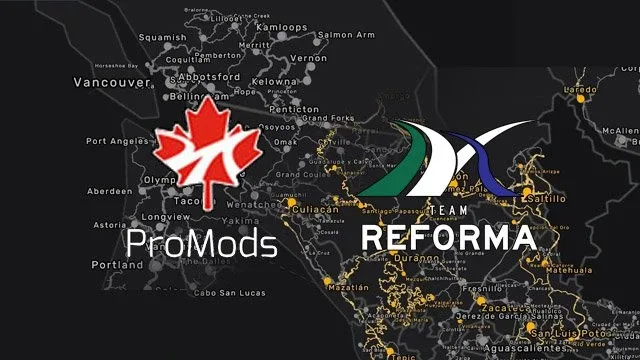
More screenshots on TruckyMods (author's page, Eblem, Verified Creator) ↗
What this mod does
Reforma ProMods Background Fix is a UI mod by Eblem, the creator of the Reforma map, for anyone who plays with Reforma and ProMods Canada together. It repositions the North America map shown in the game’s interface so that both Reforma’s Mexico and ProMods’ northern Canada appear on it.
What’s included
- Adjusted position of the North America map in the UI.
- A background map of the continent based on SCS’s own, marking the areas already built by SCS, Reforma and ProMods.
- Adjustments for the recent DLCs: Illinois (version 26.159) and South Dakota (version 30.161).
- Map fix for Baja California and Tamaulipas since version 26.159.
Version and requirements
Version 30.161, from September 24, 2026, is the one for ATS 1.61. The mod came out in May 2024, and Eblem updates it with every game version. It requires Reforma, Reforma Mega Resources and ProMods Canada.
Load order
The author asks you to place it above ProMods Canada and Reforma in the Mod Manager.
It has more than 66,000 downloads on TruckyMods, which makes it one of the most popular Reforma add-ons.
Holyfix Check
Will it work with your mods?
Load your game.log.txt and check whether this mod is for your ATS version, whether you're missing a mod or DLC it needs and where to place it.
It's in Documents › American Truck Simulator › game.log.txt. It's read in your browser: the file is never uploaded.
Something else failing? Holyfix for ATS checks all your mods at once.
User rating
Our rating
0.0 / 5- Made by the Reforma author himself
- Background map showing what each map covers
- Updated with every game version
- Only makes sense if you use Reforma and ProMods Canada
- The page doesn't list the file size
- The author doesn't allow reuploading or modifying it
Requirements
- American Truck Simulator 1.61
- Reforma (Mexico map, free)
- Reforma Mega Resources (free)
- ProMods Canada (free)
How to install it
- Install Reforma, Reforma Mega Resources and ProMods Canada first.
- Open the mod's page on TruckyMods and download it (or use the Trucky client).
- Copy the .scs file to Documents/American Truck Simulator/mod.
- In the Mod Manager, place it above ProMods Canada and Reforma.
- Load your profile and open the map to check that both Mexico and Canada show up.
Version history
-
30.16124 Sep 2026Current
Compatible with ATS 1.61; map adjusted for the South Dakota DLC
-
27.16021 Jun 2026
Compatible with ATS 1.60
-
26.1598 May 2026
Compatible with ATS 1.59; map fixed in Baja California and Tamaulipas; Illinois added
Common problems
What's the point if I already have Reforma?
It adjusts the UI map so Mexico (Reforma) and Canada (ProMods) show up together.
Where does it go in the load order?
Above ProMods Canada and Reforma.
Is it up to date with the new DLCs?
Version 30.161 adjusts the map for South Dakota, and 26.159 added Illinois.
More mods for ATS
 ✓ ATS 1.61
  ✓ ATS 1.61
  ✓ ATS 1.61Requires DLC
  ✓ ATS 1.61Requires DLC
  ✓ ATS 1.61
  ✓ ATS 1.61