Road Trip Ford Cabin Lights (ambient lighting for the Road Trip Fords) for American Truck Simulator
Colored ambient lighting inside the cabin of all four Road Trip Fords, with eight colors and two switch-on modes. For ATS 1.61 with the Road Trip: Ford DLC.
Download Road Trip Ford Cabin Lights (ambient lighting for the Road Trip Fords)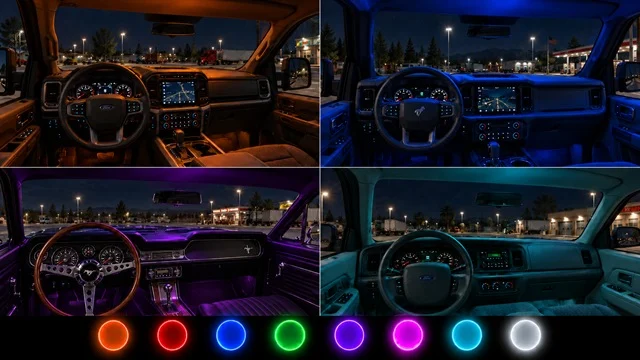
More screenshots on Steam Workshop ↗
What this mod does
Road Trip Ford Cabin Lights is a mod by Codeman91, the same author behind the underglow lights for these cars. It adds colored ambient lighting inside the vehicles from American Truck Simulator’s Road Trip: Ford DLC.
What’s included
- Works on the F-150, Bronco, Mustang and Crown Victoria.
- Eight colors: neon orange, red, blue, green, purple, pink, cyan and ice white.
- “Headlights” mode: the lights turn on with the parking lights or headlights.
- “Beacon” mode: they turn on and off with the beacon key, which also controls other accessories tied to that key.
Installation
After enabling it in the Mod Manager, go to an upgrade shop and look for the option in the vehicle upgrades menu, under the interior options. There you choose the factory finish, the color and the switch-on mode.
What you should know
The author requires ATS 1.61 and the Road Trip: Ford DLC. You have to disable any other cabin light mod for these Fords, including the author’s own single-color ones. In the comments, some find them too bright and others say they don’t work for them, with no further details. It was published on October 4, 2026.
Holyfix Check
Will it work with your mods?
Load your game.log.txt and check whether this mod is for your ATS version, whether you're missing a mod or DLC it needs and where to place it.
It's in Documents › American Truck Simulator › game.log.txt. It's read in your browser: the file is never uploaded.
Something else failing? Holyfix for ATS checks all your mods at once.
User rating
Our rating
0.0 / 5- Eight colors for all four Fords
- Two switch-on modes
- Compatible with 1.61 according to the author
- Steam lists a size of about 414 MB
- Incompatible with other cabin light mods for these Fords
- Some players find them too bright
- You need the Road Trip: Ford DLC
- Unofficial mod: the brands belong to their owners; neither Holymod nor the author is affiliated with them
Requirements
Links go to each DLC’s official Steam page.
- American Truck Simulator 1.61
- Road Trip: Ford DLC
- Steam account
How to install it
- Open the “Road Trip Ford Cabin Lights” page on Steam Workshop and click “Subscribe”.
- Launch American Truck Simulator and wait for Steam to finish downloading the mod.
- Open your profile's Mod Manager and enable “Road Trip Ford Cabin Lights”.
- Go to an upgrade shop and, in the vehicle upgrades, open the interior options.
- Choose the finish, color and switch-on mode (headlights or beacon key).
Version history
-
4 Oct 2026Current
Release
Common problems
What colors are there?
Neon orange, red, blue, green, purple, pink, cyan and ice white.
Can I use it with another cabin light mod?
No: the author asks you to disable other cabin light mods for these Fords.
How do they turn on?
With the parking lights or headlights, or with the beacon key if you pick “Beacon” mode.
More mods for ATS
 ✓ ATS 1.61Requires DLC
  Requires DLC
  Requires DLC
  Requires DLC
  ✓ ATS 1.61Requires DLC
  Requires DLC