Waze colors for ATS Map Mods [Blue]: Waze-style blue GPS route for ATS map mods for American Truck Simulator
Replaces the ATS navigation colors with a Waze-style blue route. Only 26 KB; it edits the map_data.sii of Allan's America Background Map, so it needs that map and the Reforma Other Maps Patch. By Hungarikum; 517 subscribers.
Download Waze colors for ATS Map Mods [Blue]: Waze-style blue GPS route for ATS map mods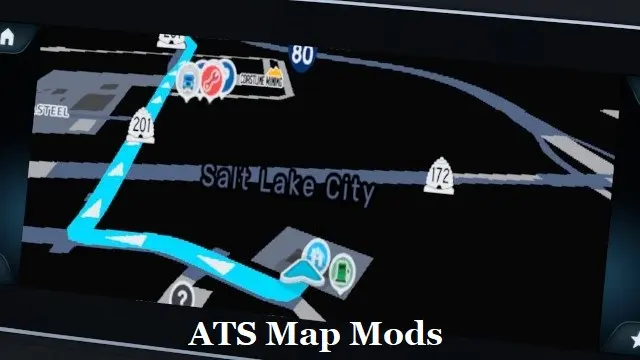
Official screenshots by the author: © Hungarikum on Steam WorkshopMore screenshots on steamcommunity.com (Steam Workshop) ↗
What this mod does
Waze colors for ATS Map Mods [Blue], by Hungarikum, replaces the stock navigation colors of American Truck Simulator with the blue route line Waze uses, far more readable over dark background maps. Released on October 19, 2026 and updated on October 26, it has 517 subscribers; the same author offers a purple variant and other navigation mods (Better Navigation FOV, Waze Navigation Icons).
What it does
- GPS and map route in Waze-style blue.
- It only edits the map_data.sii file of Allan’s America Background Map, hence the 26 KB.
Requirements and load order
It needs Allan’s America Background Map (any version) and the Reforma Other Maps Patch. The author gives the Mod Manager order, top to bottom: this mod, Allan’s background map, the Reforma Other Maps Patch and then the rest of the maps. In the comments he confirms it works with ProMods. Two user reports: one saw no color change and another had the map out of square with other backgrounds; the author pointed him to the right variant of Allan’s map. No game version is stated. More visual aids in the graphics category.
Holyfix Check
Will it work with your mods?
Load your game.log.txt and check whether this mod is for your ATS version, whether you're missing a mod or DLC it needs and where to place it.
It's in Documents › American Truck Simulator › game.log.txt. It's read in your browser: the file is never uploaded.
Something else failing? Holyfix for ATS checks all your mods at once.
User rating
Highlights and things to keep in mind
- Blue route that is much more readable over dark background maps
- Only 26 KB
- The author explains the exact load order
- Only works with Allan's America Background Map and the Reforma Other Maps Patch
- One user saw no color change; another had the map out of square with a different background
- The author doesn't state the game version
- Unofficial mod: the brands belong to their owners; neither Holymod nor the author is affiliated with them
Requirements
- American Truck Simulator
- A Steam account to subscribe on the Workshop
- Allan's America Background Map (any version)
- Reforma Other Maps Patch
How to install it
- Subscribe to this mod on Steam Workshop and have Allan's America Background Map and the Reforma Other Maps Patch installed.
- Start American Truck Simulator and open the Mod Manager of your profile.
- Order top to bottom: Waze colors, Allan's background map, Reforma Other Maps Patch and then the other maps.
- Confirm the changes and check on the GPS that the route shows in blue.
Version history
-
update26 Oct 2026Current
Second change note: the author details the two required maps
-
initial19 Oct 2026
Released on Steam Workshop
Common problems
What exactly does it change?
The route colors on the navigation and the map, in Waze-style blue.
Which mods does it need?
Allan's America Background Map (any version) and the Reforma Other Maps Patch, because it edits their map_data.sii.
Does it work with ProMods?
The author says in the comments that it does.
Are there other colors?
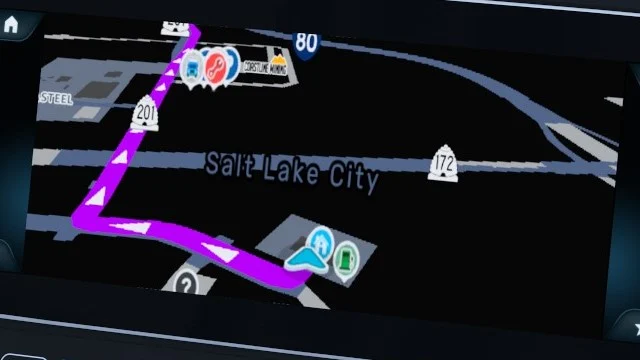
Yes, the author has a purple variant.
More mods for ATS
 ATS 1.59
 ATS 1.61
 ATS 1.59
 ATS 1.61
 ATS 1.59
 ATS 1.61