Advanced Pedal Button Input for BeamNG.drive
Makes clutch, throttle and brake progressive when you play with a keyboard or controller buttons, with per-gear settings and savable profiles.
Download Advanced Pedal Button Input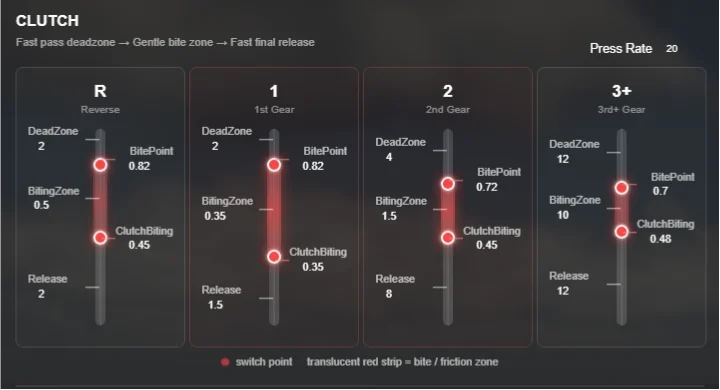
More screenshots on Official BeamNG Repository (beamng.com/resources) ↗
What this mod does
Advanced Pedal Button Input (APBI), by skylinelee0505, is designed for anyone who plays BeamNG.drive with a keyboard or a controller and uses buttons for the pedals. Normally those keys are all or nothing; the mod keeps the digital input but turns each press into a progressive pedal movement.
What it lets you do
- Progressive clutch with per-gear settings (reverse, neutral, 1st, 2nd, 3rd and higher), an adjustable bite point and support for the controller’s clutch button without extra bindings.
- Throttle with a different response in each gear and adjustable release speed.
- Three-stage brake for better braking control.
- Built-in and custom profiles, with a preview before loading them.
- Each system can be turned on or off separately.
- Since 1.2, double-tap and hold on the throttle or brake for a temporary, more aggressive profile.
Compatibility
Throttle and brake work with both manual and automatic transmissions; the clutch is mainly designed for manual. Analog axes from wheels and triggers are left untouched. It’s not a replacement for a wheel and pedals.
Tips
Add the app from the UI apps editor, start with the relaxed profile and change one system at a time. The author states he used ChatGPT for the programming and debugging.
User rating
Mod video
Highlights and things to keep in mind
- Much more control with a keyboard or controller
- Per-gear settings and profiles
- Very small file
- It's not a replacement for a wheel and pedals
- May need an update for 0.40 (released October 19, 2026)
- Programmed with the help of AI, according to the author himself
Requirements
- BeamNG.drive 0.39 or later
- Keyboard or controller with buttons for the pedals
How to install it
- Open the Advanced Pedal Button Input page on the official BeamNG Repository.
- Click Download to get the .zip, or subscribe from the in-game Repository (Subscribe button).
- If you download it manually, copy the .zip (don't unzip it) into the mods folder inside your BeamNG.drive user folder (AppData > Local > BeamNG > BeamNG.drive > current > mods).
- Launch the game and check in the Mod Manager that it's enabled.
- Open the UI apps editor, add Advanced Pedal Button Input and start with the relaxed profile.
Version history
-
1.219 Oct 2026Current
Power Boost: double-tap and hold on the throttle or brake for a temporary, more aggressive profile, plus a new interface.
-
1.19 Sep 2026
Fixed the mod auto-loading without the app added.
-
—7 Sep 2026
First version published.
Common problems
Is it useful if I have a wheel and pedals?
You don't need it: analog axes are deliberately ignored; the mod is for digital inputs.
How do I save my setup?
Press Ready to Save to save it as your own profile; when you choose a profile, it's applied when you press Ready to Load.
When drag racing, the clutch slips in 2nd and 3rd, can I turn that off?
One user asked for it and the author said he'd look into per-gear on/off; for now, adjust the release in those gears.
More mods for BeamNG