Reset State Keeper for BeamNG.drive
Keeps your fuel, temperatures and lights when you reset the car, and adds a panel to set the fuel level and multiply fuel consumption.
Download Reset State Keeper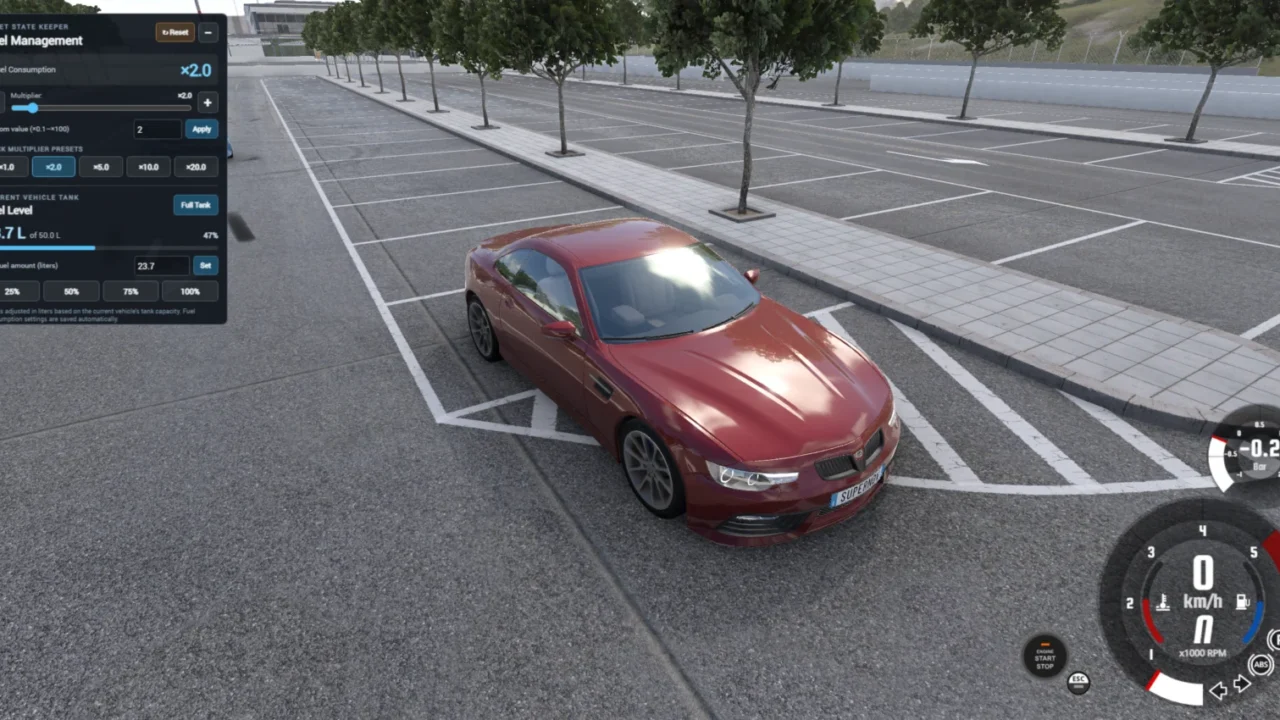
More screenshots on Official BeamNG Repository (beamng.com/resources) ↗
What this mod does
Reset State Keeper stops a vehicle reset (Insert key) from giving you back a full tank and a cold engine. It saves some of the car’s parameters and restores them after the reset, and adds a small panel to manage fuel.
What it keeps
- The fuel level in compatible tanks.
- Whatever engine temperatures are available, such as oil and coolant.
- The headlight mode and hazard lights.
Each player vehicle has its own saved state, so you can spawn another car or switch between them without losing it. AI traffic isn’t affected.
Fuel panel
- Shows the current fuel and the tank capacity in liters.
- Lets you set an exact amount, fill the tank or use 25, 50, 75 and 100% shortcuts.
- Consumption multiplier with x1 to x20 shortcuts, fine control and manual input up to x100.
- F10 or the Reset button clears the saved state, and the next reset goes back to normal.
Limits
States only last for the current game session. Tank capacity depends on the data each vehicle exposes, so on some modded cars it may not be exact. It doesn’t repair mechanical damage or start a broken engine. The author developed it for 0.40, and the panel starts collapsed: click the icon to open it and drag it to move it.
User rating
Highlights and things to keep in mind
- More realistic resets without losing fuel or temperature
- Very flexible consumption multiplier
- Developed for 0.40
- Very recent mod with only two ratings
- States aren't kept between sessions
- Tank capacity may be inaccurate on modded cars
Requirements
- BeamNG.drive 0.40
How to install it
- Open the Reset State Keeper page on the official BeamNG Repository.
- Click Download to get the .zip, or subscribe from the in-game Repository (Subscribe button).
- If you download it manually, copy the .zip, without unzipping it, into the mods folder inside your BeamNG.drive user folder (the launcher opens it via Manage User Folder).
- Launch the game and check in the Mod Manager that it's enabled.
- In the game, press Esc, open UI Apps and add Reset State Keeper — Fuel Control.
- Click the fuel icon to expand the panel.
Version history
-
0.8.319 Oct 2026Current
The panel opens collapsed by default, as users requested.
-
—16 Oct 2026
First version released on the Repository.
Common problems
Is the state saved when I close the game?
No, the snapshots only last for the current session; the consumption multiplier is saved, though.
Does it fix the engine if it's broken?
No: it doesn't repair mechanical damage or a disabled engine.
How do I go back to the normal reset?
Press F10 or the panel's Reset button to clear the saved state.
More mods for BeamNG