Project Japan for Euro Truck Simulator 2
A standalone map that recreates Japan's roads at 1:10 scale, with its own signage and companies. Free, compatible with ETS2 1.61, and requires 10 map DLCs.
Download Project Japan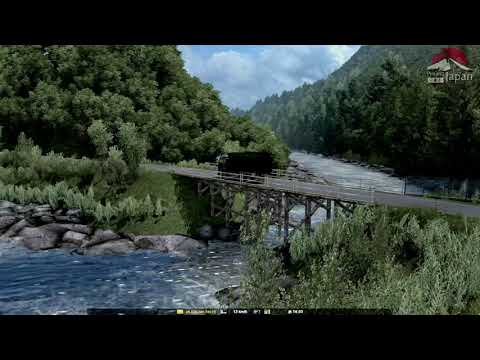
More screenshots on ets2.jp (official website of Project Japan, download via ShareMods) ↗
What this mod does
Project Japan is one of the most striking maps for Euro Truck Simulator 2: instead of expanding Europe, it takes you driving through Japan. A mostly Japanese team has been developing it since 2017, and it’s free. Since version 1.0 it uses a 1:10 scale, larger than the base map’s, so junctions and narrow roads can be recreated just as they are in real life.
What it changes in the game
- It’s a separate module: when you create your profile you pick japan.mbd and drive only in the Japanese area, with no connection to Europe.
- It includes regions such as Hokuriku, Shikoku and Kansai, linked by ferry routes, and 1.1.0 added part of Kitakyushu (Fukuoka) and rebuilt Osaka’s south port.
- It has its own companies and traffic vehicles, Japanese signage and very narrow mountain stretches.
- It comes with optional add-ons: winter sounds, Christmas traffic, accessories and additional Japanese companies.
Who it’s for
For anyone who already knows Europe by heart and wants a different challenge: left-hand traffic, very narrow streets and different traffic rules. The package includes a traffic rules guide in English.
Version
Version 1.1.11 was released on September 27, 2026 for ETS2 1.61. You need the 10 map DLCs listed on the official website; if you’re missing any, the mod shows up as incompatible. The team warns that unofficial copies that may contain malware are circulating: only download it from ets2.jp.
Holyfix Check
Will it work with your mods?
Load your game.log.txt and check whether this mod is for your ETS2 version, whether you're missing a mod or DLC it needs and where to place it.
It's in Documents › Euro Truck Simulator 2 › game.log.txt. It's read in your browser: the file is never uploaded.
Something else failing? Holyfix for ETS2 checks all your mods at once.
User rating
Mod video
Highlights and things to keep in mind
- A driving experience very different from Europe, with narrow roads and left-hand traffic
- Free and updated for 1.61 a few days after its release
- Optional add-ons for winter, Christmas and Japanese companies
- Requires 10 map DLCs
- It runs on a separate profile and module: it doesn't connect to the European map
- The download goes through ShareMods, with a countdown and ads
Requirements
- Euro Truck Simulator 2 version 1.61
- Map DLCs: Going East!, Scandinavia, Vive la France!, Italia, Beyond the Baltic Sea, Road to the Black Sea, West Balkans, Iberia, Greece and Nordic Horizons
- 7-Zip or another program that can join split archives (.zip.001 and .zip.002)
- A new profile created with the japan.mbd module
How to install it
- Check in the bottom-left corner of the menu that you have ETS2 1.61, and that you have all 10 map DLCs in the DLC browser.
- Download both parts (.zip.001 and .zip.002) of the package from the official website.
- Join and extract both parts with 7-Zip and copy the contents to Documents/Euro Truck Simulator 2/mod.
- Create a new profile and, under Game module, select japan.mbd.
- In the Mod Manager, enable the 5 main files (MAIN_MOD) and, if you want, the add-ons (ADD-ON_MOD) in the order the guide specifies.
- In Options > Gameplay, turn off random road events and detours.
Common problems
The mod shows up as incompatible, what do I do?
Usually one of the 10 required map DLCs is missing or your game isn't on version 1.61.
I start my save and I'm still in Europe
You have to create a new profile and pick the japan.mbd module; without that step the Japan area doesn't appear.
Do I need to turn off road events?
Yes, the official guide asks you to set random events and detours to the minimum in the gameplay options.
Can I use the winter sounds mod?
Yes, but the Winter_Sounds add-on must be at the very top of the load order.
More mods for ETS2
 ✓ ETS2 1.61Requires DLC
  ✓ ETS2 1.61Requires DLC
  ✓ ETS2 1.61Requires DLC
  ✓ ETS2 1.61Requires DLCMultiplayer
  ✓ ETS2 1.61Requires DLC
  ETS2 1.60Requires DLC