Adoa’s Minimap for Hytale
A configurable corner-of-the-screen minimap with compass points, nearby players and enemies, plus an indicator for what you're looking at. Version 10.0.1 for Hytale 0.6.2.
Download Adoa’s Minimap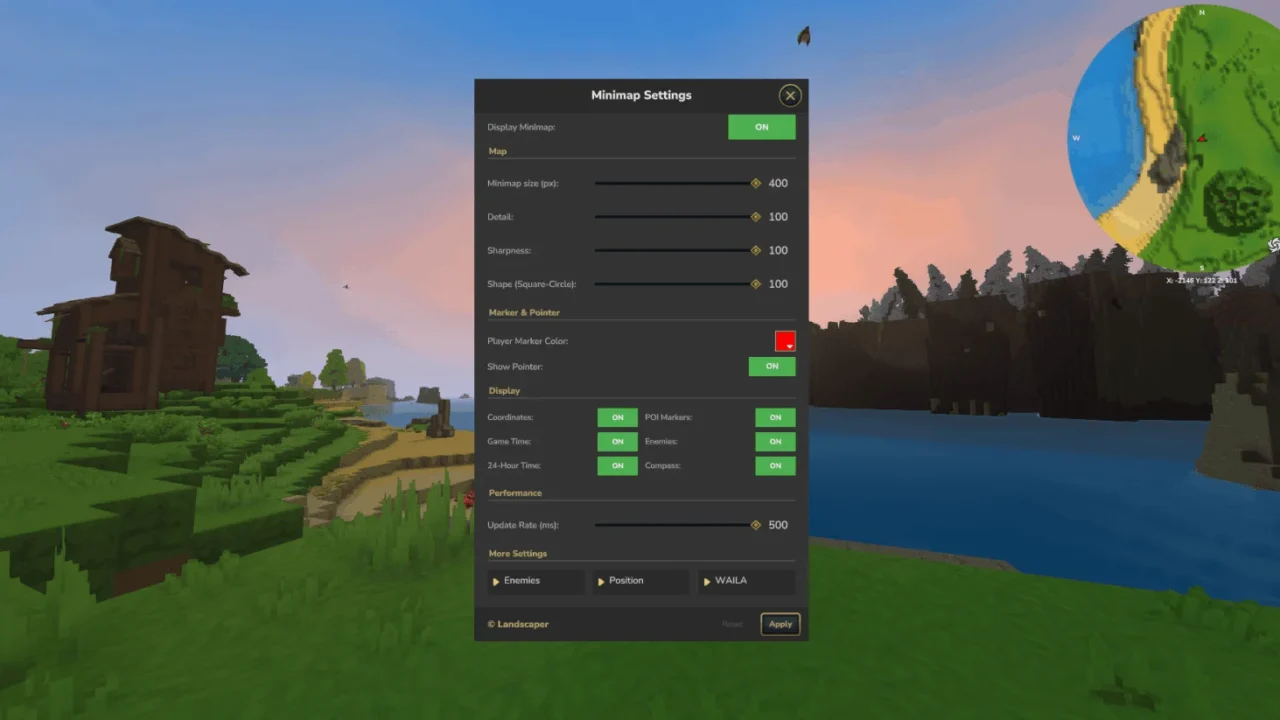
More screenshots on CurseForge ↗
What this mod does
Hytale has a world map, but no on-screen minimap. Adoa’s Minimap adds one: a small map that updates as you move and that you can place wherever you want.
What it shows
- The terrain around you, with the compass points (N, S, E, W).
- Other players and nearby enemies as colored dots.
- An indicator for the block or creature you’re looking at (WAILA feature), which can be turned off.
Customization
With /minimap settings you open a menu to change the size, scale and zoom, the colors of the player and hostile creature dots, and which elements are shown. /minimap toggle hides or shows it and /minimap waila on or off controls the indicator. All commands use permissions (landscaper.simpleminimap.command), so on a server you need to be granted them or be an operator.
Version 10.0.1 was updated on August 30, 2026 for Hytale 0.6.2. If you’d rather improve the game’s big map, check out BetterMap; the two can run together.
This mod page was checked with Hytale 0.6 (Update 6). With Update 7 (0.7), released on October 12, 2026, the author has already released a compatible file: version 10.0.1 (October 12, 2026).
User rating
Highlights and things to keep in mind
- On-screen minimap, something the game doesn't have
- Very configurable: size, zoom, colors and elements
- Includes an indicator for what you're looking at
- The CurseForge description is somewhat outdated (it still asks for MultipleHUD)
- The commands require permissions
- All Rights Reserved license
- Update 7 (0.7) already has a compatible file from the author (October 12, 2026)
Requirements
- Hytale (Early Access) on PC, version 0.7 (file SimpleMinimap-10.0.1, tagged for 0.7.2)
- No dependencies in the 0.6 file (MultipleHUD hasn't been needed since Hytale 0.5.0)
- Operator permissions or the landscaper.simpleminimap.command.* nodes to use the commands
How to install it
- Open the Adoa's Minimap page on CurseForge and click Install to install it with the CurseForge app, or download SimpleMinimap-10.0.1-for-0.6.2.jar from the Files tab (the file tagged 0.7).
- If you download it manually, copy the file as is, without unzipping it, into the mods folder: on Windows, %APPDATA%\Hytale\UserData\Mods.
- Open Hytale, right-click the world, check Adoa's Minimap in the mod list and save the world settings.
- On a dedicated server, place the file in the server's mods folder and restart it.
- Join the world: the minimap appears on its own. Type /minimap settings to adjust size, zoom and colors.
Version history
-
10.0.112 Oct 2026Current
File for Hytale 0.7 (Update 7)
-
10.0.130 Aug 2026
Updated to work with Hytale 0.6.2
-
10.0.129 Jul 2026
File for Hytale 0.5.7
Common problems
Do I need MultipleHUD?
The description still mentions it, but MultipleHUD itself says it hasn't been needed since Hytale 0.5.0, and the 0.6 file lists no dependencies.
Can you see enemies through walls?
The minimap marks nearby hostile creatures as dots. On a server, it's the admin who decides whether to install it and who can use its commands.
I can't open /minimap settings, why?
The commands require permission. In your own world, make yourself an operator; on a server, ask the admin for the landscaper.simpleminimap.command node.
Is it compatible with BetterMap?
Yes. BetterMap improves the game's big map and this mod adds the on-screen minimap.
More mods for Hytale
 Multiplayer
  Multiplayer
  Multiplayer
  Multiplayer
  Multiplayer
  Multiplayer