Gravestones (Zurku): a gravestone keeps your items when you die in Hytale and you get them back with one tap for Hytale
Plugin by Zurku for Hytale that spawns a gravestone with your items when you die; tap it and they return to your inventory. Protection, limit and timer. Over 146,000 downloads; file 1.1.0 (Feb 19, 2026), not confirmed for 0.7.
Download Gravestones (Zurku): a gravestone keeps your items when you die in Hytale and you get them back with one tap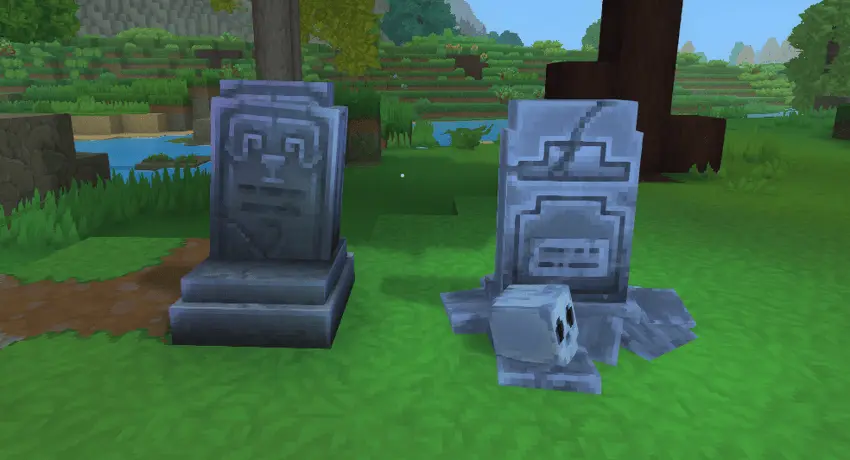
More screenshots on CurseForge (curseforge.com) ↗
What this mod does
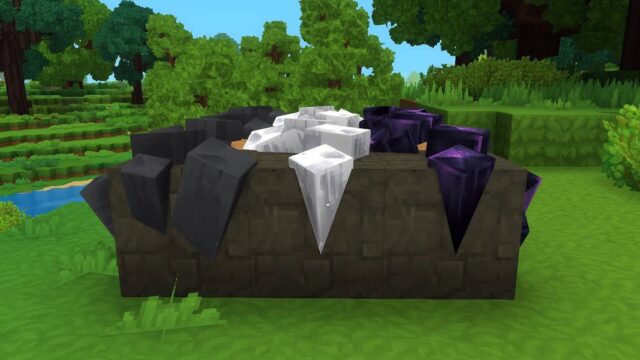
Gravestones, by Zurku (with GodlessGod as artist), stops you from losing your inventory when you die in Hytale: a gravestone holding every item you would have dropped spawns where you died and, when you interact with it, the items return to your inventory instantly, with no container menu; whatever doesn’t fit drops at your feet and the gravestone breaks on its own. When we checked it had passed 146,000 downloads on CurseForge.
What’s included
- Works with any death rule in your world: no item loss, full item loss or percentage-based loss, according to the author.
/gravestoneshows all settings;/gsmodelswitches between the custom model and the vanilla gravestone./gslimit <count>caps gravestones per player,/gsprotectionrestricts them to their owner and/gstimer <min>auto-breaks them after that time, dropping the loot (0 turns it off).- Open source under GPLv3 and, since 1.1.0, an API so other mods can control access and receive events.
Version and compatibility
The latest file is GravestonePlugin-1.1.0.jar, from February 19, 2026, marked on CurseForge only as «Early Access»: it predates updates 0.5, 0.6 and 0.7 and there is no confirmation for them. It is a .jar plugin that goes in the same mods folder. Try it on a copy of your world and, if it fails, check which mods break on 0.7. For the base game’s commands, see the Hytale command list; if you play on a server, check the essential server plugins.
User rating
Highlights and things to keep in mind
- Over 146,000 downloads on CurseForge
- You get your items back instantly by tapping the gravestone, no menu
- Commands for model, per-player limit, protection and timer
- Open source (GPLv3) and an API for other mods since 1.1.0
- Last update: February 19, 2026, with no confirmation for Hytale 0.5, 0.6 or 0.7; it may cause errors on the current version, test it on a copy of your world
- It is a .jar file (plugin): it goes in the same mods folder, without extracting
- Owner protection does not apply to creative-mode players (since 1.0.9)
- Since 1.0.9 data is stored in mods/Gravestones (previously plugins/Gravestones); migration is automatic
Requirements
- Hytale (Early Access) on PC or on a dedicated server (file GravestonePlugin-1.1.0.jar from February 19, 2026, marked only "Early Access")
- No dependencies: the page lists no other mod
- You need to be able to run commands in the world or server to change settings
How to install it
- Open the Gravestones page on CurseForge and click Install to install it with the CurseForge app, or download GravestonePlugin-1.1.0.jar from the Files tab (the file from February 19, 2026, marked only "Early Access").
- If you download it manually, copy the .jar file as is, without extracting it, into the mods folder: on Windows, %APPDATA%\Hytale\UserData\Mods.
- Open Hytale, right-click the world, check Gravestones in the mod list and save the world settings.
- On a dedicated server, put the file in the server's mods folder and restart it.
- When you die a gravestone with your items appears; interact with it and they return to your inventory (overflow drops on the ground) and the gravestone disappears.
- Type /gravestone to see settings and commands: /gsmodel switches between the custom and vanilla gravestone, /gslimit caps gravestones per player, /gsprotection restricts them to their owner and /gstimer auto-breaks them after that time (0 turns it off).
- Back up your world first: the file is from February 2026 and is not confirmed for 0.7.
Version history
-
1.1.019 Feb 2026Current
API for other mods (contributed by derrickmehaffy): gravestone access control, creation, collection and breaking events, and per-player gravestone queries
-
1.0.921 Jan 2026
Creative-mode players can break or collect any gravestone; gravestones with no owner data can be collected by anyone; fixes the gravestone placed on the wrong block when dying at an edge; data moves from plugins/Gravestones to mods/Gravestones
-
1.0.215 Jan 2026
First file visible on CurseForge
Common problems
What happens when you die?
A gravestone spawns on the spot with every item you would have dropped. Interacting with it returns them instantly, with no chest menu; whatever doesn't fit in your inventory drops at your feet and the gravestone breaks on its own.
Does it work with any death rule?
According to the author, yes: with no item loss, full item loss or percentage-based loss.
Can I stop others from looting my gravestone?
Yes, with /gsprotection only the owner can open it. Since 1.0.9 creative-mode players can break or collect any gravestone, and gravestones with no owner data can be collected by anyone so they don't get stuck.
Do gravestones pile up?
You can cap them per player with /gslimit and make them auto-break with /gstimer , dropping the loot.
Does it work on 0.7?
Not confirmed: the latest file is from February 19, 2026, marked only "Early Access", before 0.5, 0.6 and 0.7. Try it on a copy of your world.
More mods for Hytale
 Multiplayer
 Multiplayer