DaisyNiko’s Earthy Recolour for Stardew Valley
A recolor of the whole valley's outdoors in earthy, less saturated tones, with matching trees, grass and town buildings. Version 1.4.4, updated for 1.6.
Download DaisyNiko’s Earthy Recolour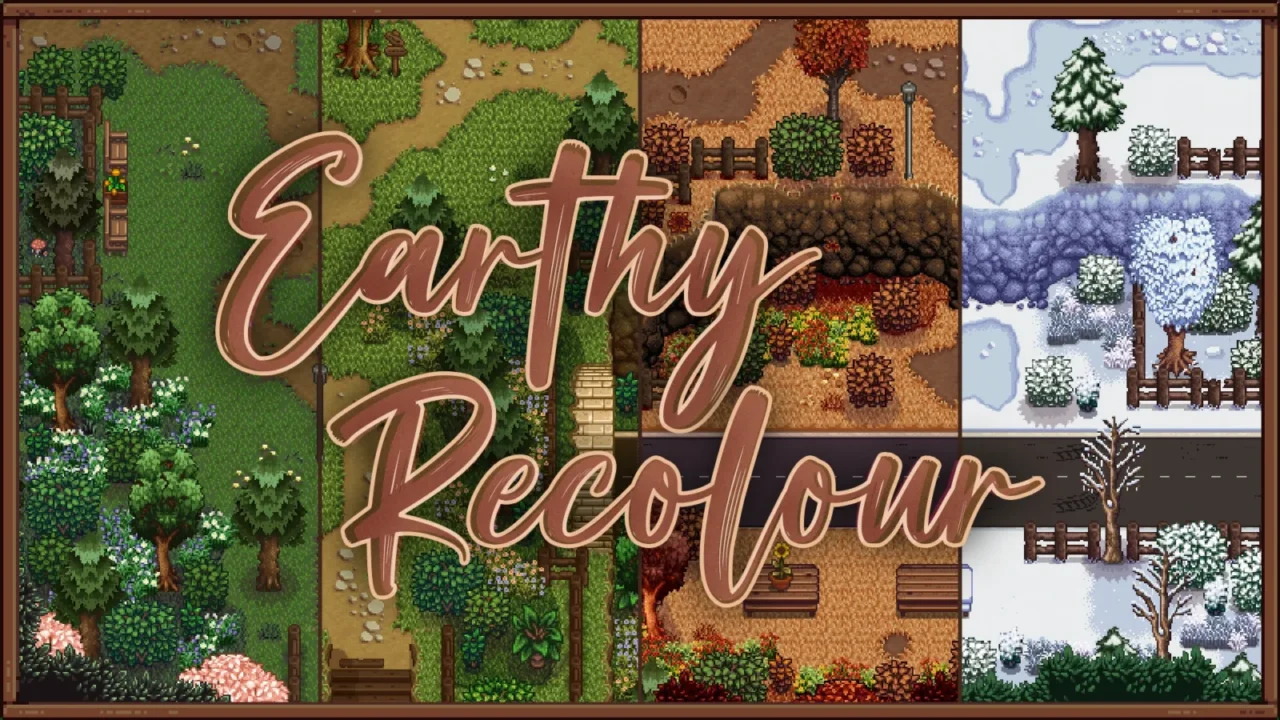
More screenshots on Nexus Mods ↗
What this mod does
DaisyNiko’s Earthy Recolour is one of the most downloaded map recolors for Stardew Valley. It shifts the palette of the valley’s entire outdoors toward earthy tones, softer and less saturated than the originals, and redraws trees, grass and town buildings so everything matches.
What it changes
- Recolors every outdoor tilesheet for all four seasons.
- Adds its own trees, a new artifact spot and custom grass.
- Since 1.4 it covers what 1.6 brought: blue grass, waterfalls, mossy and green rain trees, the new world map and fruit trees.
- Version 1.4.4 added the train tracks recolor.
Options
In the config.json you can turn the grass, artifact spot, fruit trees, minimap and town buildings on or off, choose between its new trees or the recolored originals, and decide whether winter tilled soil is brown or blue.
Requirements and compatibility
It requires SMAPI and Content Patcher. Version 1.4.4 (November 9, 2024, 8 MB) is updated for 1.6, and the page marks it as Android-compatible. It’s a reference point for other mods: many building retextures, like Elle’s Seasonal Buildings or Hudson Valley Buildings, come with matching palettes. It has no text to translate.
User rating
Highlights and things to keep in mind
- One of the most popular recolors, with a warm, less saturated look
- Includes the new 1.6 elements
- Many building mods come with matching versions
- Options for grass, trees, minimap and town buildings
- Configured by editing the config.json
- Conflicts with other map recolors that change the same textures
- New map mods may look mismatched in color if they don't have an Earthy patch
Requirements
- Stardew Valley 1.6.x (PC; the page also marks it as Android-compatible)
- SMAPI 4.x
- Content Patcher
How to install it
- Install SMAPI and Content Patcher first (see their mod pages) and launch the game once with SMAPI to make sure everything loads.
- Open the DaisyNiko's Earthy Recolour page on Nexus Mods, go to the Files tab and click Manual download on the main file (DaisyNiko's Earthy Recolour 1.4.4). You need a free Nexus account to download.
- Unzip the .zip outside the game folder and move the resulting folder into the Mods folder, inside the game folder.
- Launch the game once with SMAPI so the config.json is generated and, if you want, change the options there (grass, trees, minimap, town buildings, winter soil).
Version history
-
1.4.49 Nov 2024Current
Adds the train tracks recolor
-
1.41 Apr 2024
Update for 1.6: blue grass, waterfalls, mossy and green rain trees, world map and fruit trees
Common problems
Does it also change interiors?
The page talks about outdoor tilesheets, trees, grass and town buildings; it doesn't mention interiors.
Does it work with Stardew Valley Expanded?
The changelog includes tweaks for SVE's world maps and minimap, but it doesn't detail full compatibility with all its areas.
Can I combine it with another map recolor?
It's not recommended: two recolors that change the same tilesheets overwrite each other.
More mods for Stardew Valley
 ✓ Stardew Valley 1.6
  ✓ Stardew Valley 1.6
  ✓ Stardew Valley 1.6Multiplayer
 ✓ Stardew Valley 1.6
  ✓ Stardew Valley 1.6Multiplayer