Hudson Valley Buildings – Complete Pack for Stardew Valley
Rustic Hudson Valley-style farm buildings in ten color schemes, each in a vibrant or muted version, with seasonal layers. Version 2.1.1 for 1.6.
Download Hudson Valley Buildings – Complete Pack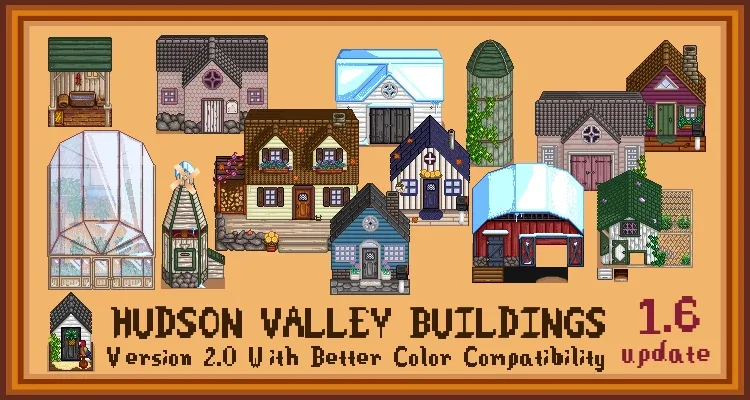
More screenshots on Nexus Mods ↗
What this mod does
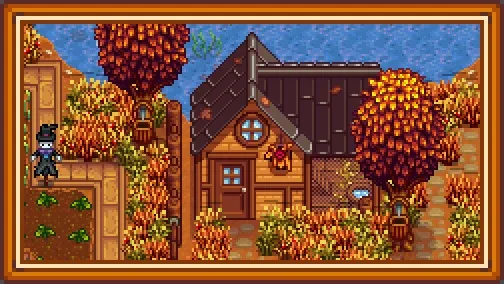
Hudson Valley Buildings – Complete Pack changes the farm buildings to a rustic style inspired by the Hudson Valley in New York. The original is by magimatica, and the current pack is maintained by oomps62 and endohare.
What it changes
- Farmhouse, greenhouse, multiplayer cabins, coops, barns, silo, mill, sheds, obelisks, gold clock, slime hutch and fish ponds.
- Mailboxes, pet bowls and bee houses in classic or realistic style.
- Ten color schemes named after Hudson Valley towns (Amherst, Rhinebeck, Saratoga…), each in a vibrant or muted version.
- Seasonal layers for vanilla foliage and for DaisyNiko’s Earthy Recolour.
Requirements and compatibility
It requires SMAPI and Content Patcher. File 2.1.1 (June 2, 2024, 16 MB) is marked as compatible with 1.6. Version 2.1 redesigned all the cabins, added the muted version of each color, the mailbox, the realistic bee house and the pet bowls, and fixed a visual glitch with the well.
Everything is configured in the config.json created the first time you open the game with the mod. Since it’s a visual change, it works in multiplayer even if not everyone has it: each player will see their own buildings. It has no text to translate.
User rating
Highlights and things to keep in mind
- Polished rustic style for almost every farm building
- Ten color schemes with vibrant or muted variants
- Seasonal layers, also for Earthy Recolour
- Only needs Content Patcher
- Configured by editing the config.json
- Conflicts with other mods that change the same buildings
- No updates since June 2024 (works with 1.6 according to the page)
Requirements
- Stardew Valley 1.6.x (PC)
- SMAPI 4.x
- Content Patcher
How to install it
- Install SMAPI and Content Patcher first (see their mod pages) and launch the game once with SMAPI to make sure everything loads.
- Open the Hudson Valley Buildings page on Nexus Mods, go to the Files tab and click Manual download on the main file (Hudson Valley Buildings 2.1.1). You need a free Nexus account to download.
- Unzip the .zip outside the game folder and move the resulting folder into the Mods folder, inside the game folder.
- Launch the game once with SMAPI so the config.json is generated, then close it.
- Edit the config.json to choose the color scheme, the vibrant or muted version and the seasonal layers.
Version history
-
2.1.12 Jun 2024Current
Current file (2.1 added muted colors, new cabins, mailbox, realistic bee house and pet bowls)
Common problems
Can I use it with Elle's Seasonal Buildings?
Both change the same buildings, so you'd have to choose one for each building; don't combine them without checking their configs.
What does vibrant or muted version mean?
Since 2.1, each of the ten color schemes has one variant with more saturated colors and a softer one.
Does it include the multiplayer cabins?
Yes, and 2.1 redesigned all of them.
More mods for Stardew Valley
 ✓ Stardew Valley 1.6Multiplayer
  ✓ Stardew Valley 1.6Multiplayer
  ✓ Stardew Valley 1.6Multiplayer
  ✓ Stardew Valley 1.6Multiplayer
  ✓ Stardew Valley 1.6Multiplayer
  ✓ Stardew Valley 1.6Multiplayer