Warm Stalls and Cozy Boxes for Stardew Valley
Redesigns barns and coops: every animal sleeps in its own stall or box, plus a machine room and matching recolors. Best Visual Mod at Modfest 2026; v1.4.1.
Download Warm Stalls and Cozy Boxes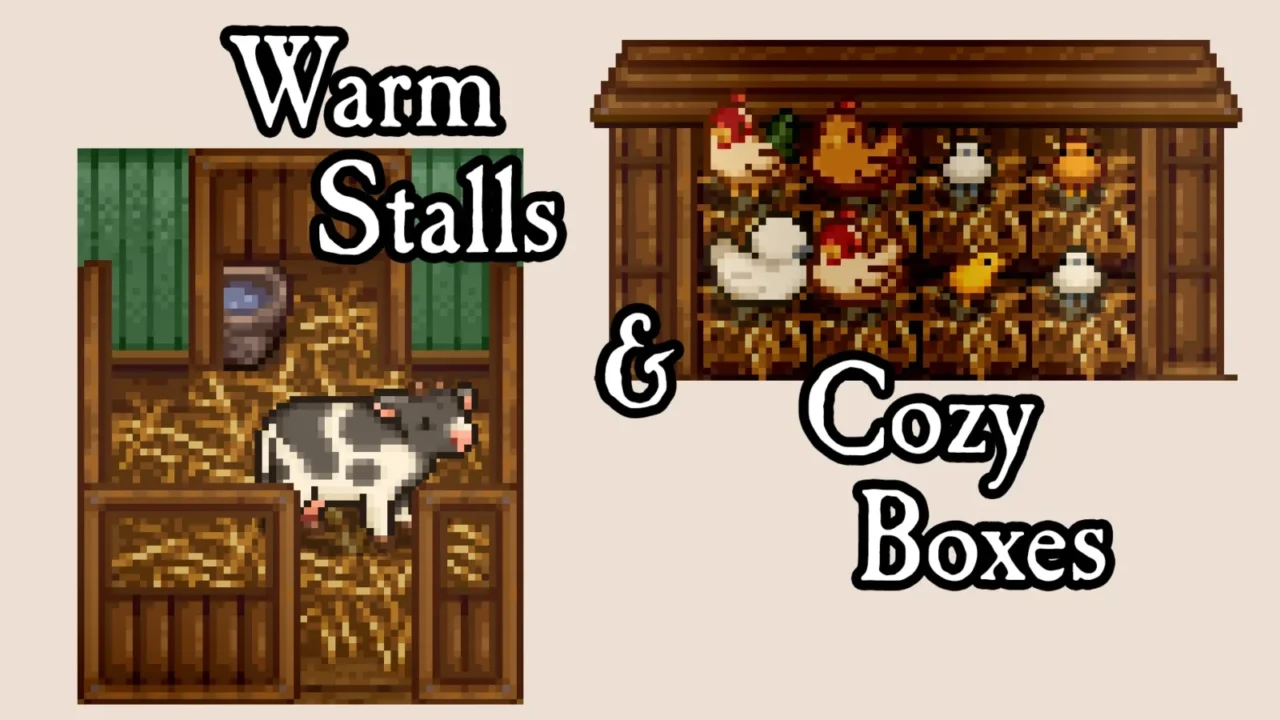
More screenshots on Nexus Mods ↗
What this mod does
Warm Stalls and Cozy Boxes redesigns barn and coop interiors so every animal has its own spot. It was made by lindest and bitswitch, won Best Visual Mod at the Stardew Valley Modfest 2026, and version 1.4.1, released September 10, 2026, works with 1.6.
What it changes
- Barn stalls: each animal starts the day in its own stall and goes back there to sleep; the rest of the time it roams freely.
- Sleeping boxes in the coop, with the same idea.
- A well-lit machine room in the deluxe buildings; the animal area has a day/night cycle.
- Recolored hay, 24 wall colors and two versions of the map for Shane’s 8-heart event.
Recolors and compatibility
It detects, or lets you pick, the palette for DaisyNiko’s Earthy Interiors, Rustic Country Town Interiors, Seaside Interiors, Starblue Valley or Vibrant Pastoral. It’s compatible with SVE, Walk of Life, Vanilla Plus Professions and several bigger-barn mods, but not with other mods that change these buildings’ interiors.
Before uninstalling it, move your machines out of the buildings or they’ll be lost. It includes a Spanish translation by Hayato2236, and there’s an Android version.
User rating
Highlights and things to keep in mind
- Much nicer, tidier barns and coops
- Adapts to the most popular recolors
- Best Visual Mod at Modfest 2026
- Spanish included
- Incompatible with other barn and coop interior mods
- Large animals can look off in the coop
- Uninstalling without moving your machines out means losing them
Requirements
- Stardew Valley 1.6.x (PC; separate version for Android)
- SMAPI 4.x
- Content Patcher, Cross-Mod Compatibility Tokens and Misc Map Actions Properties
- Recommended: Generic Mod Config Menu
How to install it
- First install SMAPI, Content Patcher, Cross-Mod Compatibility Tokens and Misc Map Actions Properties (see their mod pages or links) and launch the game once with SMAPI.
- Open the Warm Stalls and Cozy Boxes page on Nexus Mods, go to the Files tab and click Manual download on the main file (Warm Stalls and Cozy Boxes 1.4.1). You need a free Nexus account to download. On Android, use the optional ANDROID file and add Arbitrary Tilesheet Access.
- Unzip the .zip outside the game folder and move the resulting folder into the Mods folder inside the game folder.
- Use Generic Mod Config Menu to choose the recolor palette, the wall color and the barn and coop options. Don't change the map while you're inside the building.
- Launch the game with SMAPI: Spanish turns on automatically if your game is set to Spanish.
Version history
-
1.4.110 Sep 2026Current
Fix for forced machine placement, Seaside Interiors recolor and Animals Need Water bowls
-
1.0.05 Mar 2026
First release (Stardew Valley Modfest 2026)
Common problems
Are the animals locked in their stalls?
No. They just start the day there and go back to sleep in them; the rest of the time they move around normally.
What happens if I remove it?
Artisan machines left in the machine room can be lost to the void. Move them out before uninstalling.
Is it available in Spanish?
Yes, since 1.3.0 it includes the Spanish translation by Hayato2236.
More mods for Stardew Valley
 ✓ Stardew Valley 1.6
  ✓ Stardew Valley 1.6Multiplayer
  ✓ Stardew Valley 1.6Multiplayer
  ✓ Stardew Valley 1.6Multiplayer
  ✓ Stardew Valley 1.6Multiplayer
  ✓ Stardew Valley 1.6Multiplayer