Dialogue Display Framework Continued (DDFC) for Stardew Valley
Framework to customize almost everything in the dialogue box: friendship hearts, text, images, size and position. The 1.6 continuation. Version 0.7.5.
Download Dialogue Display Framework Continued (DDFC)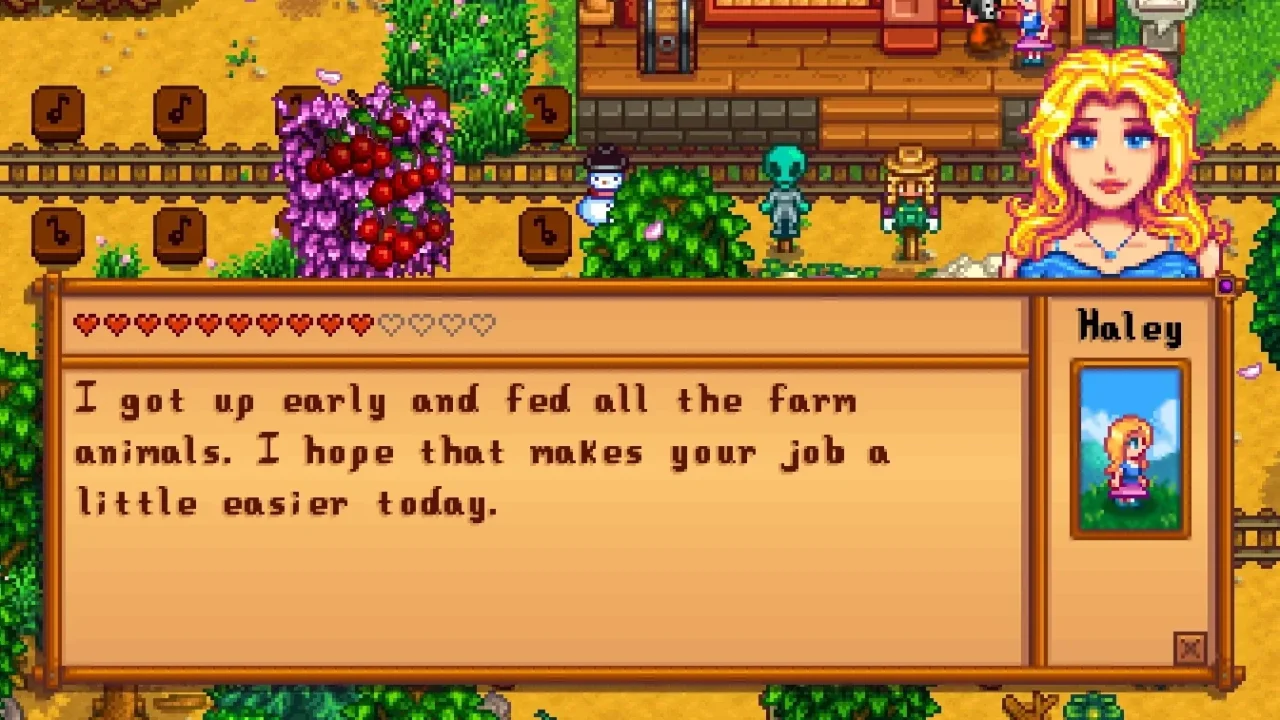
More screenshots on Nexus Mods ↗
What this mod does
Dialogue Display Framework Continued (DDFC) is the 1.6 continuation of aedenthorn’s original framework, maintained by Mangupix. It lets other mods customize almost everything in the dialogue box using text patches, with no coding. On its own it doesn’t change anything.
What it allows
- Changing the position and look of the friendship hearts and the gift icon.
- Adding custom text and images to the box.
- Adjusting the size and position of the box from the config, which is handy on Android.
- An API for more complex mods.
Requirements and compatibility
It needs SMAPI 4.0 or later. Version 0.7.5 (July 30, 2025, 38 KB) fixes placement after dialogue transitions on Android, where it works with SMAPI for Android. It’s compatible with UI and portrait recolors, NPC mods like Unique Children Talk, Portraiture and SpaceCore animations.
It’s partially compatible with Farmer Portraits, Platonic Relationships and Happy Birthday, which may show some misplaced details. Under Optional files there are compatibility patches between DDFC mods. Examples of mods that use it: Changing Skies and Hearts and Gifts Dialogue Display.
User rating
Highlights and things to keep in mind
- Customize the dialogue box without coding
- Works on Android with size settings
- No open bug reports on Nexus
- It does nothing without mods that use it
- Partial compatibility with some popular mods
- The page doesn't clarify multiplayer
Requirements
- Stardew Valley 1.6.x (PC; also with SMAPI for Android)
- SMAPI 4.0 or later
- A mod that uses it (it does nothing on its own)
How to install it
- Install SMAPI first (see its mod page) and launch the game with it once to make sure it works.
- Open the Dialogue Display Framework Continued page on Nexus Mods, go to the Files tab and click Manual download on the main file (Dialogue Display Framework 0.7.5). You need a free Nexus account to download.
- Unzip the .zip outside the game folder and move the resulting folder into the Mods folder, inside the game folder.
- Install the mod that uses it (for example, Hearts and Gifts Dialogue Display) and, if you like, the Compatibility Patches under Optional files. Launch the game with SMAPI.
Version history
-
0.7.530 Jul 2025Current
Current file: placement fix after dialogue transitions on Android
-
0.7.210 Jul 2025
Compatibility with MEEP animals and a fix for a crash with portraits
Common problems
Is it the same as the original Dialogue Display Framework?
It's the 1.6 continuation: the original is by aedenthorn and this version is maintained by Mangupix.
Does it work on Android?
Yes, with SMAPI for Android. Use the config to fit the box's size and position to your screen.
Does it conflict with Happy Birthday?
It's partially compatible: birthday dialogue may show some visual glitches.
More mods for Stardew Valley
 ✓ Stardew Valley 1.6
  ✓ Stardew Valley 1.6
  ✓ Stardew Valley 1.6
  ✓ Stardew Valley 1.6
  ✓ Stardew Valley 1.6
  ✓ Stardew Valley 1.6Multiplayer