Natural Mod PP Filter for Assetto Corsa
One of the oldest and highest-rated post-processing filters for Assetto Corsa, focused on a natural image for driving. Free; for Pure LCS.
Download Natural Mod PP Filter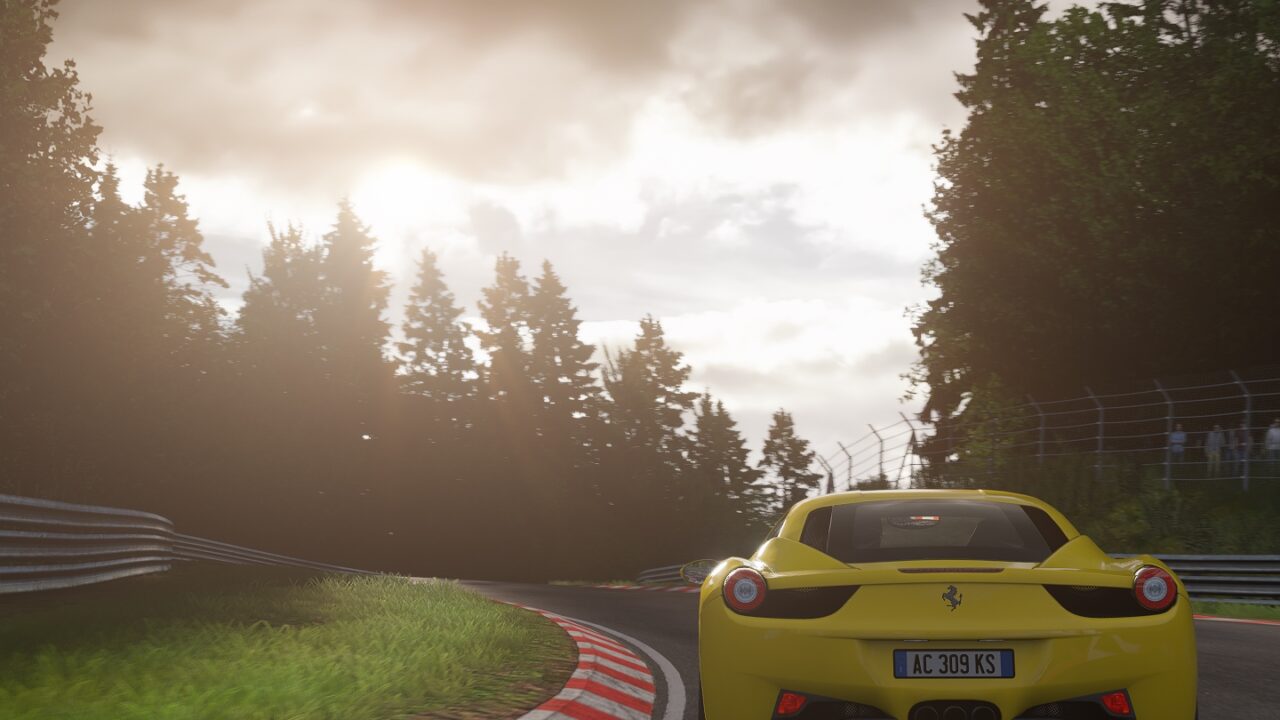
More screenshots on OverTake.gg (formerly RaceDepartment) ↗
What this mod does
Natural Mod PP Filter is a post-processing filter by Chris Kennedy that has been around since December 2014 and that its author still updates: version 41.1 is from October 2026. It has over 300,000 downloads on OverTake and a rating of 4.93 out of 5 from over 330 reviews, one of the highest in its category.
What it offers
Its goal is a natural image designed for driving, not for taking screenshots. Recent updates have adjusted sun strength, the exposure curve, gamma, reflections and glare to fit the latest versions of Pure and Custom Shaders Patch.
- Version for Pure LCS, the one the author recommends.
- Version for Pure Gamma, which the author admits he hasn’t worked on in a long time, although it got an exposure fix after a change in Pure.
- Installation instructions in the included readme file.
Who it’s for
For anyone who wants a realistic look without exaggerated colors or effects. Many virtual reality users praise its natural look and good performance.
Requirements and tips
If you use Pure, update Pure and Custom Shaders Patch to their latest versions first. The author warns that the free version of Content Manager doesn’t install it properly by dragging the file, so it’s best to follow the readme and copy it manually.
User rating
Highlights and things to keep in mind
- Rated 4.93 out of 5 from over 330 reviews
- Still being updated in 2026
- Barely 20 KB
- Designed for Pure: update Pure and CSP before using it
- The Pure Gamma version is barely maintained
- With the free Content Manager you have to install it manually
Requirements
- Assetto Corsa for PC
- Up-to-date Pure (LCS version recommended)
- Up-to-date Custom Shaders Patch
- Free OverTake.gg account to download
How to install it
- Update Pure and Custom Shaders Patch to their latest versions.
- Go to the filter's page on OverTake.gg and log in.
- Download the file (about 20 KB) and open it.
- Follow the included readme and copy the files into your Assetto Corsa folder; with the free Content Manager, dragging it in isn't enough.
- In the video settings, choose the Natural Mod post-processing filter in its LCS or Gamma version.
Version history
-
41.113 Oct 2026Current
Exposure fix in Pure Gamma after a change in Pure, and sun, exposure curve, gamma, reflection and glare tweaks in Pure LCS
Common problems
Which version should I pick, LCS or Gamma?
The author recommends the Pure LCS one; he says the Pure Gamma one hasn't been worked on in a while.
I dragged it into Content Manager and it doesn't show up
The free version of Content Manager doesn't install it properly. Install it manually following the readme.
Is it good for virtual reality?
Several VR users recommend it for its natural look and performance.
More mods for Assetto Corsa
 Multiplayer

