Interior Cabin Lights (cabin lights for ATS) for American Truck Simulator
Ambient lights in six colors for your cabin interior, switched on with the parking lights or the beacon. For SCS trucks and many modded ones; updated in May 2026.
Download Interior Cabin Lights (cabin lights for ATS)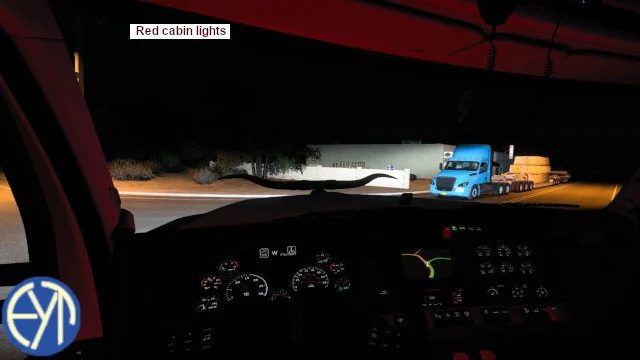
More screenshots on Steam Workshop ↗
What this mod does
Interior Cabin Lights is a mod by Eddie Yantz that adds an ambient glow inside the cabin, in blue, green, orange, purple, red or white. It works with SCS trucks and with a list of modded trucks. It has more than 170,000 subscribers.
How it works
- The lights go in the “Driver’s Plate” and “Co-Driver’s Plate” slots, and you can combine them.
- Parking light mode: they turn on with the parking lights.
- Beacon mode: they turn on with the beacons. There’s no default key, so assign one in the controls.
- They’re only visible when it’s dark outside the truck.
- In Graphics, “Light visibility ranges” must not be disabled and “Secondary vehicle lights” must be checked.
Modded trucks
It includes, among others, Harven’s FLB, HX520, Mack R and W990. Also GTM’s T800, the Rezbilt 389, the Rezworth W900 and Smarty’s Peterbilt 350. On the FLB and the K100-E it works only partially.
Version
The changelog notes say “1.58 compatible” on February 28, 2026 and “159” on April 18. The latest, from May 13, 2026, adds the 2025 Volvo VNL and the VNR Electric. You can edit the colors in its .sii files, but every update overwrites them.
Holyfix Check
Will it work with your mods?
Load your game.log.txt and check whether this mod is for your ATS version, whether you're missing a mod or DLC it needs and where to place it.
It's in Documents › American Truck Simulator › game.log.txt. It's read in your browser: the file is never uploaded.
Something else failing? Holyfix for ATS checks all your mods at once.
User rating
Our rating
0.0 / 5- Six cabin light colors
- Compatible with many popular modded trucks
- Updated with new SCS trucks
- Latest game version confirmed by the author: 1.58. It may cause errors on 1.61; Holyfix will warn you if so.
- On the FLB and the K100-E it works only partially
- Updates overwrite any color changes you make
Requirements
- American Truck Simulator
- No DLC or other mods needed
- In Graphics: “Secondary vehicle lights” enabled and “Light visibility ranges” not disabled
How to install it
- Open the mod's page on Steam Workshop and click “Subscribe”.
- Wait for Steam to download it and launch American Truck Simulator.
- In the Mod Manager, enable Interior Cabin Lights and confirm the changes.
- In Controls, assign a key to the beacon if you want to use that mode.
- At the service shop, place the lights in “Driver's Plate” and “Co-Driver's Plate” and pick the color.
Version history
-
232413 May 2026Current
added volvo.vnl2025 & volvo.vnre
-
18 Apr 2026
159
-
225028 Feb 2026
1.58 compatible, fixed volvo.vnl.2018 Galimim
Common problems
I can't see the lights
They only show at night or in the dark, and they need “Secondary vehicle lights” enabled in Graphics.
How do I turn them on?
With the parking lights or the beacon, depending on the mode you choose; the beacon has no default key.
Can I change the color?
Yes, by editing its .sii files; the author warns that updates erase your changes.
More mods for ATS
 ✓ ATS 1.61
  ✓ ATS 1.61
  ✓ ATS 1.61
  ATS 1.59