Smoke in my Trucks for ATS (exhaust smoke) for American Truck Simulator
Constant exhaust smoke for ATS trucks that follows direction and speed. With an optional plugin, the smoke reacts to the engine. For ATS 1.50 to 1.61, free.
Download Smoke in my Trucks for ATS (exhaust smoke)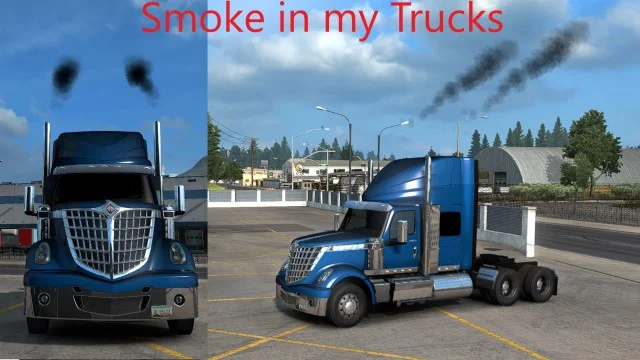
More screenshots on Steam Workshop ↗
What this mod does
Smoke in my Trucks is a mod by Carlitos that adds smoke to the exhausts of American Truck Simulator’s stock trucks: the ones sold at the Freightliner, International, Kenworth, Mack, Peterbilt, Volvo and Western Star dealers.
How it works
- Smoke comes out constantly and follows the direction of each exhaust, except the ones mounted under the truck.
- The trail changes depending on which way you’re heading and how fast.
- With ToniVolma’s MODGuard.dll plugin, smoke cut-off is enabled: no smoke with the engine off, and more when you accelerate or shift gears.
- Without the plugin, the constant smoke works the same, but there’s no cut-off.
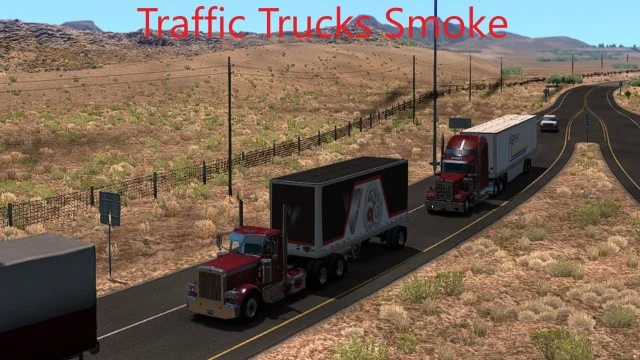
The author also publishes Light Smoke and Heavy Smoke versions, plus another mod with smoke for traffic trucks.
Compatibility and load order
According to the author, it’s made for versions 1.50 to 1.61. If you also use his Traffic Trucks Smoke, place Smoke in my Trucks above it in the Mod Manager. No DLC required.
Installing the plugin
The plugin is optional and installed by hand: copy the .dll file into the game’s bin\win_x64\plugins folder (create it if it doesn’t exist). The author links the download on the MODGuard website. In October 2026 he released an updated plugin because the smoke had stopped cutting off.
Holyfix Check
Will it work with your mods?
Load your game.log.txt and check whether this mod is for your ATS version, whether you're missing a mod or DLC it needs and where to place it.
It's in Documents › American Truck Simulator › game.log.txt. It's read in your browser: the file is never uploaded.
Something else failing? Holyfix for ATS checks all your mods at once.
User rating
Mod video
Our rating
0.0 / 5- Smoke that follows the exhaust direction and your speed
- Realistic smoke cut-off with the optional plugin
- Light and heavy smoke variants from the same author
- Only for the game's stock trucks
- The plugin is a .dll file by another author (ToniVolma) that you install by hand; only download it from the link on the mod's page
- The Workshop file is from Jul 3, 2025, although the description already includes 1.61
- The author's page gives the ETS2 plugin path; in ATS it's the same bin\win_x64\plugins folder inside American Truck Simulator
Requirements
- American Truck Simulator 1.50 to 1.61
- Steam account
- No DLC required
- Optional: MODGuard.dll plugin (ToniVolma) so the smoke cuts off with the engine off
How to install it
- Open the "Smoke in my Trucks" page on Steam Workshop and click "Subscribe".
- Launch American Truck Simulator and wait for Steam to download the mod.
- In the Mod Manager, enable "Smoke in my Trucks"; if you use Traffic Trucks Smoke by the same author, place it above that one.
- Optional: download MODGuard.dll from the link on the author's page and copy it into the game's bin\win_x64\plugins folder (create it if it doesn't exist).
- When you launch the game with the plugin, accept the SDK plugins warning.
Version history
-
3 Jul 2025Current
Latest file update (the changelog has 23 entries)
-
19 Dec 2020
Released on Steam Workshop
Common problems
Do I need the plugin?
No. Without it you get constant smoke; with it, the smoke cuts off with the engine off and increases when you accelerate.
Does it work on modded trucks?
The author makes it for the stock trucks sold at the game's dealers.
Smoke comes out with the engine off
Update the plugin: the author released a new version in October 2026.
Is there lighter or thicker smoke?
Yes, the author has separate Light Smoke and Heavy Smoke versions.
More mods for ATS
 ✓ ATS 1.61
  ✓ ATS 1.61
  ✓ ATS 1.61
  ✓ ATS 1.61
  ✓ ATS 1.61Multiplayer