Adviser Top Bar HUD (top bar interface) for Euro Truck Simulator 2
Rearranges the ETS2 1.61 interface: drops the new tachometer and moves the map, speed, gear, limit and indicator lights to a top bar. Free, by Distiller.
Download Adviser Top Bar HUD (top bar interface)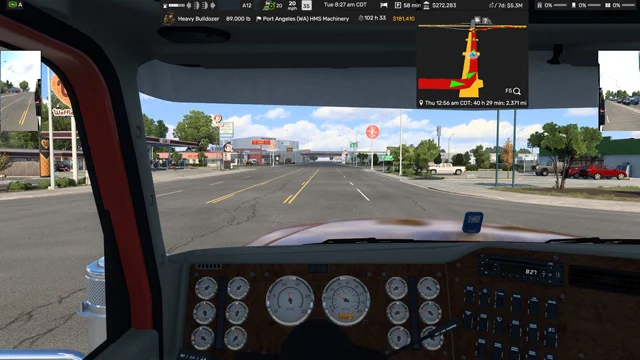
More screenshots on Steam Workshop ↗
What this mod does
Adviser Top Bar HUD is a mod by Distiller that changes the layout of the Euro Truck Simulator 2 interface. Instead of grouping the data at the bottom, it moves the main information to a bar at the top of the screen, clearing your view of the road.
What it changes
- Removes the new tachometer from the interface and moves the map to the top.
- The top bar brings together the fixed indicator lights, the basic gauges (fuel, lights and turn signals), the gear, the cruise control, the speed and the speed limit.
- It also shows the in-game time and the fatigue monitor.
- The line with the company name moves to that bar too.
Settings
With the F6 key options you can turn each element on or off and change its transparency.
Version and compatibility
Version 1.61.1016 is the 1.61 update. The author lists it for 1.59 and later, and has tested it at resolutions from 1920×1080 up to 7680×1440. It was released on October 11, 2026 and updated on October 16. Distiller also has mirror and tachometer add-ons for the Adviser in his Workshop collections.
Holyfix Check
Will it work with your mods?
Load your game.log.txt and check whether this mod is for your ETS2 version, whether you're missing a mod or DLC it needs and where to place it.
It's in Documents › Euro Truck Simulator 2 › game.log.txt. It's read in your browser: the file is never uploaded.
Something else failing? Holyfix for ETS2 checks all your mods at once.
User rating
Our rating
0.0 / 5- All the information in one top bar
- A clearer view of the road
- Customizable with F6
- Removes the new tachometer from the interface
- Still has few subscribers and ratings
- The mirror and tachometer add-ons are separate mods
Requirements
- Euro Truck Simulator 2 updated to version 1.61
- No DLC or other mods needed
How to install it
- Open the mod's page on Steam Workshop and click “Subscribe”.
- Wait for Steam to finish downloading.
- Launch ETS2, open the Mod Manager and enable “Adviser Top Bar HUD”.
- Load your save and press F6 to choose the elements and their transparency.
Common problems
Which resolutions does it support?
The author tested it from 1920×1080 up to 7680×1440.
Can I hide elements?
Yes, from the F6 key options you can turn each one on or off and adjust the transparency.
Does it work on older versions?
The author lists it for 1.59 and later; this version is the one updated for 1.61.
More mods for ETS2
 ✓ ETS2 1.61
  ✓ ETS2 1.61
  ETS2 1.60
  ETS2 1.59
 ETS2 1.60