Vision HUD (windshield head-up display) for Euro Truck Simulator 2
A minimalist, transparent HUD in front of the driver with speed, limit, cruise, gear, navigation and fuel. Tested on ETS2 1.61 with 23 stock trucks. Free.
Download Vision HUD (windshield head-up display)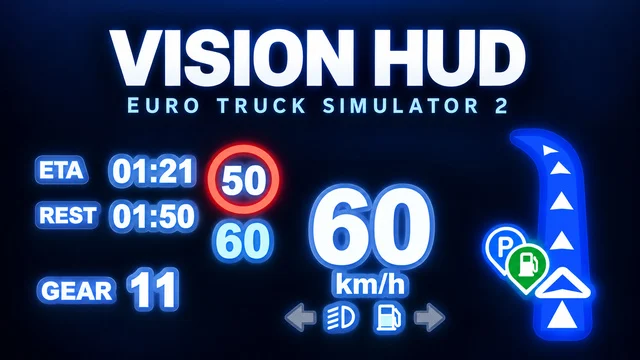
More screenshots on Steam Workshop ↗
What this mod does
Vision HUD is a mod by OwenXu that adds a minimalist, transparent data projector to the Euro Truck Simulator 2 cab, like the head-up display in modern vehicles. The text is white, the cruise control speed is ice blue and the speed limit appears on a red sign.
What it shows
- Current speed, road speed limit, cruise control speed and gear.
- Trip and rest timers.
- Live navigation.
- Turn signals, low and high beams, and parking brake.
- Fuel level with a low fuel warning.
Installation
Subscribe and enable it. At a service shop or dealer, open the cabin accessories and choose “Minimal Projection HUD – VISION” on the mounting point in the corner of the windshield.
Compatibility
It includes settings for 23 stock diesel trucks, calibrated separately for left-hand and right-hand drive. It’s tested on 1.61; it hasn’t been tested on other versions, although loading isn’t blocked. The author tested it without the Cabin Accessories DLC and says it doesn’t appear on the electric DAF XF.
Keep in mind
If you change the cab or the interior, install the HUD again. Custom interiors and camera mods can move it, and some dashboard mods hide the speed limit.
Holyfix Check
Will it work with your mods?
Load your game.log.txt and check whether this mod is for your ETS2 version, whether you're missing a mod or DLC it needs and where to place it.
It's in Documents › Euro Truck Simulator 2 › game.log.txt. It's read in your browser: the file is never uploaded.
Something else failing? Holyfix for ETS2 checks all your mods at once.
User rating
Our rating
0.0 / 5- All the key data without looking at the dashboard
- Calibrated for left-hand and right-hand drive
- No DLC needed
- Only for stock diesel trucks; it doesn't appear on the electric DAF XF
- Some users can't find it on certain trucks, such as the Scania S
- Custom interiors and camera mods can knock it out of place
Requirements
- Euro Truck Simulator 2 updated to version 1.61
- No DLC needed (the author tested it without Cabin Accessories)
- A stock diesel truck
How to install it
- Open the mod's page on Steam Workshop and click “Subscribe”.
- Wait for Steam to finish downloading.
- Launch ETS2, open the Mod Manager and enable “Vision HUD”.
- In your save, go to a service shop or dealer and open the cabin accessories.
- Choose “Minimal Projection HUD - VISION” on the mounting point in the corner of the windshield.
Common problems
It doesn't show up on the windshield
Check that you're playing on 1.61 and that the truck is a stock diesel; the author says it doesn't appear on the electric DAF XF.
The HUD has moved
Install it again after changing the cab or the interior.
Why can't I see the rest time?
It's hidden if you have fatigue turned off.
More mods for ETS2
 ✓ ETS2 1.61
  ✓ ETS2 1.61
  ✓ ETS2 1.61
  ETS2 1.60
  ETS2 1.59