Arrows Drop On Miss for Hytale
Arrows that miss drop to the ground so you can pick them up, with a configurable chance and support for other mods' arrows. Version 1.2.4 for Hytale 0.7.
Download Arrows Drop On Miss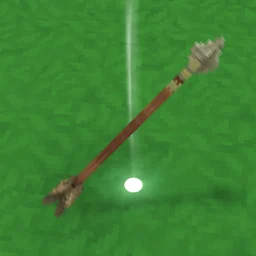
More screenshots on CurseForge ↗
What this mod does
Arrows Drop On Miss stops you from wasting ammo: when an arrow doesn’t hit any creature, it appears as an item where it lands and you can pick it up.
Configuration
The file is created the first time you enter a world and saved in that world’s Mods folder, so each save has its own. The author thinks you need to reload the world to apply changes.
- ArrowDropPercentageChance: chance that the arrow drops.
- AllowSignatureMovesToDropArrows: lets signature attacks drop arrows too (the author admits this is basically duplicating them).
- ModelIdsToItemIds: maps an arrow model from another mod to its item, so those arrows can be recovered too.
- ShowModelIdInChatDebug: shows the model ID in chat when an arrow lands, useful for filling in the previous option.
Compatibility
Version 1.2.4 (October 12, 2026) is the file for 0.7, and the author confirms it works with Update 7. It has no dependencies. The author warns that magnet or pickup mods, like Item Magnet, or other arrow mods could cause duplicates (not tested). It does the same thing as Recover Arrows: pick one.
User rating
Highlights and things to keep in mind
- Adjustable recovery chance
- Supports arrows from other mods through the config
- MIT license and no dependencies
- The author considers it a work in progress
- Possible duplicates with magnet, pickup or other arrow mods (untested)
- Turning on AllowSignatureMovesToDropArrows lets you duplicate arrows
- The 1.2.4 changelog doesn't list any changes
Requirements
- Hytale (Early Access) on PC or server, version 0.7 (file ArrowsDropOnMissPlugin-1.2.4.jar)
- No dependencies: it doesn't need any other mods
How to install it
- Open the Arrows Drop On Miss page on CurseForge and click Install to add it with the CurseForge app, or download ArrowsDropOnMissPlugin-1.2.4.jar from the Files tab (the file tagged 0.7).
- If you download it manually, copy the file as is, without unzipping it, into the mods folder: on Windows, %APPDATA%\Hytale\UserData\Mods.
- Open Hytale, right-click the world, check Arrows Drop On Miss in the mod list and save the world settings.
- On a dedicated server, put the file in the server's mods folder and restart it.
- Enter the world once so the config is generated and adjust the drop chance if you like; then reload the world.
Version history
-
1.2.412 Oct 2026Current
File tagged for Hytale 0.7 ('Updatd Version')
-
1.2.215 Aug 2026
Version for Hytale 0.6
Common problems
Where's the config?
It's generated the first time you enter a world and saved in that world's Mods folder; each world has its own.
Does it recover arrows from other mods?
Yes, if you add their model and item to ModelIdsToItemIds. With ShowModelIdInChatDebug you'll see the model ID in chat.
Can I use it with Recover Arrows?
There's no point: they do the same thing, and you could end up with duplicated arrows.
More mods for Hytale
 Multiplayer
  Multiplayer
  Multiplayer

 Multiplayer