DaisyNiko’s Tilesheets for Stardew Valley
DaisyNiko's tilesheets for other mods to use in their maps: caves, waterfalls, bridges, fences and more. Used by almost 300 mods. Version 1.12.
Download DaisyNiko’s Tilesheets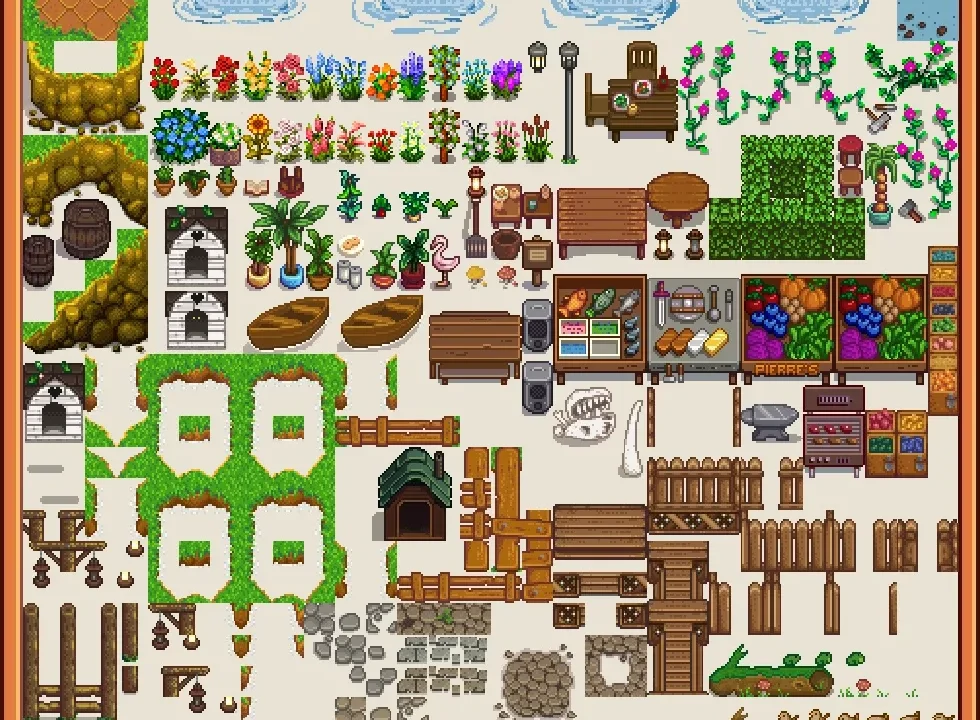
More screenshots on Nexus Mods ↗
What this mod does
DaisyNiko’s Tilesheets is a resource for map makers: a set of tilesheets drawn by DaisyNiko, the author of DaisyNiko’s Earthy Recolour. According to Nexus, almost 300 mods use it. As a player, you only need it if a mod asks for it.
What’s included
- Cave tiles with water, waterfalls, steam and lily pads.
- Beach, bridges, water with grassy edges and small cliffs.
- Signs, arrows, a doghouse, platforms and fences with lampposts.
- Since 1.12: critters, a fallen log, river corners and transparent stones.
Requirements and compatibility
It works with SMAPI and Content Patcher. Version 1.12 (February 19, 2026, 6.3 MB) is tagged as compatible with 1.6 and with Android. It detects several recolors and adapts the tiles to Earthy, Vibrant Pastoral, Starblue Valley, A Wittily Named Recolor and Project Yellog, with an option to pick one manually. The page doesn’t mention multiplayer and has no open bugs.
Creators can use the tilesheets without asking permission as long as they credit DaisyNiko and list this mod as a dependency, instead of bundling the images in their own mod.
User rating
Highlights and things to keep in mind
- A widely used resource: almost 300 mods
- Adapts to the most popular map recolors
- Tagged as compatible with 1.6 and Android
- Does nothing without mods that use it
- Version 1.12 removed the green/orange fall variant for Vibrant Pastoral
Requirements
- Stardew Valley 1.6.x (PC; tagged as compatible with Android)
- SMAPI 4.x
- Content Patcher
- A mod that uses it (it does nothing on its own)
How to install it
- Install SMAPI and Content Patcher first (see their mod pages) and launch the game once with SMAPI to make sure everything loads.
- Open the DaisyNiko's Tilesheets page on Nexus Mods, go to the Files tab and click Manual download on the main file (DaisyNiko's Tilesheets 1.12). You need a free Nexus account to download.
- Extract the .zip outside the game folder and move the resulting folder into the Mods folder, inside the game folder.
- Launch the game with SMAPI and check in the console that DaisyNiko's Tilesheets appears in the list of loaded mods with no red errors.
Version history
-
1.1219 Feb 2026Current
Current file: critters, fallen log, river corners and more transparent stones
-
1.1118 Jan 2025
Transparent stones
Common problems
Does it change anything in my game?
Not on its own. It provides tiles that other mods use in their maps.
Does it work with my recolor?
It adapts to Earthy, Vibrant Pastoral, Starblue Valley, A Wittily Named Recolor and Project Yellog; if it doesn't detect yours, you can pick it manually in the config.
Can I use it in my own mod?
Yes, with credit to DaisyNiko and listing it as a dependency; the images can't be redistributed.
More mods for Stardew Valley
 ✓ Stardew Valley 1.6
  ✓ Stardew Valley 1.6
  ✓ Stardew Valley 1.6
  ✓ Stardew Valley 1.6Multiplayer
  ✓ Stardew Valley 1.6
  ✓ Stardew Valley 1.6Multiplayer