Shop Tile Framework for Stardew Valley
A framework for content packs to create shops and animal shops with custom currencies, hours and stock. Deprecated for new mods but maintained. Version 1.0.13.
Download Shop Tile Framework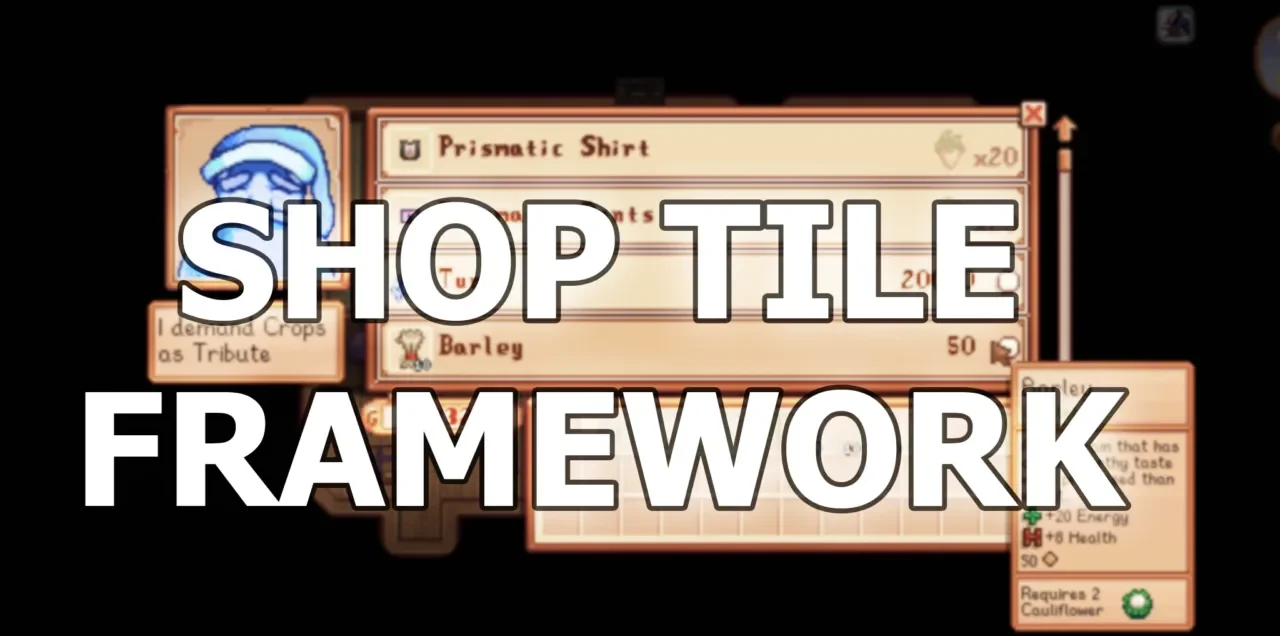
More screenshots on Nexus Mods ↗
What this mod does
Shop Tile Framework (STF), by Cherry, lets content packs create custom shops that open when you interact with a map tile. According to Nexus, more than 200 mods use it, and it’s now kept up to date by Pathoschild, the author of SMAPI.
What it allows
- New shops and changes to base-game shops.
- Different currencies: gold, casino Qi Coins, festival Star Tokens or items as payment.
- Animal shops with stock limits, and the option to remove animals from Marnie’s shop.
- Random stock, conditions that change daily and custom opening hours.
- Open game shops, such as Marnie’s animals, Robin’s buildings or Clint’s geodes, from any tile.
Requirements and compatibility
It requires SMAPI and Expanded Preconditions Utility. Version 1.0.13 (March 15, 2026, 47 KB) needs SMAPI 4.1.10 and Stardew Valley 1.6.15 or later. It works in single-player and multiplayer, on Windows, macOS and Linux, with no known conflicts, and it doesn’t modify your save file.
Heads up: the author marks it as deprecated for new mods, which should use the shop system built into 1.6. It’s maintained so older packs keep working.
User rating
Highlights and things to keep in mind
- Maintained by Pathoschild and up to date with 1.6.15
- Widely used: more than 200 mods
- Doesn't modify your save file
- Deprecated for new mods (1.6 has its own shop system)
- Also requires Expanded Preconditions Utility
- Does nothing without content packs
Requirements
- Stardew Valley 1.6.15 or later (Windows, macOS or Linux)
- SMAPI 4.1.10 or later
- Expanded Preconditions Utility
- Content packs that use it
How to install it
- Install SMAPI and Expanded Preconditions Utility first (see their mod pages) and launch the game once with SMAPI.
- Open the Shop Tile Framework page on Nexus Mods, go to the Files tab and click Manual download on the main file (Shop Tile Framework 1.0.13). You need a free Nexus account to download.
- Extract the .zip outside the game folder and move the resulting folder into the Mods folder, inside the game folder.
- Launch the game with SMAPI and check in the console that Shop Tile Framework appears in the list of loaded mods with no red errors.
Version history
-
1.0.1315 Mar 2026Current
Current file (SMAPI 4.1.10 or later), published by Pathoschild
-
1.0.127 Sep 2025
Maintenance update by Pathoschild
Common problems
Is it abandoned?
No. It's marked as deprecated for new mods, but Pathoschild keeps updating it so the packs that already use it keep working.
Does it touch my save?
According to the page, it makes no changes to the save file.
Does it work in multiplayer?
Yes, the page lists single-player and multiplayer.
More mods for Stardew Valley
 ✓ Stardew Valley 1.6Multiplayer
  ✓ Stardew Valley 1.6Multiplayer
  ✓ Stardew Valley 1.6
  ✓ Stardew Valley 1.6Multiplayer
  ✓ Stardew Valley 1.6Multiplayer
  ✓ Stardew Valley 1.6Multiplayer