PCs Rattan Furniture for Stardew Valley
74 vintage-style rattan furniture pieces for your house and bathroom, in the regular catalogue or their own one sold by Robin. Version 2.0.0, with Spanish.
Download PCs Rattan Furniture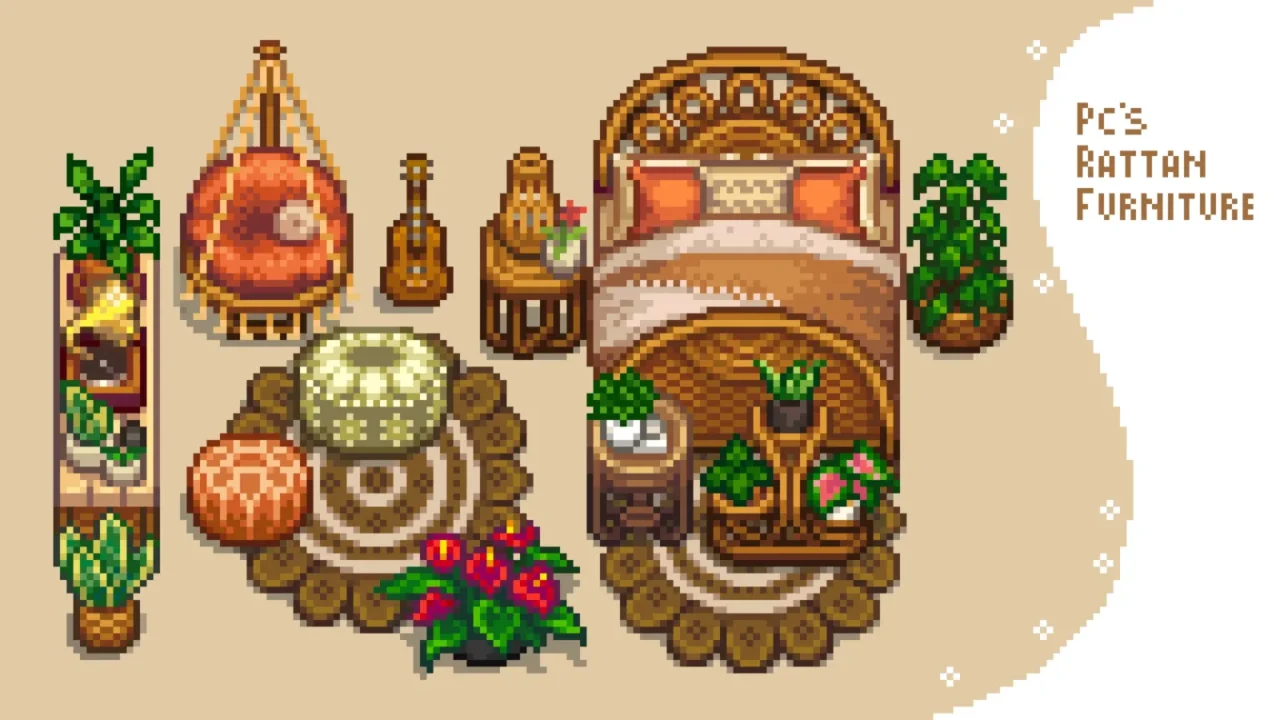
More screenshots on Nexus Mods ↗
What this mod does
PCs Rattan Furniture, by PlatinumCats, adds 74 rattan furniture pieces with a warm, vintage feel: sofas, chairs, tables, shelves, beds, lamps and, since 1.1.0, bathroom furniture.
Versions
- PCs Rattan Furniture (2.0.0): the Content Patcher version, with its own rattan catalogue sold by Robin. The catalogue needs Calcifer, and it can be turned off in
config.json. - No Catalogue (2.0.0): the same version without Calcifer; the furniture shows up in the game’s regular catalogue.
- AT (1.2.0): a pack for Alternative Textures that changes the look of vanilla furniture. It has fewer pieces because some don’t match in size, and it works on PC and Android.
Requirements and compatibility
The Content Patcher versions need SMAPI and Content Patcher. Version 2.0.0 (June 28, 2025) is the 2,000-endorsements update, with new furniture you can see in the gallery. Some chairs can’t be rotated because the author thinks they look better facing forward, and the AT version applies to vanilla furniture like shelves, beds or lamps.
There are translations into Spanish (by 17SunAndMoon17), Russian, Chinese, Portuguese, Vietnamese and Italian. The mod’s page doesn’t mention multiplayer or known issues.
User rating
Highlights and things to keep in mind
- 74 rattan furniture pieces with their own style
- Versions with and without a catalogue
- Spanish translation available
- Updated in 2025
- The AT version has fewer pieces
- Some chairs can't be rotated
- No information about multiplayer
Requirements
- Stardew Valley 1.6.x (PC)
- SMAPI 4.x
- Content Patcher (CP versions)
- Optional: Calcifer (custom catalogue) or Alternative Textures (AT version)
How to install it
- First install SMAPI and Content Patcher (plus Calcifer if you want the custom catalogue) (see their mod pages) and launch the game once with SMAPI to check that everything loads.
- Open the PCs Rattan Furniture page on Nexus Mods, go to the Files tab and click Manual download on the main file (PCs Rattan Furniture 2.0.0, or PC's Rattan Furniture - No Catalogue if you don't want to install Calcifer). You need a free Nexus account to download.
- Unzip the .zip outside the game folder and move the resulting folder into the Mods folder inside the game folder. If you had an older version, delete it first instead of overwriting it.
- Install only one of the two main versions. If you want the text in Spanish, add the translation by 17SunAndMoon17 available on Nexus Mods.
- Launch the game with SMAPI and look for the furniture in the rattan catalogue sold by Robin or, with the No Catalogue version, in the regular catalogue.
Version history
-
2.0.028 Jun 2025Current
2,000-endorsements update with new furniture and a no-catalogue version
-
1.2.06 Nov 2024
AT version: manifest update only
-
1.1.031 Aug 2024
Bathroom furniture and free catalogue fix
Common problems
Do I need Calcifer?
Only for the custom catalogue. The No Catalogue version doesn't need it and puts the furniture in the regular catalogue.
Is it available in Spanish?
There's a Spanish translation by 17SunAndMoon17 on Nexus Mods.
Does it work on Android?
The AT version works on PC and Android, according to the author.
More mods for Stardew Valley
 ✓ Stardew Valley 1.6
  ✓ Stardew Valley 1.6
  ✓ Stardew Valley 1.6Multiplayer
  ✓ Stardew Valley 1.6
  ✓ Stardew Valley 1.6
  ✓ Stardew Valley 1.6Multiplayer