ATS Trucks Physics by MK for American Truck Simulator
More realistic truck physics for ATS: suspension, cab, weight, brakes and interior camera, with settings recommended by the author. Free on Steam; works from 1.50.
Download ATS Trucks Physics by MK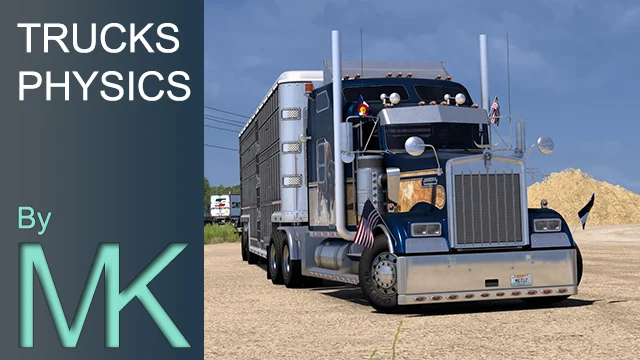
More screenshots on Steam Workshop ↗
What this mod does
ATS Trucks Physics by MK, by Maquessimeuh, reworks the truck physics in American Truck Simulator, aiming for realism within what the game allows: braking, suspension, cab movement and the interior camera.
What it changes
- Truck suspension and damping.
- Cab suspension and damping.
- Truck weight and stability.
- Braking curve and force, and brake operating temperatures.
- Interior camera physics.
Results vary by truck: some feel stiffer than others, which the author considers realistic. It’s hard to roll over, as in real life, although it can still happen in tight corners at high speed.
Recommended settings
Truck stability 70% (60-80), cab suspension 25% (20-40), truck suspension 50% (25-75), driveshaft torque 100% (50-100), brake intensity 60% (50-60), trailer stability 70% (60-80), road bumpiness 125% (110-140) and camera physics 200% (100-200).
Compatibility
It works with any truck and any mod that doesn’t touch physics; if two mods change it, whichever is higher in the list wins. It works from ATS 1.50 onward and the latest update is from February 2026. It doesn’t limit speed. There’s an ETS2 version.
Holyfix Check
Will it work with your mods?
Load your game.log.txt and check whether this mod is for your ATS version, whether you're missing a mod or DLC it needs and where to place it.
It's in Documents › American Truck Simulator › game.log.txt. It's read in your browser: the file is never uploaded.
Something else failing? Holyfix for ATS checks all your mods at once.
User rating
Highlights and things to keep in mind
- Very detailed recommended settings
- Works from 1.50
- Very lightweight file
- Greatly changes the driving feel
- Conflicts with other physics mods
- No confirmed game version after February 2026
Requirements
- American Truck Simulator 1.50 or later (according to the author)
- Steam account
- No DLC required
How to install it
- Open the “ATS Trucks physics by MK” page on Steam Workshop and click “Subscribe”.
- Launch American Truck Simulator and wait for Steam to finish downloading the mod.
- In your profile's Mod Manager, enable “ATS Trucks physics by MK”.
- If you use another physics mod, put the one you want to take priority on top.
- In Options > Gameplay, set the physics to the values recommended by the author.
Version history
-
13 Feb 2026Current
Last update (8 changelog notes; contents not read)
-
27 Nov 2025
Release
Common problems
Is it compatible with other physics mods?
Yes, but whichever is higher in the list overrides the other.
Does it limit speed?
No; the author makes clear it doesn't add any limiter.
Is there an ETS2 version?
Yes, optimized for European trucks (Steam Workshop 3613547526).
Can I use other settings values?
Yes, but the author asks you to stay within the recommended ranges.
More mods for ATS
 ✓ ATS 1.61
  ATS 1.60
  ATS 1.58
  ATS 1.60
  ATS 1.59
  ✓ ATS 1.61Multiplayer