Boreman LED Marker Lights Pack for ATS for American Truck Simulator
Boreman LED marker lights in eight colors, with steady, strobe and flashing versions, for SCS and modded trucks. The author lists compatibility from 1.51 to 1.57+.
Download Boreman LED Marker Lights Pack for ATS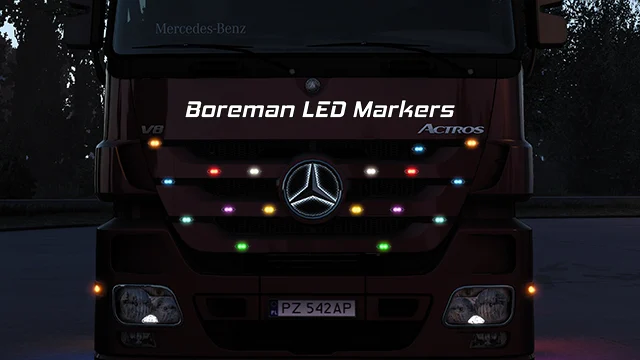
More screenshots on Steam Workshop ↗
What this mod does
Boreman LED Marker Lights Pack is a mod by obelihnio that adds LED marker lights to decorate your truck in American Truck Simulator. It has more than 90,000 subscribers. Its ETS2 version is also on Holymod.
What’s included
- High-quality 3D model made from scratch in Blender, with its own texture and light mask.
- Eight colors: white, light orange, red, amber, blue, cyan, green and purple.
- Three types: steady marker, marker with strobe and strobe only.
- Strobes in left and right variants.
- Flashing versions in amber and red.
Compatibility
It works with trucks from every brand in the game and, according to the author, with many modded trucks. It’s fully compatible with the same author’s Kelsa light bars. Csabee and abasstreppas helped him with the compatibility lists.
Version
The description says “Game version: [1.51.*] – [1.57.*]+”. The latest update is from November 23, 2025. Several players reported crashes or problems loading their save after 1.57, while others said it worked for them. If you see errors while using it, Holyfix will tell you whether they come from this mod.
Holyfix Check
Will it work with your mods?
Load your game.log.txt and check whether this mod is for your ATS version, whether you're missing a mod or DLC it needs and where to place it.
It's in Documents › American Truck Simulator › game.log.txt. It's read in your browser: the file is never uploaded.
Something else failing? Holyfix for ATS checks all your mods at once.
User rating
Our rating
0.0 / 5- Eight colors and several light modes
- High-quality original model
- Compatible with many modded trucks
- Latest game version confirmed by the author: 1.57. It may cause errors on 1.61; Holyfix will warn you if so.
- Some players reported crashes after 1.57
Requirements
- American Truck Simulator
- No DLC or other mods needed
- Optional: Kelsa light bars by the same author
How to install it
- Open the mod's page on Steam Workshop and click “Subscribe”.
- Wait for Steam to download it and launch American Truck Simulator.
- In the Mod Manager, enable Boreman LED Marker Lights Pack and confirm the changes.
- At the service shop, look for the truck's small lights.
- Pick the Boreman light color and type and place them.
Common problems
What colors does it have?
White, light orange, red, amber, blue, cyan, green and purple.
Does it work with modded trucks?
Yes, according to the author it supports many modded trucks.
Is there an ETS2 version?
Yes, the author publishes another one for Euro Truck Simulator 2.
More mods for ATS
 ✓ ATS 1.61Requires DLC
  ATS 1.60
  ATS 1.59