Backing & Lane Prediction (reversing and lane guide lines) for Euro Truck Simulator 2
Guide lines like a backup camera's, plus a blue line showing your path within the lane. Version 0.5.0 for ETS2 1.61, with a free plugin on GitHub.
Download Backing & Lane Prediction (reversing and lane guide lines)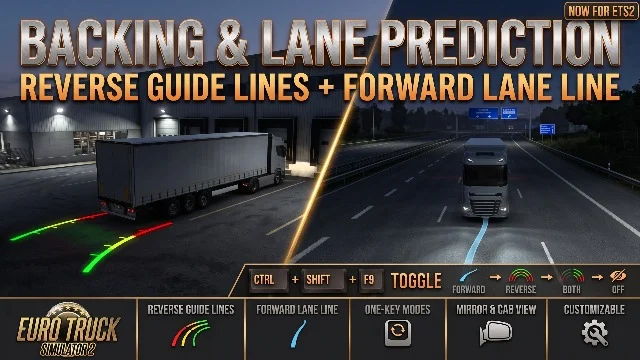
More screenshots on Steam Workshop ↗
What this mod does
Backing & Lane Prediction is a tool by Telemichus that adds backup camera-style guide lines to Euro Truck Simulator 2, plus a forward line that shows where your truck is going to go within the lane.
What it includes
- Reversing: two lines from the rear corners of the trailer (or the truck, if you’re running without a trailer), red for the first 3 m, yellow up to 8 m and green up to 15 m.
- They follow the real wheel angle, lift axles and trucks with several steering axles, including double and triple trailers.
- Forward: a semi-transparent blue line of 25 m at low speed and up to 40 m on the highway.
- The lines are world objects: you can see them in every camera and in the mirrors.
- Ctrl+Shift+F9 switches between forward only, reverse only, both or none.
Installation
The Workshop mod only provides the line models. The plugin that draws them (ats_reverse_overlay.dll) is downloaded from the author’s GitHub and installed with Install.bat while the game is closed.
Compatibility
Version 0.5.0, from October 19, 2026, works on ETS2 1.61 and ATS 1.61 with 64-bit Windows. The drawing technique is based on Reverse Posture Assistant, under the MIT license; don’t use both at the same time.
Holyfix Check
Will it work with your mods?
Load your game.log.txt and check whether this mod is for your ETS2 version, whether you're missing a mod or DLC it needs and where to place it.
It's in Documents › Euro Truck Simulator 2 › game.log.txt. It's read in your browser: the file is never uploaded.
Something else failing? Holyfix for ETS2 checks all your mods at once.
User rating
Our rating
0.0 / 5- Reversing guides visible in mirrors and cameras
- Lane line that helps on long curves
- Open source under the MIT license
- Requires installing a separate DLL from GitHub
- The DLL isn't signed yet: Windows or your antivirus may block it
- After a game update the lines turn off until a new plugin is released
- Don't use it together with Reverse Posture Assistant
Requirements
- Euro Truck Simulator 2 updated to version 1.61
- 64-bit Windows
- ats_reverse_overlay.dll plugin 0.5.0 or later (author's GitHub)
- No DLC needed
How to install it
- Open the mod's page on Steam Workshop, click “Subscribe” and wait for Steam to finish downloading.
- Close ETS2.
- Download Backing_Lane_Prediction_v0.5.0.zip from the releases page on the author's GitHub and unzip it.
- Run Install.bat: it copies the DLL to bin\win_x64\plugins (and to ATS too if you have it).
- Launch ETS2 and enable the mod in the Mod Manager.
- In your save, press Ctrl+Shift+F9 to choose which lines to show.
Version history
-
0.5.019 Oct 2026Current
ETS2 support, with a single installer for ATS and ETS2
Common problems
Is subscribing on the Workshop enough?
No: the Workshop only brings the models; the plugin that draws the lines is installed separately from GitHub.
I can't see the lines
Check that the DLL is in bin\win_x64\plugins, that the mod is enabled, and the mode selected with Ctrl+Shift+F9.
Why does Windows block the DLL?
It isn't digitally signed yet, so Smart App Control or your antivirus may show a warning.
More mods for ETS2
 ✓ ETS2 1.61
  ✓ ETS2 1.61
  ✓ ETS2 1.61
  ✓ ETS2 1.61
  ETS2 1.60
  ETS2 1.59